As an Amazon Associate we earn from qualifying purchases. Learn more.
Best Printers Under $150 for Dorms (2026)
Students and dorm residents who need reliable, compact printing without high running costs will find this guide useful. We reviewed small-footprint wireless monochrome printers that balance size, print efficiency and ongoing value. Models were selected for dorm-friendly features: compact footprint, wireless/mobile printing, low per-page cost (toner efficiency), duplex options and straightforward setup. The picks below are ordered by overall fit for a dorm room — factoring product features, customer feedback on durability and connectivity, and long-term running costs.
Quick Answer
Best Overall: Brother HL-L2460DW — a compact monochrome laser with fast output, automatic duplex and strong long-term value thanks to efficient toner options. It's the top pick for dorm rooms that need dependable, low-cost B/W printing.
Our Top Picks
Quick Comparison
Select 2-3 products to compare side-by-side
| Compare | Product | HomeOfficePilot Score | Price Tier | Key Feature | Best For | Action |
|---|---|---|---|---|---|---|
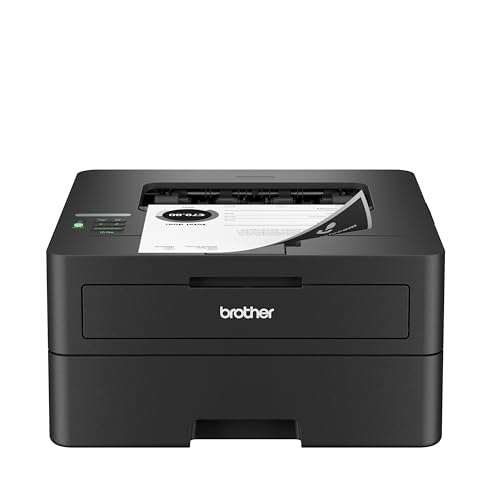 Brother HL-L2460DW
|
Premium | Fast 36 ppm mono laser with duplex | Busy students who print often | Check Price | ||
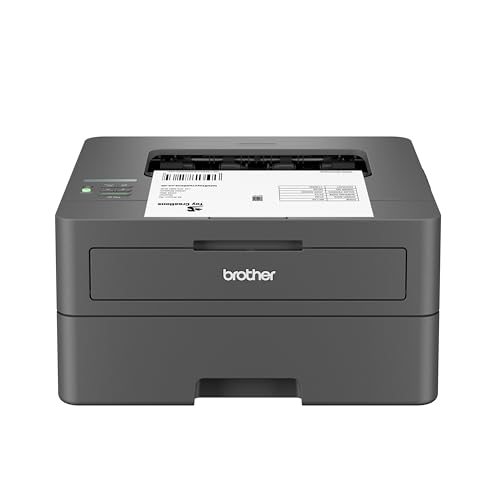 Brother HL-L2405W
|
Mid-Range | Simple, compact 30 ppm mono laser | Students wanting straightforward, space-saving printing | Check Price | ||
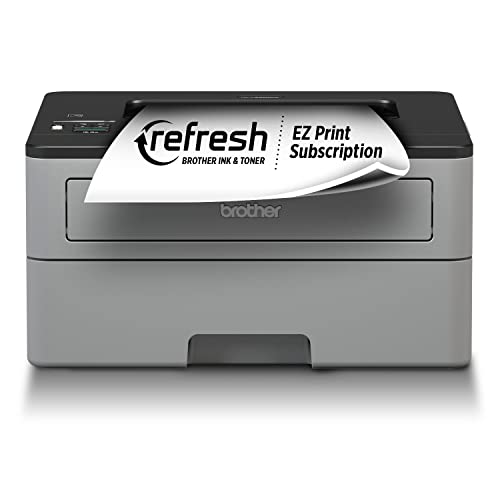 Brother HL-L2350DW
|
Premium | Duplex printing with high-yield cartridge support | Students who want value + duplex features | Check Price |
1. Brother HL-L2460DW Wireless Compact Monochrome Laser Printer with Duplex, Mobile Printing, Black & White Output | Includes Refresh Subscription Trial(1), Works with Alexa
A compact monochrome laser built for speed and efficiency. The HL-L2460DW delivers up to 36 ppm, automatic duplexing and flexible connectivity (dual-band Wi‑Fi, Ethernet, USB), making it a strong choice for dorm rooms that need fast, low-cost black & white printing. Customers praise its crisp output and compact footprint, while some report occasional setup or Wi‑Fi frustrations.
Key Specs
- Monochrome laser printer
- Up to 36 pages per minute
- Automatic duplex (two-sided) printing
- 250-sheet paper tray; dual-band Wi‑Fi, Ethernet and USB
Pros
- Very fast print speed for high-volume work
- Automatic duplex saves paper in a dorm setting
- Compact footprint fits on small desks
Cons
- Some users report mixed Wi‑Fi connectivity and setup issues
- User interface and occasional reliability complaints
Best For: Busy students who print often
Check Latest Price on Amazon2. Brother HL-L2405W Wireless Compact Monochrome Laser Printer with Mobile Printing, Black & White Output | Includes Refresh Subscription Trial(1), Works with Alexa
A budget-minded, compact monochrome laser that focuses on simplicity and reliable everyday printing. The HL-L2405W prints quickly at up to 30 ppm, supports dual-band wireless and mobile printing, and keeps a small footprint suitable for dorm desks. Users like its ease of use (especially from tablets), though connectivity can be inconsistent and it prioritizes one-sided speed over automatic duplexing.
Key Specs
- Monochrome laser printer
- Up to 30 pages per minute
- Dual-band wireless and USB connectivity
- 250-sheet tray with manual feed slot
Pros
- Compact and easy to use, good for small desks
- Fast single-sided printing for assignments
- Works well with mobile devices and tablets
Cons
- Does not emphasize automatic duplexing (one-sided focus)
- Some customers experience intermittent Wi‑Fi/connectivity problems
Best For: Students wanting straightforward, space-saving printing
Check Latest Price on Amazon3. Brother Compact Monochrome Laser Printer, HL-L2350DW, Wireless Printing, Duplex Two-Sided Printing, Includes 4 Month Refresh Subscription Trial and Amazon Dash Replenishment Ready
A well-rounded compact laser that balances speed and running cost. The HL-L2350DW offers automatic duplexing, up to 32 ppm print speed and compatibility with high-yield toner to reduce per-page cost — a smart pick for dorm residents who print regularly. Reviews note easy setup and strong value, while connectivity and occasional print-quality variability are mentioned.
Key Specs
- Monochrome laser printer
- Up to 32 pages per minute
- Automatic duplex (two-sided) printing
- 250-sheet paper capacity; wireless and USB
Pros
- Good balance of speed and running-cost efficiency
- Automatic duplexing on a compact body
- Easy to set up with clear value for frequent printing
Cons
- Some users report mixed wireless connectivity
- Build feels mostly plastic — durability questioned by a few
Best For: Students who want value + duplex features
Check Latest Price on AmazonWhich One Should You Choose?
If budget is tight → Brother HL-L2405W. It’s the most straightforward, space-saving option for students who print occasionally and want simple mobile printing. If you want the best mix of performance and long-term value → Brother HL-L2350DW. It brings duplex printing and good support for high-yield toner cartridges. If premium speed and the quickest page output matter most → Brother HL-L2460DW. It’s fastest, supports duplex, and is ideal for heavier, regular printing in a dorm setting.
Best for Specific Scenarios
- Late-night essay sprints: Brother HL-L2460DW because its higher speed and duplex cut time and paper use.
- Basic homework & occasional printing: Brother HL-L2405W because it’s compact, easy to use and works well from tablets.
- Frequent printing with low long-term cost: Brother HL-L2350DW because duplex plus high-yield toner support reduces per-page expense.
Frequently Asked Questions
Are monochrome laser printers better for dorm rooms than inkjets?
For most students yes — monochrome lasers are typically more compact, faster for black‑and‑white documents, and have lower per-page costs for text-heavy printing. Inkjets are useful only if you need frequent color photos or high-quality color graphics.
How can I keep running costs low?
Buy high-yield toner cartridges when possible, enroll in manufacturer toner-replenishment plans if they match your usage, use draft or toner-save modes for non-final copies, and print double-sided to halve paper costs.
Will these printers work with campus Wi‑Fi?
It depends on the campus network. Many dorm-friendly printers support direct mobile-printing methods (AirPrint, Mopria, Brother Mobile Connect) that bypass complex campus authentication. If campus Wi‑Fi restricts device discovery, use USB or local Wi‑Fi Direct/airprint features where available.
How We Selected These Products
Our recommendations are based on data-driven analysis: we evaluated 29748+ products across 4825+ brands using a composite scoring system that weighs rating (40%), review volume (30%), price value (20%), and demand signals (10%). Every product is ranked by data, not opinions.
Last updated: August 03, 2026
As an Amazon Associate we earn from qualifying purchases at no extra cost to you. Full disclosure.
HomeOfficePilot Score is our editorial ranking based on a composite analysis of product quality, value, and verified customer sentiment. Click through to Amazon for current pricing, availability, and live customer reviews.