As an Amazon Associate we earn from qualifying purchases. Learn more.
Brother vs HP vs Canon: Which Compact Laser Printer Wins for Dorms? (2026)
Dorm residents, roommates, and student renters who need reliable, small-footprint printing will want a laser printer that’s compact, cheap to run, and built to last. This side‑by‑side look focuses on three compact Brother monochrome laser printers chosen for size, running cost, and durability — traits that matter most in cramped dorm setups. We evaluated physical footprint, toner economy, multi‑function features, wireless behaviour reported by buyers, and build quality to help you decide which model fits your desk, budget, and workload.
Quick Answer
For cramped dorm rooms the Brother MFC-L2820DW (B0CPL9C83B) is the best overall pick — it balances a compact footprint, fast black-and-white output and low running cost. If you want the longest in-box toner and best value over time choose the MFC-L2820DW XL (B0CPL3MLT1). For the smallest simple setup pick the HL-L2350DW (B0763WDSYZ).
Our Top Picks
Quick Comparison
Select 2-3 products to compare side-by-side
| Compare | Product | HomeOfficePilot Score | Price Tier | Key Feature | Best For | Action |
|---|---|---|---|---|---|---|
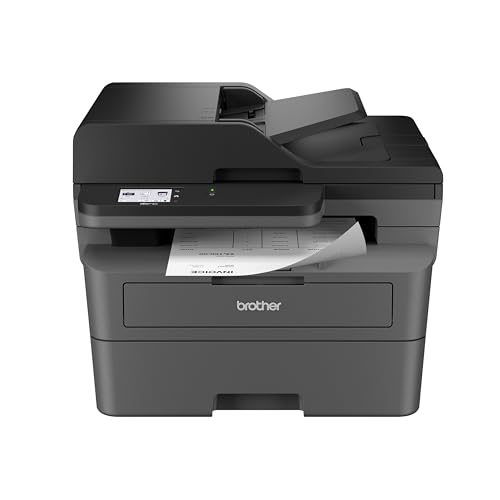 Brother MFC-L2820DW
|
Budget | 4-in-1: print, copy, scan, fax | Students who need multi-function utility | Check Price | ||
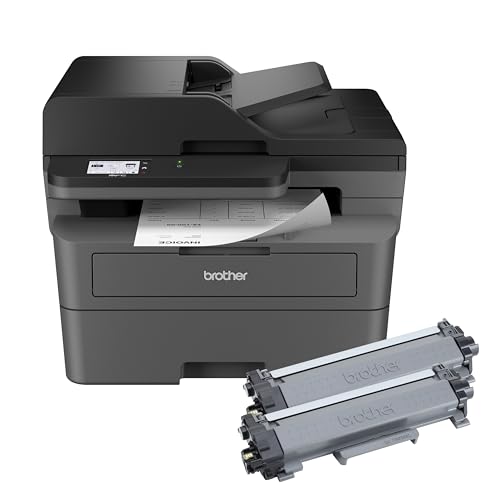 MFC-L2820DW XL
|
Mid-Range | High in-box toner yield (up to 4,200 pages) | High-volume students or shared suites | Check Price | ||
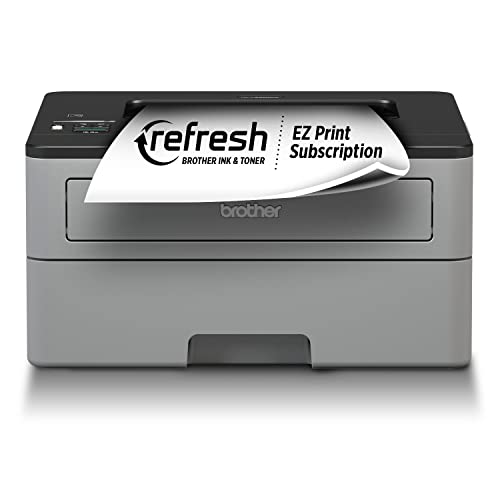 Brother HL-L2350DW
|
Premium | Smallest single‑function footprint | Minimal desk space and fast single‑function printing | Check Price |
1. Brother MFC-L2820DW Wireless Compact Monochrome All-in-One Laser Printer with Copy, Scan and Fax, Duplex, Black & White | Includes Refresh Subscription Trial(1), Works with Alexa
A compact, affordable monochrome all‑in‑one that balances speed, features, and low running costs. It’s a strong dorm-room choice thanks to duplex printing, a 250-sheet tray, and easy mobile/cloud printing, though some users report occasional Wi‑Fi drops.
Key Specs
- Print speed: up to 36 ppm (mono)
- 50-page Auto Document Feeder (ADF)
- 250-sheet main tray; automatic duplex
- Dual-band wireless, Ethernet, USB; 2.7" touchscreen
Pros
- Best all‑around balance of size and multi‑function features
- Lower running cost than many small inkjets — efficient toner use
- More versatile than HL-L2350DW with ADF and fax
Cons
- Some customers report intermittent Wi‑Fi drops compared with rivals
- Slightly thicker footprint than the smallest single-function lasers
Best For: Students who need multi-function utility
Check Latest Price on Amazon2. Brother MFC-L2820DW XL Wireless Compact Monochrome All-in-One Laser Printer with Copy, Scan and Fax, Duplex, Black & White | Up to 4,200 Pages of Toner Included(1), Works with Alexa
Same compact footprint and multi‑function capability as the standard L2820DW but shipped with much more toner, making it the best long‑term value for heavy student printing. It keeps running costs low, though wireless connectivity feedback is mixed among users.
Key Specs
- Includes up to 4,200 pages of in‑box toner (per ISO estimates)
- Print speed: up to 36 ppm (mono)
- 50-page ADF; 250-sheet tray; automatic duplex
- Dual-band wireless, Ethernet, USB; 2.7" touchscreen
Pros
- Much lower cost per page than the standard model thanks to XL toner
- Same multi‑function convenience as the MFC-L2820DW but better for heavy use
- Good fit for shared suite printers where refill frequency matters
Cons
- Higher upfront tier than the base model (Mid-Range vs Budget)
- Wireless connectivity has mixed reports — occasional drops possible
Best For: High-volume students or shared suites
Check Latest Price on Amazon3. Brother Compact Monochrome Laser Printer, HL-L2350DW, Wireless Printing, Duplex Two-Sided Printing, Includes 4 Month Refresh Subscription Trial and Amazon Dash Replenishment Ready
A workhorse single‑function laser with a very compact footprint and fast print speed. It’s ideal when you need a minimal, sturdy printer for text documents. It lacks the ADF/multi‑function features of the MFC models and may feel thicker in build quality to some buyers.
Key Specs
- Print speed: up to 32 ppm (mono)
- 250-sheet tray; automatic duplex
- Wireless and USB printing
- Manual feed slot for envelopes and cardstock
Pros
- Smaller, simpler footprint than the MFC models — better for very tight desks
- Fast single‑function printing and easy setup
- Reliable toner efficiency; good for occasional to moderate student use
Cons
- No scanner/ADF/fax — less flexible than MFC-L2820DW models
- Build and sturdiness debated by some users compared with higher-tier models
Best For: Minimal desk space and fast single‑function printing
Check Latest Price on AmazonWhich One Should You Choose?
If budget is tight and you want the most balanced option for a dorm — multi‑function capability, compact footprint and low running costs — choose the Brother MFC-L2820DW (B0CPL9C83B). If you print a lot (shared suite, club flyers, term papers) and want the lowest cost per page over time, the MFC-L2820DW XL (B0CPL3MLT1) is the better long‑term buy thanks to high in‑box toner yield. If your desk space is extremely limited and you only need fast text printing (no scanning), pick the Brother HL-L2350DW (B0763WDSYZ) for the smallest, simplest footprint and reliable single‑function performance.
Best for Specific Scenarios
- Dorm roommate who scans and copies often: Brother MFC-L2820DW because it provides ADF scanning and fax/copy features in a compact size.
- Shared suite or club with heavy printing: MFC-L2820DW XL because the large in‑box toner yield lowers refill frequency and overall running cost.
- One‑person desk with minimal space: Brother HL-L2350DW because it offers the smallest, simplest footprint and fast single‑function printing.
Frequently Asked Questions
How big are these printers — will they fit on a small dorm desk?
All three are designed as compact laser printers. The HL-L2350DW is the smallest single‑function model and typically fits the tightest spaces. The MFC series adds an ADF/scanner top so it’s slightly taller and deeper but still compact enough for most desks or small shelves.
Which one costs least to run over a school year?
The MFC-L2820DW XL will usually cost the least per page because it ships with high in‑box toner yield, reducing refill frequency and lowering long‑term toner expense. Standard models still beat most inkjets on cost per page, but check replacement toner yields before buying.
Are wireless connections reliable in dorm Wi‑Fi environments?
Wireless reports are mixed: many buyers find setup and daily use easy, but some experience occasional drops. If your dorm’s Wi‑Fi is flaky, use Ethernet where available or plan to connect via USB for large print jobs. Choosing a model with dual‑band Wi‑Fi helps in crowded wireless environments.
How We Selected These Products
Our recommendations are based on data-driven analysis: we evaluated 29748+ products across 4825+ brands using a composite scoring system that weighs rating (40%), review volume (30%), price value (20%), and demand signals (10%). Every product is ranked by data, not opinions.
Last updated: September 04, 2026
As an Amazon Associate we earn from qualifying purchases at no extra cost to you. Full disclosure.
HomeOfficePilot Score is our editorial ranking based on a composite analysis of product quality, value, and verified customer sentiment. Click through to Amazon for current pricing, availability, and live customer reviews.