As an Amazon Associate we earn from qualifying purchases. Learn more.
Best Wireless Photo Printers for Portable Holiday Gift Stations (2026)
Setting up a pop-up gift station at holiday markets or family gatherings means you need a photo printer that’s compact, fast, and reliable on the go. This guide reviews four wireless photo printers suited for portable gift printing in 2026 — chosen for size, print quality, wireless ease, and real-world durability. You’ll learn which model is best for high-volume event printing, which balances cost and features, and which is best when space and portability matter most. Products were selected from current photo-focused inkjet and MegaTank offerings and compared by portability, ink cost, print quality, and user feedback on durability and connectivity.
Quick Answer
For portable holiday gift stations the Canon PIXMA G620 is our top pick — its MegaTank ink system and compact footprint deliver low-cost, high-quality 4x6 photos for busy events. If you want value, consider the Canon MAXIFY MB2720; for the smallest footprint, the Epson XP-6100 is the most compact option.
Our Top Picks
Quick Comparison
Select 2-3 products to compare side-by-side
| Compare | Product | HomeOfficePilot Score | Price Tier | Key Feature | Best For | Action |
|---|---|---|---|---|---|---|
 Canon PIXMA G620 |
Premium | MegaTank high page yield | High-volume event photo printing | Check Price | ||
 Canon MAXIFY MB2720 |
Mid-Range | Large paper capacity | Value-focused home-business printing | Check Price | ||
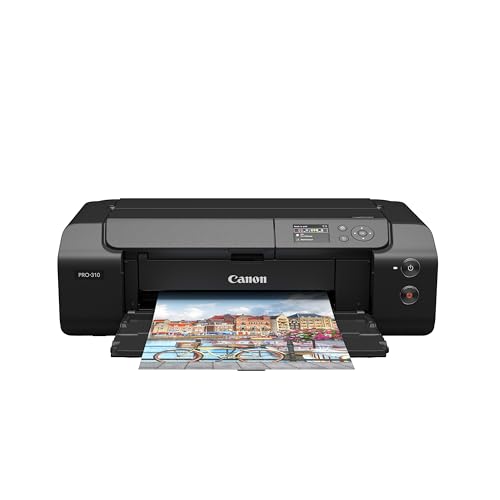 Canon PRO-310 |
Premium | 9-color pigment system | Gallery-quality prints and fine art | Check Price | ||
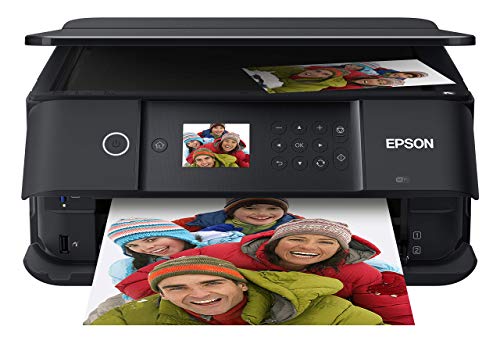 Epson XP-6100 |
Mid-Range | Compact, fast 4x6 printing | Small pop-up stations and portability | Check Price |
1. Canon PIXMA G620 Wireless MegaTank Photo All-in-One Printer [Print, Copy, Scan], Black,Works with Alexa
The PIXMA G620 uses a 6-color MegaTank system to deliver vivid 4x6 photos at a very low per-print cost, and its compact design keeps a gift station tidy. Wireless mobile printing and Alexa integration add convenience, though some users report occasional connectivity or longevity issues.
Key Specs
- Ink system: 6-color dye-based (includes Red & Gray)
- Yield: Up to ~3,800 4x6 photos per full ink set
- Connectivity: USB and wireless (mobile printing, Alexa support)
- Design: Compact footprint, all-in-one print/copy/scan
Pros
- Very low cost per 4x6 print thanks to MegaTank
- Excellent color gamut and photo quality for events
- Compact all-in-one that fits small stations
Cons
- Some reports of inconsistent longevity and reliability
- Mixed feedback on print speed under heavy use
Best For: High-volume event photo printing
Check Latest Price on Amazon2. Canon Office Products MAXIFY MB2720 Wireless Color Photo Printer with Scanner, Copier and Fax
The MAXIFY MB2720 is built for volume with dual paper cassettes and fast first-page output, making it a solid choice if you’ll print mixed document and photo jobs at a holiday booth. It uses DRHD inks for sharp color and text but has mixed user feedback on longevity and wireless stability.
Key Specs
- Paper capacity: Two cassettes (total up to 500 sheets)
- Ink: Dual Resistant High Density (DRHD) inks
- Duty cycle: Designed for high monthly volume
- Connectivity: Built-in Wi‑Fi and Canon PRINT app support
Pros
- High paper capacity reduces reloads during busy events
- Fast first-print speeds for quick transactions
- Good color and text quality with DRHD inks
Cons
- Some users report reliability issues after prolonged use
- Wireless connectivity and setup experiences vary
Best For: Value-focused home-business printing
Check Latest Price on Amazon3. Canon imagePROGRAF Professional 13" PRO-310 Wireless Inkjet Photo Printer with 3.0-Inch Color LCD Monitor, 9 Color Pigment-Based Ink System, Black
The imagePROGRAF PRO-310 targets photographers who need gallery-level color accuracy and deep blacks via a 9-color plus Chroma Optimizer pigment system. It’s less portable than consumer models but excellent for premium keepsakes — expect higher ink use and a larger footprint.
Key Specs
- Ink system: 9-color pigment + Chroma Optimizer
- Control: 3.0-inch color LCD for status and settings
- Output size: Up to 13 inches wide for high-quality prints
- Features: Anti-clogging, skew correction for consistent output
Pros
- Outstanding color accuracy and professional print quality
- Features designed for consistent, gallery-level results
- Good color uniformity and scratch resistance
Cons
- Larger footprint and heavier ink consumption
- Higher upfront and operating costs for event use
Best For: Gallery-quality prints and fine art
Check Latest Price on Amazon4. Epson Expression Premium XP-6100 Wireless Color Photo Printer with Scanner and Copier, Black, Medium
The XP-6100 is a compact Small-in-One that prints 4x6 photos quickly (as fast as 15 seconds for a 4x6 in optimal mode) and is easy to set up wirelessly, making it the most portable option for tight spaces. Expect standard cartridge costs and occasional connectivity quirks reported by some users.
Key Specs
- Ink: 5-color dye ink set for up to 8x10 photos
- Speed: 4x6 photos in as little as 15 seconds (draft)
- Connectivity: Wi‑Fi, Wi‑Fi Direct, USB, memory card slot
- Design: Ultra-slim Small-in-One for compact setups
Pros
- Very compact and easy to move between stations
- Quick 4x6 photo output ideal for lines at events
- Straightforward wireless setup for mobile devices
Cons
- Higher operating cost per print compared with MegaTank
- Some users report intermittent connectivity or slow starts
Best For: Small pop-up stations and portability
Check Latest Price on AmazonWhich One Should You Choose?
If budget and long runs are your priority → Canon PIXMA G620. If you need a high-capacity, fast all-in-one for mixed document and photo jobs → Canon MAXIFY MB2720. If premium gallery-level prints matter and you don’t mind a larger footprint → Canon imagePROGRAF PRO-310. If portability and the smallest footprint are most important → Epson XP-6100.
Best for Specific Scenarios
- Busy holiday market with many photo requests: Canon PIXMA G620 because MegaTank yields keep refills low and per-print costs minimal.
- Combined gift station and administrative printing: Canon MAXIFY MB2720 because its large paper capacity and faster first-page times handle mixed tasks.
- Small family event or tabletop booth: Epson XP-6100 because it’s the most compact and quick for individual 4x6 keepsakes.
Frequently Asked Questions
Do I need special photo paper for these printers?
Yes — for best results bring glossy or matte photo paper sized for your prints (4x6 is common). Higher-weight (thicker) photo papers improve perceived quality and durability of keepsakes; check each model’s supported paper weights to ensure compatibility.
Which printer has the lowest ongoing ink cost?
Printers with a MegaTank-style refill system typically have the lowest cost per 4x6 photo because they use bulk ink bottles rather than small cartridges. The Canon PIXMA G620 is engineered for high yield and low per-print costs.
How can I make setup smooth at a holiday event?
Test everything at home first: wireless printing from phones, any card readers, and paper handling. Bring spare ink or extra paper, a small table and sturdy surface, a power strip, and a backup cable. Using Wi‑Fi Direct or a dedicated hotspot can avoid venue network issues.
How We Selected These Products
Our recommendations are based on data-driven analysis: we evaluated 29748+ products across 4825+ brands using a composite scoring system that weighs rating (40%), review volume (30%), price value (20%), and demand signals (10%). Every product is ranked by data, not opinions.
Last updated: November 03, 2026
As an Amazon Associate we earn from qualifying purchases at no extra cost to you. Full disclosure.
HomeOfficePilot Score is our editorial ranking based on a composite analysis of product quality, value, and verified customer sentiment. Click through to Amazon for current pricing, availability, and live customer reviews.