As an Amazon Associate we earn from qualifying purchases. Learn more.
Wireless vs Wired vs Mobile Photo Printers: Which Is Best for Markets? (2026)
If you sell prints at local markets, pop-up shops or craft fairs, choosing between wireless, wired, and mobile photo printers means balancing portability, connection stability and image quality. This head-to-head comparison looks at three current options chosen for different market needs: Canon PIXMA G620 (premium, high-volume), HP Envy Photo 7975 (versatile multifunction), and Epson Expression Premium XP-6100 (compact & fast). You’ll learn how each handles mobility, reliability in busy environments, and the real-world print quality and running costs reported by customers.
Quick Answer
For market sellers who need high-volume, long-lasting photos with low per-print cost, the Canon PIXMA G620 is the best overall choice. If you need a compact, fast device for on-the-go printing choose the Epson Expression Premium XP-6100; for all-in-one home or booth versatility with easy mobile setup pick the HP Envy Photo 7975.
Our Top Picks
Quick Comparison
Select 2-3 products to compare side-by-side
| Compare | Product | HomeOfficePilot Score | Price Tier | Key Feature | Best For | Action |
|---|---|---|---|---|---|---|
![Canon PIXMA G620 Wireless MegaTank Photo All-in-One Printer [Print, Copy, Scan], Black,Works with Alexa](/assets/images/products/B08XZQVWZW.jpg) Canon PIXMA G620
Canon PIXMA G620
|
Premium | MegaTank: very low cost per photo | High-volume market sellers who value print cost | Check Price | ||
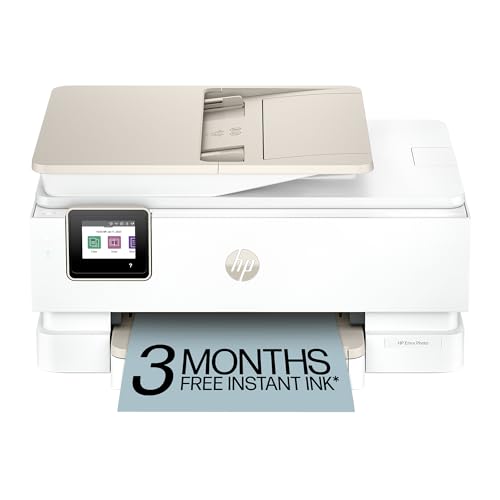 HP Envy Photo 7975
|
Mid-Range | AI-enabled formatting + dual-band Wi‑Fi | Vendors needing multifunction convenience and mobile app features | Check Price | ||
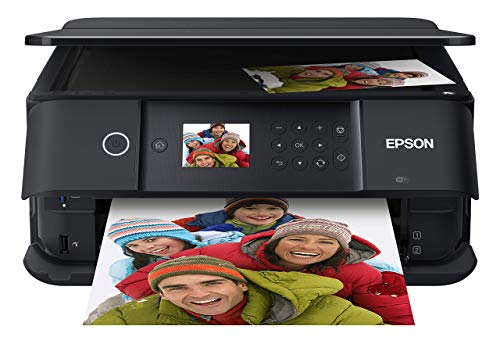 Epson XP-6100
|
Mid-Range | Compact size with quick 4x6 photos (≈15s) | On-the-go booths and pop-ups needing compact speed | Check Price |
1. Canon PIXMA G620 Wireless MegaTank Photo All-in-One Printer [Print, Copy, Scan], Black,Works with Alexa
The PIXMA G620 is built for volume and photo longevity. Its refillable MegaTank system drops per-print cost and a 6-color dye-based ink set (including red and gray) boosts color gamut for richer photos. It's less portable than small desktop models but delivers excellent long-term value and vivid prints.
Key Specs
- MegaTank high page yield — up to ~3,800 4x6 photos per full ink set
- 6-color dye-based ink system (includes Red and Gray)
- Connects via high-speed USB and wireless; Alexa integration
- Chromalife100 for long-lasting photos
Pros
- Much lower cost per 4x6 print than typical cartridge models
- Richer color gamut (6-color) than most mid-range printers
- Better long-term photo longevity (Chromalife100) than basic dye-only units
Cons
- Less compact/portable than the Epson XP-6100
- Some users report occasional connectivity or early-failure issues
Best For: High-volume market sellers who value print cost
Check Latest Price on Amazon2. HP Envy Photo 7975 Wireless Color Inkjet Photo Printer, Print, scan, Copy, Easy Setup, Mobile Printing, Best-for-Home, 3 Months of Instant Ink Included, AI-Enabled (B63K3A)
The HP Envy Photo 7975 is a flexible all-in-one that handles photos, documents and light batch printing with smart features like AI print formatting and dual-band Wi-Fi designed to reduce connection hiccups. It’s a good middle ground for booths that need copying/scanning and easy mobile control.
Key Specs
- AI-enabled print formatting for better web/email prints
- Dual-band Wi-Fi with auto issue detection
- Automatic 2-sided printing and automatic document feeder (ADF)
- Includes separate photo tray and 3 months of Instant Ink
Pros
- More versatile for scanning/copying than the Canon and Epson
- Dual-band Wi-Fi aims to be more stable in busy network environments
- Sustainable design with recycled plastic content
Cons
- Print color accuracy and value are debated by customers
- Some users report Wi-Fi drops and occasional paper jams
Best For: Vendors needing multifunction convenience and mobile app features
Check Latest Price on Amazon3. Epson Expression Premium XP-6100 Wireless Color Photo Printer with Scanner and Copier, Black, Medium
The Epson XP-6100 is a compact, slim photo-focused all-in-one that prints fast 4x6 photos and supports Wi‑Fi Direct for router-free printing. Customers like its small footprint and straightforward setup — ideal for limited-space market tables — though ink cost and some connectivity nuances are tradeoffs.
Key Specs
- 5-color ink system for up to 8x10 photo prints
- Fast 4x6 photo printing in ~15 seconds (draft measure)
- Wi‑Fi Direct, USB and memory card slots; 2.4" color LCD
- Auto 2-sided printing and dedicated photo tray
Pros
- More compact and lighter than the Canon G620 for market portability
- Fast small-photo throughput compared with many home AIOs
- Easier Wi‑Fi Direct setup for printing without a network
Cons
- Higher per-photo ink cost vs. MegaTank systems like Canon
- Some users report mixed connectivity and occasional slow start-up
Best For: On-the-go booths and pop-ups needing compact speed
Check Latest Price on AmazonWhich One Should You Choose?
If premium quality and the lowest long-term cost per photo matter most — especially for high-volume market sellers — buy the Canon PIXMA G620. Its MegaTank design and 6-color ink system deliver richer colors and much lower per-print costs than cartridge models.
If space and portability are primary — you need a lightweight, fast printer for a tight booth or pop-up — choose the Epson Expression Premium XP-6100 for its compact footprint and Wi‑Fi Direct convenience.
If you need an all-in-one that handles scanning, copying and smarter web/email prints with generally easy mobile setup, the HP Envy Photo 7975 is the pick for versatility and features, though ink costs and occasional connection issues are tradeoffs.
Best for Specific Scenarios
- High-volume market seller: Canon PIXMA G620 because MegaTank inks lower per-print costs and the 6-color system improves color depth.
- Mobile pop-up or craft fair: Epson XP-6100 because it’s compact, quick for 4x6 prints and supports Wi‑Fi Direct without a router.
- Multi-use booth (prints + scans): HP Envy Photo 7975 because of its ADF, multifunction features and AI formatting that simplify varied print jobs.
Frequently Asked Questions
Can I print from a phone without Wi‑Fi?
Yes — models with Wi‑Fi Direct (like the Epson XP-6100) let you print directly from smartphones without a local router. Some printers also support Bluetooth or create their own hotspot for mobile printing.
Which option has the lowest cost per photo?
MegaTank or refillable-ink systems (Canon PIXMA G620) typically have the lowest cost per 4x6 photo over time. Cartridge-based mid-range printers can cost more per print even if they’re cheaper up front.
Are wireless printers reliable at busy markets with many devices?
Wireless reliability depends on network congestion and router quality. Dual-band Wi‑Fi and Wi‑Fi Direct reduce interference; for the most stable setup, use a wired USB connection to a laptop when possible or choose models with robust dual-band connectivity.
How We Selected These Products
Our recommendations are based on data-driven analysis: we evaluated 29748+ products across 4825+ brands using a composite scoring system that weighs rating (40%), review volume (30%), price value (20%), and demand signals (10%). Every product is ranked by data, not opinions.
Last updated: July 25, 2026
As an Amazon Associate we earn from qualifying purchases at no extra cost to you. Full disclosure.
HomeOfficePilot Score is our editorial ranking based on a composite analysis of product quality, value, and verified customer sentiment. Click through to Amazon for current pricing, availability, and live customer reviews.