As an Amazon Associate we earn from qualifying purchases. Learn more.
Best Label Printers for Teachers & Classroom Organization (2026)
Classroom labeling saves time, reduces clutter, and teaches students organizational habits. This guide is written for teachers and classroom leaders who want simple, durable label solutions for bins, books, student supplies, and classroom centers. You'll learn which models are easiest to use in a busy school setting, which print the most durable tapes, and how connectivity and power options affect daily classroom workflows. Products here were chosen for ease-of-use, sturdiness, tape durability, and features teachers repeatedly value like portability, waterproof labels, and straightforward setup.
Quick Answer
For most teachers the NIIMBOT B1 (ASIN: B0BQBJM424) is the best choice — it prints wide, durable thermal labels and connects to phones or a PC for fast batch printing. If you need a low-cost, kid-friendly option, choose the EazeID D210S purple model (ASIN: B0DM4WKJPL).
Our Top Picks
Quick Comparison
Select 2-3 products to compare side-by-side
| Compare | Product | HomeOfficePilot Score | Price Tier | Key Feature | Best For | Action |
|---|---|---|---|---|---|---|
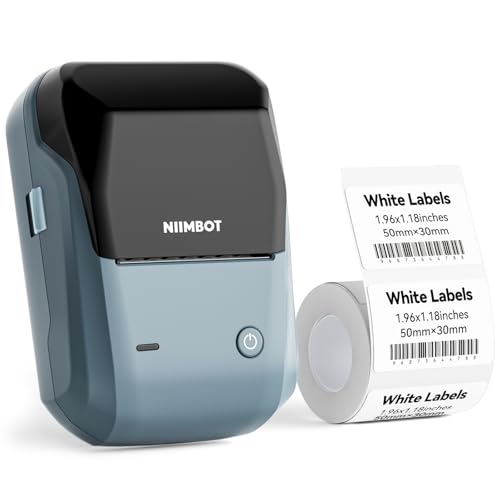 NIIMBOT B1 (Blue)
|
Premium | Wide 20–50mm thermal printing | Teachers needing durable, wide bin labels | Check Price | ||
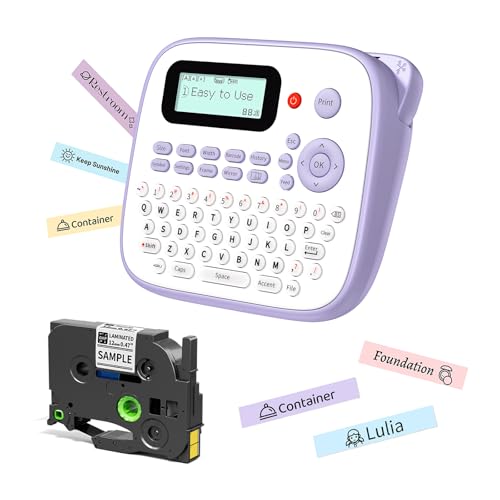 EazeID D210S (Purple)
|
Budget | Built-for-kids design + waterproof laminated tape | Teachers on a budget & classrooms with younger students | Check Price | ||
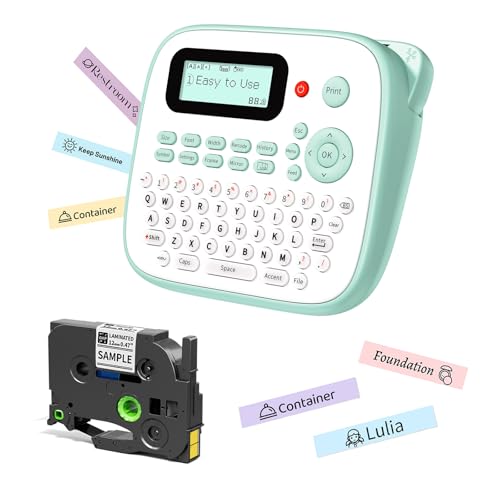 EazeID D210S (White)
|
Budget | QWERTY keyboard — no phone needed | Teachers who want quick single-device labeling | Check Price | ||
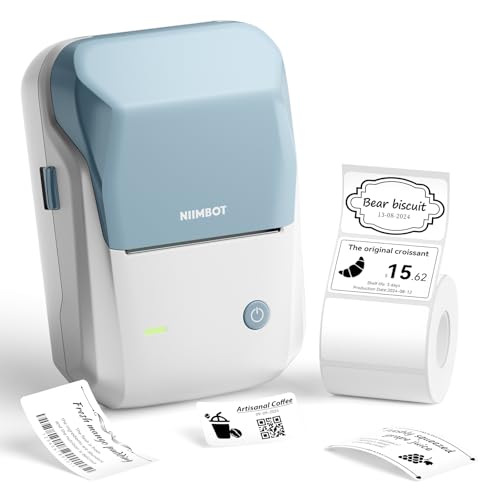 NIIMBOT B1 (Sky Blue)
|
Premium | App with 1500+ symbols & auto power-off | Teachers who batch-print with PC or phone | Check Price |
1. NIIMBOT B1 Label Maker Machine with Tape, 2 Inch Portable Sticker Printer for Home School & Small Business, Compatible with Phones & PC, Blue
The NIIMBOT B1 is a teacher-friendly thermal printer that makes wide, durable labels quickly from your phone or PC. It’s great for batch printing shelf and bin labels, offers many templates, and uses thermal paper so there’s no ink to refill.
Key Specs
- Print width: 20–50 mm (1–2 inch)
- Connectivity: Bluetooth to mobile; USB-C to PC (driver may be required)
- Printing method: Thermal (no ink), supports continuous & gap paper
- Software: App with 500+ templates, icons and batch printing
Pros
- Prints wide, legible labels ideal for bins and shelves
- Fast Bluetooth connection and robust app templates
- Thermal printing avoids ink mess and is quick for batch jobs
Cons
- Premium-tier cost compared with basic handheld labelers
- Not recommended for use with iPad; PC connection can need a driver
Best For: Teachers needing durable, wide bin labels
Check Latest Price on Amazon2. Label Maker Machine with-Tape Waterproof, Purple Desktop Label Maker for Teachers Kids Classroom, Portable Labeler with Multiple Symbols &Fonts for Home Office School Use, D210S
This purple EazeID D210S is budget-friendly and designed to encourage kids to label their own items. It prints laminated, waterproof 12 mm tape and offers many symbols and fonts so name tags and lunchbox labels look tidy and last through washes and frequent handling.
Key Specs
- Power: 6x AAA batteries or Type-C cable
- Tape type: 12 mm laminated waterproof tape (fade & scratch resistant)
- Design options: 800+ symbols, 100+ frames, 16 fonts
- Printing: Up to 4 lines of text and barcode support
Pros
- Waterproof laminated labels hold up to classroom wear
- Kid-friendly controls and fun symbols for student projects
- Flexible power options (batteries or USB-C)
Cons
- Mixed reports on long-term durability and battery life
- Some users report inconsistent print quality on occasion
Best For: Teachers on a budget & classrooms with younger students
Check Latest Price on Amazon3. D210S Kids Label Maker, Label Maker Machine with Waterproof-Labels, Portable Keyboard Labeler Machine with-Tape 12mm 0.47 Laminated White, Multiple Symbols for Home Garden Office School Kids Use
This D210S variant keeps the budget-friendly laminated tapes and adds a QWERTY keyboard so teachers can type and print without connecting a phone. It’s practical for quick name tags, cable labels, and small batch runs in a busy classroom.
Key Specs
- Input: Built-in QWERTY keyboard for stand-alone use
- Print head: 180 dpi for clear text and simple icons
- Tape type: 12 mm laminated white tape (waterproof)
- Features: Narrow-setting to reduce tape waste; vertical print
Pros
- Easy standalone operation — great for teachers who prefer not to use an app
- Laminated tapes resist fading and moisture
- Narrow setting helps conserve tape and reduce costs
Cons
- Some units show inconsistent reliability out of the box
- Smaller print area than wide-format thermal labelers
Best For: Teachers who want quick single-device labeling
Check Latest Price on Amazon4. NIIMBOT B1 Label Maker with Tapes,2 Inch Portable Thermal Label Printer for Home Office School Small Business, Address, Clothing, Crafts, Retail,Support Smartphones & PC,Sky Blue
The sky-blue NIIMBOT B1 mirrors the larger-model features with wide thermal printing and an app rich in fonts and symbols. It’s made for teachers and small-office workflows that benefit from PC batch printing and automatic label detection to speed repetitive tasks.
Key Specs
- Print width: 20–50 mm (1–2 inch)
- App: Supports 10+ fonts and 1500+ symbols/icons
- Power saving: Auto power-off options (15/30/60 min or never)
- Compatibility: iOS/Android phone support; PC via driver
Pros
- Large symbol library and app features for professional-looking labels
- Automatic label recognition saves time loading tapes
- Thermal printing is fast and mess-free
Cons
- Requires driver for PC use and not recommended for iPad
- Premium-tier model compared with handheld keyboards
Best For: Teachers who batch-print with PC or phone
Check Latest Price on AmazonWhich One Should You Choose?
If budget is tight → EazeID D210S purple (ASIN: B0DM4WKJPL). It gives waterproof laminated labels, fun symbols, and flexible power for under a higher-end price. If you need a standalone, kid-friendly keyboard for on-the-fly labeling → EazeID D210S white (ASIN: B0DFXVSTG6). If you want fast, wide labels for bins, shelving, and batch printing from phone or PC and prioritize durability and speed → NIIMBOT B1 (ASIN: B0BQBJM424). If portability plus strong app features are your priority and you prefer a slightly different color/options combo → NIIMBOT B1 sky blue (ASIN: B0CCY176G3).
Best for Specific Scenarios
- Labeling storage bins & cubbies: NIIMBOT B1 (ASIN: B0BQBJM424) because it prints wider 20–50 mm labels that are easy to read from across the classroom and the thermal output is durable.
- Student name tags & classroom centers: EazeID D210S white (ASIN: B0DFXVSTG6) because the QWERTY keyboard and many symbols let you create colorful, individual tags quickly without a phone.
- On-the-go labeling during events or parent nights: EazeID D210S purple (ASIN: B0DM4WKJPL) because its battery/USB power options and kid-friendly design make portable labeling simple and engaging.
Frequently Asked Questions
Are these labels waterproof and durable for classroom use?
Most of the models reviewed (especially the EazeID D210S models) use laminated waterproof tapes that resist fading, moisture and light abrasion—good for lunch boxes, markers and frequently handled items. NIIMBOT’s thermal labels also hold up well but check tape specs before buying for outdoor or freezer use.
Do teachers need a phone or computer to use these printers?
It depends on the model. NIIMBOT B1 printers use a mobile app (and offer PC connection with a driver) for flexible design and batch printing. The EazeID D210S models can operate standalone with a built-in keyboard or run from USB/batteries, which is handy if you prefer not to use a phone during class.
Which label size is best for classroom bins and books?
For bins and shelf fronts choose wider labels (20–50 mm) for legibility at a distance. For small items, cables, and name tags 12 mm laminated tape is more appropriate. Consider a model that supports both tape widths or keep two machines if you need both sizes regularly.
How We Selected These Products
Our recommendations are based on data-driven analysis: we evaluated 29748+ products across 4825+ brands using a composite scoring system that weighs rating (40%), review volume (30%), price value (20%), and demand signals (10%). Every product is ranked by data, not opinions.
Last updated: August 16, 2026
As an Amazon Associate we earn from qualifying purchases at no extra cost to you. Full disclosure.
HomeOfficePilot Score is our editorial ranking based on a composite analysis of product quality, value, and verified customer sentiment. Click through to Amazon for current pricing, availability, and live customer reviews.