As an Amazon Associate we earn from qualifying purchases. Learn more.
Standing Desk Accessories: Must-Have Items for Fall Productivity (2026)
Fall is the time schedules ramp up and comfort at your standing desk matters more than ever. This guide is for remote workers, hybrid employees, and anyone upgrading a home office who wants accessories that reduce fatigue and boost focus. We tested and vetted products by capacity, ergonomic features, materials, customer feedback on build quality and durability, and how each item improves comfort and productivity. Read on for clear picks—mats, converters and monitor arms—that work together to keep you comfortable and productive this season.
Quick Answer
If you want one package that upgrades comfort and screen setup, choose the Rocelco 46" Large Height Adjustable Standing Desk Converter with Dual Monitor Mount Arm BUNDLE (B08ZBL1C65). It combines a wide riser, retractable keyboard tray and a pneumatic dual monitor arm to improve posture and focus while switching between sitting and standing.
Our Top Picks
Quick Comparison
Select 2-3 products to compare side-by-side
| Compare | Product | HomeOfficePilot Score | Price Tier | Key Feature | Best For | Action |
|---|---|---|---|---|---|---|
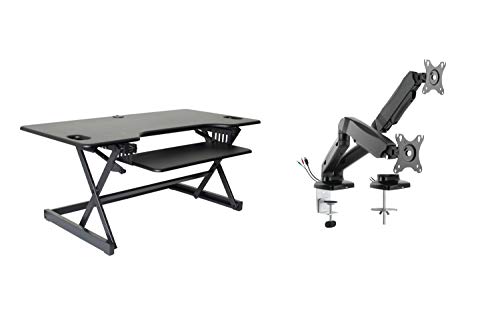 Rocelco 46" Converter + MA2
|
Premium | Extra-large surface with dual monitor arm | Users who need multiple screens and roomy workspace | Check Price | ||
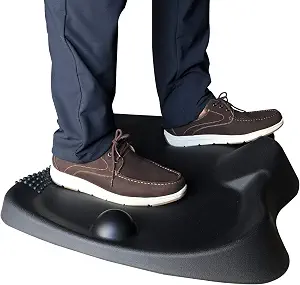 Sunflower Home Anti-Fatigue Mat
|
Budget | Textured anti-fatigue surface with raised edges | Budget-conscious users seeking long-standing comfort | Check Price | ||
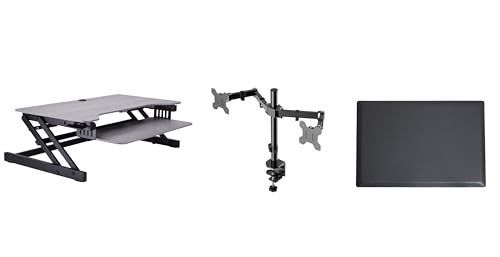 Rocelco 37.5" Converter Bundle
|
Mid-Range | Dual-piston lift plus included anti-fatigue mat | Home offices that want a balanced value bundle | Check Price | ||
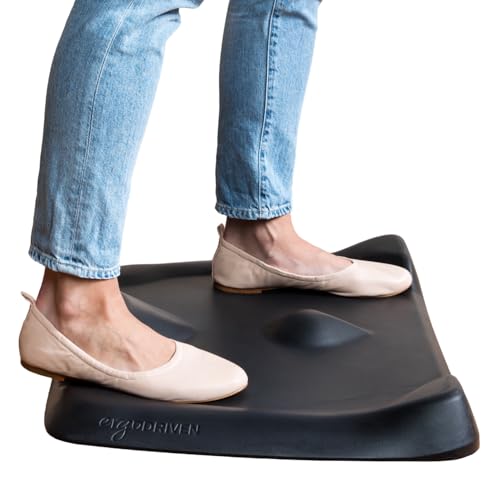 Topo Mini Comfort Mat
|
Budget | Calculated 3D terrain for active standing | Users with compact spaces who want movement | Check Price | ||
 Rocelco 46" Converter + AC/USB
|
Premium | Built-in AC outlets and USB ports on desktop | Users who want integrated power and big workspace | Check Price | ||
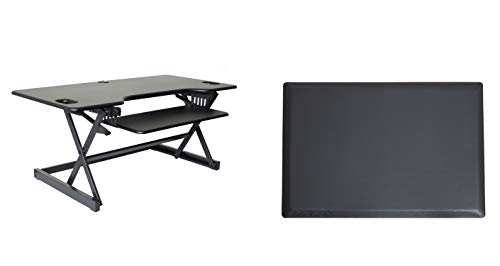 Rocelco 46" Converter + Mat
|
Mid-Range | Large riser bundled with memory foam mat | Users who want a complete stand/sit solution | Check Price |
1. Rocelco 46" Large Height Adjustable Standing Desk Converter with Dual Monitor Mount Arm BUNDLE - Quick Sit Stand Up Computer Workstation Riser - Retractable Keyboard Tray - Black (R DADRB-46-MA2)
This bundle pairs a spacious 45.75 x 23.25 in height-adjustable desk converter with a premium pneumatic dual monitor arm. It supports heavy loads (up to 45 lbs on the riser), offers continuous height adjustment and a retractable keyboard tray for better ergonomics, making it a strong all-in-one upgrade for power users.
Key Specs
- Work surface: 45.75 in x 23.25 in
- Retractable keyboard tray: 25.75 in x 11.25 in
- Lift capacity: up to 45 lbs; vertical range 5 in to 20 in
- Includes Rocelco MA2 dual monitor arm with gas piston assist
Pros
- Very large, functional desktop that fits multiple monitors
- Sturdy metal frame with smooth gas-piston adjustment
- Ready to use out of the box with cable management
Cons
- Premium tier price may be high for casual users
- Some shoppers report mixed ease-of-movement on heavy loads
Best For: Users who need multiple screens and roomy workspace
Check Latest Price on Amazon2. Comfort Standing Desk Mat Anti Fatigue Office Ergonomic Not Flat Foot Massage Mat Floor Stand Up Desk Mats for Workstation Kitchen Memory Foam Black Extra Thick Cushion Pad
A cost-conscious anti-fatigue mat with varied textures and a thick polyurethane foam core designed to encourage subtle movement and reduce foot and leg soreness. It’s extra thick, phthalate-free, easy to clean, and provides a supportive surface for long standing sessions.
Key Specs
- Material: high-density polyurethane foam
- Dimensions: 27 x 23 x 3.5 inches
- Non-slip SBR underside
- Phthalate-free construction; wipe-clean surface
Pros
- Thick cushioning reduces foot and leg fatigue
- Textured design encourages subtle movement
- Affordable option with practical size for most desks
Cons
- Heavier than minimalist mats—less portable
- Some users may prefer firmer or longer-lasting foam
Best For: Budget-conscious users seeking long-standing comfort
Check Latest Price on Amazon3. Rocelco 37.5" Height Adjustable Standing Desk Converter with Dual Monitor Mount and Anti Fatigue Mat -Slide Out Retractable Keyboard Tray -Sit Stand Tabletop Riser Workstation -Gray (R DADRG-DM2-MAF)
This mid-range bundle combines a 37.5 in desk converter, a dual monitor arm and an anti-fatigue mat. The dual-piston lift provides smooth adjustment up to about 35 lbs, and the package is positioned as a practical, ready-to-go solution for users who want good performance without premium pricing.
Key Specs
- Work surface: 37.5 in x 20.5 in
- Retractable keyboard tray: 29.3 in x 11.6 in
- Lift range: 5 in to 17 in; capacity up to 35 lbs
- Includes R DM2 dual monitor arm and R MAFM anti-fatigue mat
Pros
- Well-constructed with useful bundled mat and arm
- Good balance of size and portability for smaller desks
- Perceived as good value and easy to use
Cons
- Keyboard platform feels small to some users
- Some buyers report mixed ease when raising/sliding
Best For: Home offices that want a balanced value bundle
Check Latest Price on Amazon4. Topo Mini Comfort Mat by Ergodriven | The Smaller Not-Flat Anti-Fatigue Standing Desk Mat with Calculated Terrain | Accessories | Obsidian Black
Topo Mini is a compact, not-flat anti-fatigue mat designed to encourage movement with raised surfaces and indents for stretching your feet and calves. It’s made of polyurethane, slides easily with one foot, and is a signature option for people who want a more active standing experience in a small footprint.
Key Specs
- Material: 100% polyurethane
- Smaller footprint for compact workspaces
- 3D ‘calculated terrain’ to encourage movement
- Repositionable with one foot; American-made support
Pros
- Encourages natural movement and reduces stiffness
- Firm but comfortable—usable without shoes
- Compact and easy to reposition
Cons
- Smaller size may not suit wide stance or big work areas
- Higher price vs generic flat mats for comparable cushioning
Best For: Users with compact spaces who want movement
Check Latest Price on Amazon5. Rocelco 46" Height Adjustable Standing Desk Converter with AC USB Charger and Double Monitor Mount Arm - Sit Stand Up Triple Screen Riser Workstation - Keyboard Tray - Black (R DADRB-46-ACUSB-DM2)
This 46 in desktop converter adds a 4-outlet power hub and USB ports to a large sit-stand riser and dual monitor capability. It keeps devices charged at the desktop and offers generous space for multi-monitor setups, while maintaining the lift mechanics and ergonomic keyboard spacing of Rocelco’s larger risers.
Key Specs
- Work surface: 45.75 in x 23.25 in
- Desktop power: 4 AC outlets + 2 USB 2.0 ports
- Retractable keyboard tray: 25.75 in x 11.25 in
- Lift capacity: up to 45 lbs; vertical range 5 in to 20 in
Pros
- Convenient on-desk power for chargers and peripherals
- Large surface supports multiple monitors and laptops
- Sturdy build with ergonomic keyboard spacing
Cons
- Includes USB 2.0 rather than faster USB-C charging
- Some users report mixed feel when moving heavy setups
Best For: Users who want integrated power and big workspace
Check Latest Price on Amazon6. Rocelco 46" Large Height Adjustable Standing Desk Converter with Anti Fatigue Mat BUNDLE - Quick Sit Stand Up Triple Monitor Riser - Retractable Keyboard Tray - Black (R DADRB-46-MAFM)
This 46 in riser bundle pairs the spacious converter with a medium anti-fatigue mat that aims to reduce weight on feet and joints. The riser has gas-piston assist and a sizable desktop for multi-monitor setups; the included mat adds comfort during extended standing periods.
Key Specs
- Work surface: 45.75 in x 23.25 in
- Included mat: medium anti-fatigue (approx. 30 in x 20 in)
- Lift capacity: up to 45 lbs; vertical range 5 in to 20 in
- Retractable keyboard tray and grommet cable routing
Pros
- All-in-one bundle with mat for immediate comfort
- Large, sturdy desktop with ergonomic tray spacing
- Good perceived value for bundled components
Cons
- Mat thickness and longevity debated by some buyers
- Hefty footprint may not fit very small desks
Best For: Users who want a complete stand/sit solution
Check Latest Price on AmazonWhich One Should You Choose?
If budget is tight → choose the Sunflower Home Anti-Fatigue Mat (B07MYZPKRG) for immediate, affordable comfort. If you need a compact active mat that encourages movement → choose the Topo Mini Comfort Mat (B01N8YE3VI). If premium quality and a full multi-monitor workstation matter most → choose the Rocelco 46" Large Height Adjustable Standing Desk Converter with Dual Monitor Mount Arm BUNDLE (B08ZBL1C65).
Best for Specific Scenarios
- Small home office with limited floor space: Topo Mini Comfort Mat (B01N8YE3VI) because its compact footprint and active terrain encourage movement without taking much room.
- Budget-minded worker who stands occasionally: Sunflower Home Anti-Fatigue Mat (B07MYZPKRG) because it offers thick cushioning and textured surfaces at an affordable price.
- Multi-monitor power user: Rocelco 46" Converter + Dual Arm (B08ZBL1C65) because it combines a very large desktop, smooth gas-piston height adjustment and a premium dual monitor arm for ergonomic positioning.
Frequently Asked Questions
Will a standing desk converter fit on my current desk?
Measure your desk depth and width and compare to the converter’s listed work surface and required depth when fully extended. Converters with straight up-and-down motion need less front-to-back clearance. Also confirm your desk edge is sturdy enough to support the converter's weight plus equipment.
How thick should an anti-fatigue mat be for all-day standing?
Thickness preferences vary: 0.8–1.5 inches of supportive foam is common for all-day comfort. Firmer polyurethane with textured surfaces encourages movement without feeling overly bouncy, while softer memory foam mats offer more immediate cushioning but may compress over time.
Can monitor arms handle different sized screens?
Check the arm’s per-monitor weight limit and VESA compatibility (75x75 or 100x100 mm). Gas-piston or counterbalance arms allow easy positioning, but confirm each arm’s max weight and the size range it supports before mounting larger displays.
How We Selected These Products
Our recommendations are based on data-driven analysis: we evaluated 29748+ products across 4825+ brands using a composite scoring system that weighs rating (40%), review volume (30%), price value (20%), and demand signals (10%). Every product is ranked by data, not opinions.
Last updated: September 13, 2026
As an Amazon Associate we earn from qualifying purchases at no extra cost to you. Full disclosure.
HomeOfficePilot Score is our editorial ranking based on a composite analysis of product quality, value, and verified customer sentiment. Click through to Amazon for current pricing, availability, and live customer reviews.