As an Amazon Associate we earn from qualifying purchases. Learn more.
Best Sit-Stand Accessories for Small Desks (2026)
If you use a small desk but want the health and productivity benefits of sit-stand work, this guide focuses on compact accessories that improve ergonomics without crowding your space. You’ll find converters and accessories picked for low depth, stable construction, and features that matter in tight footprints: small keyboard trays, slim monitor mounts, and anti-fatigue mats. Products were selected for build quality, space efficiency, and customer-reported reliability; we prioritized devices that maximize functionality while minimizing desk real estate so you can stand comfortably even at a compact workstation.
Quick Answer
For tight workspaces the Rocelco 46" Large Height Adjustable Standing Desk Converter (B08ZBL1C65) is the best overall — it delivers a wide work surface, a retractable keyboard tray and a dual monitor mount while keeping depth minimal. For a compact anti-fatigue solution choose the Topo Mini Comfort Mat (B01N8YE3VI).
Our Top Picks
Quick Comparison
Select 2-3 products to compare side-by-side
| Compare | Product | HomeOfficePilot Score | Price Tier | Key Feature | Best For | Action |
|---|---|---|---|---|---|---|
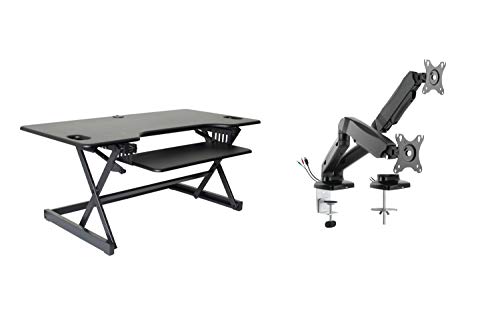 Rocelco 46" Converter (MA2)
|
Mid-Range | Extra-large surface with dual arm | Small desks needing multi-monitor support | Check Price | ||
 Rocelco 46" w/ AC & USB
|
Premium | Built-in AC outlets + USB ports | Users who need power and tidy cable access | Check Price | ||
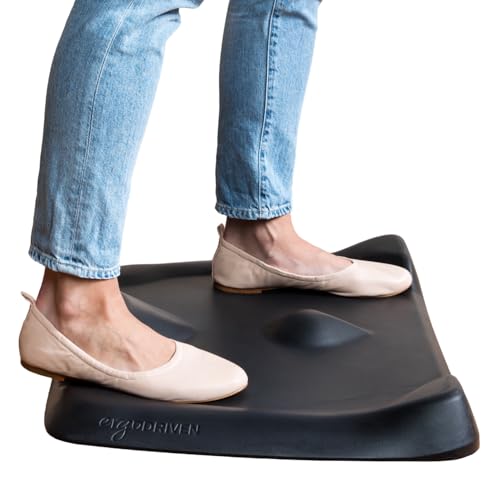 Topo Mini Comfort Mat
|
Budget | 3D calculated terrain for movement | Small-footprint standing areas | Check Price |
1. Rocelco 46" Large Height Adjustable Standing Desk Converter with Dual Monitor Mount Arm BUNDLE - Quick Sit Stand Up Computer Workstation Riser - Retractable Keyboard Tray - Black (R DADRB-46-MA2)
This Rocelco bundle gives small-desk users a surprisingly large, shallow-profile sit-stand surface with a retractable keyboard tray and a pneumatic dual monitor arm. It balances capacity (up to two medium/three small monitors) with a straight up-and-down lift that minimizes required depth — a key benefit for cramped desks.
Key Specs
- Desktop: 45.75" W x 23.25" D
- Keyboard tray: 25.75" W x 11.25" D with 4.5" drop
- Vertical range: rises 5" to 20" above desk
- Weight capacity: raises/lower up to 45 lbs
- Includes: MA2 pneumatic dual monitor arm (grommet mount)
Pros
- Large usable surface while keeping small desk depth
- Sturdy metal frame and gas piston lift for smooth height changes
- Includes dual monitor arm for neat, space-saving screen placement
Cons
- Large footprint width may overwhelm very narrow desks
- Some users report mixed impressions about ease of movement
Best For: Small desks needing multi-monitor support
Check Latest Price on Amazon2. Rocelco 46" Height Adjustable Standing Desk Converter with AC USB Charger and Double Monitor Mount Arm - Sit Stand Up Triple Screen Riser Workstation - Keyboard Tray - Black (R DADRB-46-ACUSB-DM2)
This premium Rocelco converter mirrors the large, shallow riser design but adds an on-surface power cluster (4 AC outlets + 2 USB) and a double monitor arm to reduce clutter on small desks. It’s a practical choice if you need frequent device charging without sacrificing desk depth.
Key Specs
- Desktop: 45.75" W x 23.25" D
- Keyboard tray: 25.75" W x 11.25" D with 4.5" drop
- Power: 4 UL-approved AC outlets + 2 USB 2.0 ports, 10' cord
- Vertical range: rises 5" to 20" above desk
- Includes: DM2 double monitor mount (grommet mount)
Pros
- Integrated power cluster keeps chargers off limited desk space
- Sturdy construction and easy-to-use gas piston lift
- Large work area supports multi-screen setups while minimizing depth
Cons
- Premium features increase cost compared with basic converters
- Some buyers note differences in perceived ease of movement
Best For: Users who need power and tidy cable access
Check Latest Price on Amazon3. Topo Mini Comfort Mat by Ergodriven | The Smaller Not-Flat Anti-Fatigue Standing Desk Mat with Calculated Terrain | Accessories | Obsidian Black
Topo Mini is a compact anti-fatigue mat designed to encourage foot movement in limited spaces. Made from cushioned polyurethane with raised textures, it reduces foot and lower-back fatigue so you’ll stand more comfortably at a small desk.
Key Specs
- Material: 100% polyurethane
- Design: 3D calculated terrain with indentations
- Warranty: 7-year manufacturer warranty
- Size: compact footprint designed to slide under desks
- Portability: lightweight and easy to reposition
Pros
- Encourages gentle movement, reducing standing fatigue
- Comfortable cushioning that’s supportive yet firm
- Compact size slides easily under small desks
Cons
- Smaller surface means less room to shift stance than larger mats
- Higher price than basic flat anti-fatigue mats
Best For: Small-footprint standing areas
Check Latest Price on AmazonWhich One Should You Choose?
If you need the most complete sit-stand setup for a small desk — balancing space and multi-monitor support — go with the Rocelco 46" Large Converter bundle (B08ZBL1C65). If budget and a minimal footprint are your priority, the Topo Mini Comfort Mat (B01N8YE3VI) gives the best anti-fatigue value. If you want an integrated premium experience with on-surface power and a tidy cable footprint, choose the Rocelco 46" with AC USB (B0BGVLBHV2).
Best for Specific Scenarios
- Multi-monitor on a narrow desk: Rocelco 46" Converter (B08ZBL1C65) because its shallow vertical lift and included dual arm free up depth while supporting several screens.
- Tight budget & tiny footprint: Topo Mini Comfort Mat (B01N8YE3VI) because it improves stand-time comfort without taking desk space or adding depth.
- Power-hungry devices with limited outlets: Rocelco 46" w/ AC USB (B0BGVLBHV2) because the integrated AC and USB ports reduce clutter and keep chargers off the desktop.
Frequently Asked Questions
Will a converter like the Rocelco fit on a shallow desk?
Rocelco’s converters use a straight up-and-down lift that minimizes required depth (about 23" in use), making them a good choice for shallower desks. Measure your desk depth and allow for clearance behind the converter for cables.
Can I use a standing mat like Topo Mini with shoes?
Yes. Topo Mini is firm yet cushioned and works with or without shoes. Its textured surface encourages small foot movements that reduce fatigue during long standing periods.
Do these converters support dual or triple monitors?
Both Rocelco converters reviewed are built to support multi-monitor setups: the bundle with the MA2 arm and the model with DM2 are designed for two screens and the desktop can accommodate up to three medium/smaller monitors, but always verify monitor weight and VESA compatibility against the mount’s limits.
How We Selected These Products
Our recommendations are based on data-driven analysis: we evaluated 29748+ products across 4825+ brands using a composite scoring system that weighs rating (40%), review volume (30%), price value (20%), and demand signals (10%). Every product is ranked by data, not opinions.
Last updated: October 02, 2026
As an Amazon Associate we earn from qualifying purchases at no extra cost to you. Full disclosure.
HomeOfficePilot Score is our editorial ranking based on a composite analysis of product quality, value, and verified customer sentiment. Click through to Amazon for current pricing, availability, and live customer reviews.