As an Amazon Associate we earn from qualifying purchases. Learn more.
Label Maker Apps vs Dedicated Devices: Best Workflow for Teachers (2026)
If you’re a teacher prepping classrooms, storage bins, name tags, and library shelves, this head-to-head guide helps you choose the fastest and most durable labeling workflow for the school year. You’ll learn when an app + Bluetooth printer makes sense, when a handheld or desktop label maker is smarter, and which specific devices deliver the best balance of speed, durability and value. I selected three popular classroom-friendly devices and ordered them by product suitability (speed, durability, portability, tape/material options and real-user feedback) to show clear trade-offs for typical K–12 workflows.
Quick Answer
For fastest, on-the-spot labeling use a manual applicator like the Xyron Create-A-Sticker Mini for immediate stickers; for the most durable, school-year-proof labels pick a thermal, laminated device such as the Brother PT-D220. If you want formatted, desktop-style labels, the DYMO LabelManager 210D balances speed and professional output.
Our Top Picks
Quick Comparison
Select 2-3 products to compare side-by-side
| Compare | Product | HomeOfficePilot Score | Price Tier | Key Feature | Best For | Action |
|---|---|---|---|---|---|---|
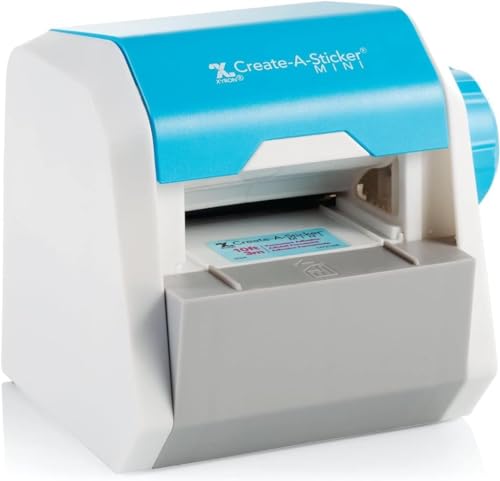 Xyron Create-A-Sticker Mini
|
Mid-Range | Non-electric adhesive applicator | Quick, portable sticker-style labels | Check Price | ||
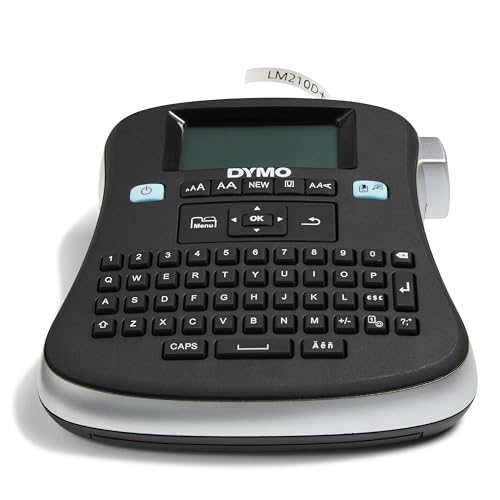 DYMO LabelManager 210D
|
Premium | QWERTY keyboard & multi-width tapes | Formatted, professional classroom labels | Check Price | ||
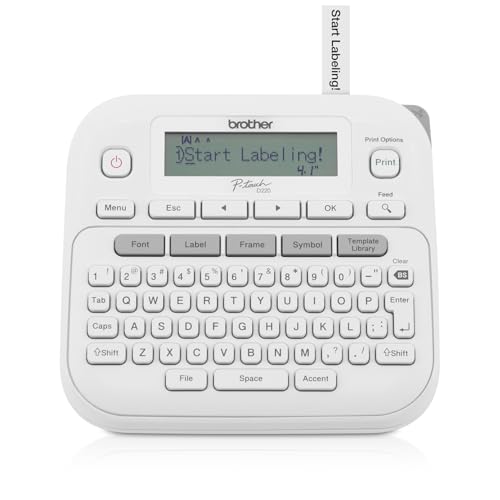 Brother PT-D220
|
Budget | Laminated, waterproof tape options | Most durable classroom labels | Check Price |
1. Xyron Create-A-Sticker, Mini, 2.5 Sticker and Label Maker Machine, Portable, Includes Permanent Adhesive, Pre-Loaded (XRN250-CFTEN)
A manual, no-power sticker applicator that turns die-cuts, photos and paper into ready-to-stick labels instantly. Extremely portable and fast for classroom stationing and craft-driven labeling, though adhesive labels are less weatherproof than laminated thermal tape.
Key Specs
- Manual, non-electric operation (turn the knob)
- Accepts up to 2.5" wide materials
- Drop-in refill cartridges (permanent or repositionable)
- Includes 2.5" x 10' permanent adhesive cartridge
Pros
- Faster for on-the-spot sticker labels than battery-powered devices
- Adhesive quality praised by users for sticking to craft materials
- Ultra-portable and lightweight for cart-to-classroom use
Cons
- Labels aren’t laminated—less waterproof/durable than thermal tape
- Limited to craft-style materials and 2.5" width
Best For: Quick, portable sticker-style labels
Check Latest Price on Amazon2. DYMO Desktop Label Maker | LabelManager 210D All-Purpose Portable Label Maker, Easy-to-Use, One-Touch Smart Keys, QWERTY Keyboard, Large Display, For Home & Office Organization
A desktop-style portable label maker with a QWERTY layout and multiple formatting options that prints tidy, office-style labels. Good for printing many copies and consistent shelf/bin IDs, though some users report a dim display and variable battery life.
Key Specs
- QWERTY keyboard and semi-graphical display
- Uses DYMO D1 tapes (6/9/12 mm)
- Prints up to 10 copies and offers 20+ formatting options
- Runs on 6 AA batteries or optional AC adapter
Pros
- More professional-looking labels than craft stickers
- Flexible tape width choice beats single-width machines like Xyron
- Fast multi-copy printing for repeating labels
Cons
- Display can be hard to read in bright classroom light
- Battery life is mixed — consider an AC adapter for heavy use
Best For: Formatted, professional classroom labels
Check Latest Price on Amazon3. Brother P-Touch Label Maker, PTD220, Thermal, Inkless Printer for Home & Office, Portable & Lightweight, QWERTY Keyboard, One-Touch Keys & 25 Pre-Set Label Templates Label Memory (Renewed Premium)
A budget-friendly thermal label maker that prints laminated, waterproof labels designed to last a school year. It has many fonts, templates and tape finishes for durable bin IDs and equipment tags, though the screen and battery life draw mixed feedback.
Key Specs
- Prints on Brother TZe laminated tapes (up to 12 mm / 1/2")
- QWERTY keyboard with 25 preset templates and 30-label memory
- Powered by 6 AAA batteries or optional AC adapter
- Offers 14 fonts, 11 styles and 600+ symbols
Pros
- Produces laminated, waterproof labels more durable than Xyron stickers
- Excellent value for long-lasting classroom labeling
- Large symbol/template library speeds label creation
Cons
- Display is small and can be difficult to read
- Requires batteries for portable use—less convenient than Xyron for instant on-the-spot labeling
Best For: Most durable classroom labels
Check Latest Price on AmazonWhich One Should You Choose?
If your priority is instant, portable labeling for stations, crafts and quick corrections — buy the Xyron Create-A-Sticker Mini (B000E147WW). It’s the fastest no-power solution for handing out stickers and bin labels on the fly. If you need labels that will survive a full school year and resist water and abrasion, choose the Brother PT-D220 (B0DD1VJW2F) for laminated, waterproof tape at a great value. If you want desktop-style formatting, multi-copy speed and a more polished label layout for repeated runs, choose the DYMO LabelManager 210D (B0018NFYLS).
Best for Specific Scenarios
- Quick craft stations & art labels: Xyron Create-A-Sticker Mini because it requires no power and produces instant stickers.
- Storage bins & long-term shelf IDs: Brother PT-D220 because laminated TZe tapes resist water and wear through the school year.
- Teacher office & mass printing: DYMO LabelManager 210D because it prints consistent, professional labels quickly and supports multiple tape widths.
Frequently Asked Questions
Are these labels waterproof?
Laminated thermal tapes (Brother TZe, many DYMO D1 options) are water-resistant and scuff-resistant and are the best choice for long-lasting classroom labels. Stickers made with manual applicators like Xyron are fine for short-term indoor use or craft items but are not as durable in wet or high-wear situations.
Should I use a label maker app + Bluetooth printer instead?
Apps paired with Bluetooth label printers can speed up batch creation from a phone or spreadsheet and are great for large inventories. For most teachers, a standalone device wins for convenience and reliability during daily classroom use—especially when you need on-the-spot labels or don’t want to depend on connectivity.
Which device is cheapest to run over a school year?
Total running cost depends on tape/cartridge type and how many labels you print. Laminated tapes cost more per foot than plain sticker cartridges, but their longevity often means fewer replacements. For heavy use where durability matters, buying laminated tape for a Brother or DYMO can be more cost-effective than repeatedly replacing temporary stickers.
How We Selected These Products
Our recommendations are based on data-driven analysis: we evaluated 29748+ products across 4825+ brands using a composite scoring system that weighs rating (40%), review volume (30%), price value (20%), and demand signals (10%). Every product is ranked by data, not opinions.
Last updated: September 22, 2026
As an Amazon Associate we earn from qualifying purchases at no extra cost to you. Full disclosure.
HomeOfficePilot Score is our editorial ranking based on a composite analysis of product quality, value, and verified customer sentiment. Click through to Amazon for current pricing, availability, and live customer reviews.