As an Amazon Associate we earn from qualifying purchases. Learn more.
Dymo vs Brother: Portable Label Makers for Quick Price Tags (2026 Comparison)
If you sell products at pop-ups, run a small retail counter, or just need neat price tags around the house, a fast, reliable portable label maker saves time. This hands-on Dymo vs Brother comparison tests three compact label makers for print speed, battery life and sticker durability. I selected models that shoppers repeatedly consider for quick price tags and small-business use: the DYMO LabelManager 210D (best-value mid-range), the Brother PTD220 (budget-friendly), and the DYMO LabelManager 280 (rechargeable premium). Read on for side-by-side specs, real-world pros/cons and a clear buying decision for 2026.
Quick Answer
For most sellers and home offices the DYMO LabelManager 210D is the best pick for quick price tags — it balances speed, label quality and value. If you need the cheapest option, the Brother PTD220 delivers durable laminated tapes on a budget; the DYMO LabelManager 280 is the premium, rechargeable choice with PC connectivity.
Our Top Picks
Quick Comparison
Select 2-3 products to compare side-by-side
| Compare | Product | HomeOfficePilot Score | Price Tier | Key Feature | Best For | Action |
|---|---|---|---|---|---|---|
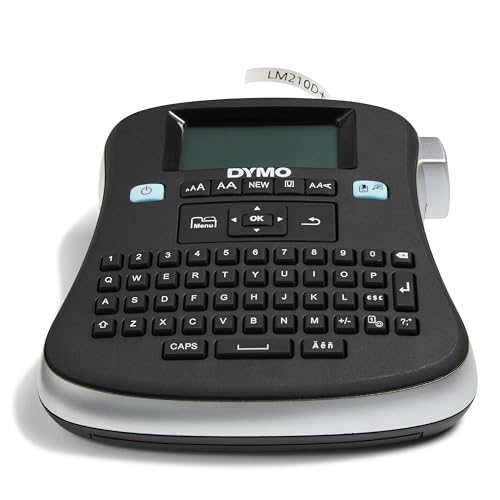 DYMO LabelManager 210D
|
Mid-Range | Prints up to 10 copies quickly | Value-focused sellers and office use | Check Price | ||
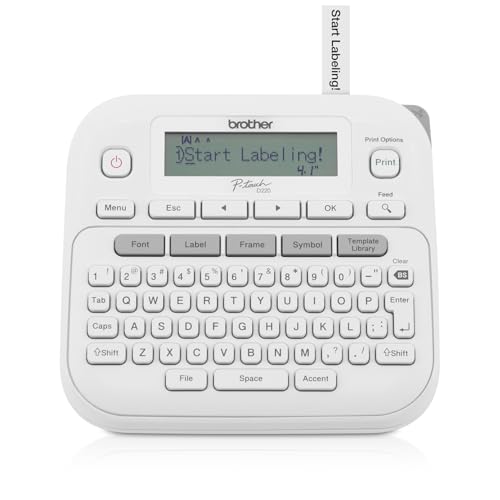 Brother PTD220
|
Budget | Wide laminated/waterproof tape options | Shoppers on a tight budget who still need durable labels | Check Price | ||
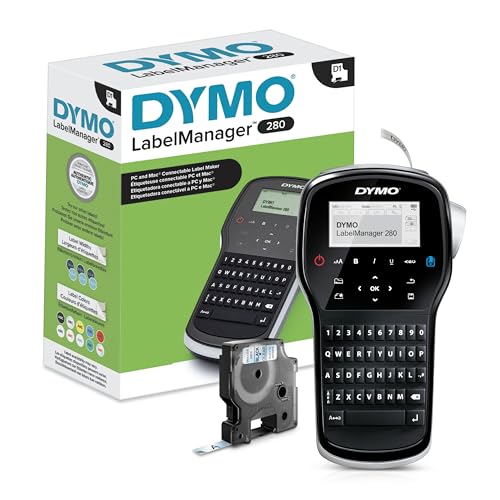 DYMO LabelManager 280
|
Premium | Rechargeable battery + PC/Mac connectivity | Users needing long sessions and custom fonts/barcodes | Check Price |
1. DYMO Desktop Label Maker | LabelManager 210D All-Purpose Portable Label Maker, Easy-to-Use, One-Touch Smart Keys, QWERTY Keyboard, Large Display, For Home & Office Organization
The 210D is a compact, easy-to-use label maker that balances speed, customization and affordability. It prints multiple copies fast, supports three D1 tape widths, and offers enough formatting options for tidy price tags and organizational labels.
Key Specs
- Print method: Thermal transfer (no ribbon)
- Tape widths: 6 mm, 9 mm, 12 mm (1/4", 3/8", 1/2")
- Power: 6x AA batteries or AC adapter (adapter not included)
- Formatting: 20+ text formats, 200+ symbols; prints up to 10 copies
Pros
- Better value than the premium DYMO 280 for basic price-tag work
- Faster multi-copy printing than models that require retyping each label
- Smaller, sturdy build that’s easy to stash on a counter or shelf
Cons
- Display can be dim or hard to read in low light compared with the 280
- Battery life is mixed; frequent use can drain AA cells faster than rechargeable options
Best For: Value-focused sellers and office use
Check Latest Price on Amazon2. Brother P-Touch Label Maker, PTD220, Thermal, Inkless Printer for Home & Office, Portable & Lightweight, QWERTY Keyboard, One-Touch Keys & 25 Pre-Set Label Templates Label Memory (Renewed Premium)
The Brother PTD220 is the budget-friendly choice with a lightweight, familiar QWERTY layout and strong tape options — especially laminated and waterproof TZe tapes that hold up on storage totes and bins. It’s straightforward to use, with lots of templates and symbol choices.
Key Specs
- Print method: Thermal (inkless)
- Tape width: ~12 mm (1/2") TZe tapes
- Power: 6x AAA batteries or optional AC adapter
- Formatting: 14 fonts, 11 styles, 99 frames, 600+ symbols; 25 templates; stores 30 labels
Pros
- Lower cost than both DYMO options while still producing durable laminated labels
- Better laminated/waterproof tape variety than the mid-range 210D for high-moisture tasks
- Lightweight and easy to carry for pop-up sales and quick on-the-go tagging
Cons
- Display is small and can be hard to read compared with the DYMO 280
- Uses AAA batteries which may require frequent replacement under heavy use
Best For: Shoppers on a tight budget who still need durable labels
Check Latest Price on Amazon3. DYMO Label Maker LabelManager 280 Rechargeable Portable Label Maker Easy-to-Use One-Touch Smart Keys QWERTY Keyboard PC and Mac Connectivity For Home & Office Organization
The LabelManager 280 targets power users: it has a rechargeable battery for long labeling sessions and a USB cable for PC/Mac customization (fonts, graphics, barcodes). It’s the most feature-rich of the three, ideal when you need professional looking price tags and fast batch printing.
Key Specs
- Power: Built-in rechargeable battery (included)
- Connectivity: PC and Mac via USB for fonts/graphics/barcodes
- Tape widths: 6 mm, 9 mm, 12 mm (D1 tapes)
- Formatting: 20+ text formats and 200+ symbols; large graphical display
Pros
- Rechargeable battery offers longer uninterrupted sessions than the AA/AAA models
- PC/Mac connectivity enables custom fonts and barcodes not possible on the PTD220
- Largest, clearest display and more advanced formatting for professional tags
Cons
- Higher cost than the 210D and PTD220 (premium tier)
- Some users report variable battery longevity and occasional adhesion issues with certain tapes
Best For: Users needing long sessions and custom fonts/barcodes
Check Latest Price on AmazonWhich One Should You Choose?
If budget is tight → Choose the Brother PTD220. It’s the most affordable option that still produces durable laminated, waterproof tapes and is lightweight for market or pop-up use. If you need the best balance of speed, value and ease-of-use → Choose the DYMO LabelManager 210D. It prints multiple copies quickly, supports common D1 tape sizes, and is the best overall pick for everyday price tags. If premium features matter (rechargeable battery, PC/Mac design tools) → Choose the DYMO LabelManager 280. Its rechargeable pack and software connectivity make it the right choice for high-volume sellers or anyone needing custom fonts and barcodes.
Best for Specific Scenarios
- Pop-up market seller: Brother PTD220 because the laminated waterproof tapes and low upfront cost handle outdoor conditions and tight budgets.
- Small retail shop: DYMO LabelManager 210D because fast multi-copy printing and solid label quality streamline daily price-tagging tasks.
- Branding or high-volume tagging: DYMO LabelManager 280 because rechargeable battery life and PC connectivity let you print custom, barcode-enabled tags for many items without interruptions.
Frequently Asked Questions
Can these label makers print waterproof labels?
Yes. Brother’s TZe laminated tapes specifically include waterproof and laminated options; DYMO D1 tapes are durable for indoor use but you’ll want laminated or specialty D1 tapes for high-moisture exposure.
Which model has the best battery life?
The DYMO LabelManager 280 uses a built-in rechargeable battery and is best for long continuous sessions. The 210D and PTD220 use replaceable AA/AAA cells — convenient for quick swaps but may need more frequent replacement under heavy use.
Can I design custom labels on my computer?
Only the DYMO LabelManager 280 includes PC/Mac connectivity for importing fonts, graphics and barcodes. The 210D and PTD220 are standalone units with built-in fonts, templates and symbols.
How We Selected These Products
Our recommendations are based on data-driven analysis: we evaluated 29748+ products across 4825+ brands using a composite scoring system that weighs rating (40%), review volume (30%), price value (20%), and demand signals (10%). Every product is ranked by data, not opinions.
Last updated: October 30, 2026
As an Amazon Associate we earn from qualifying purchases at no extra cost to you. Full disclosure.
HomeOfficePilot Score is our editorial ranking based on a composite analysis of product quality, value, and verified customer sentiment. Click through to Amazon for current pricing, availability, and live customer reviews.