As an Amazon Associate we earn from qualifying purchases. Learn more.
Best Wireless All-in-One Printers for Dorms and Small Spaces (2026)
Students, remote workers and anyone short on desk space need a printer that does more than just print. This guide highlights compact wireless all-in-one printers (print/scan/copy, some with ADF) that prioritize a small footprint, easy mobile printing and low running costs. We selected products based on objective product scores, compact design and mobile features, and cross-checked user feedback on print quality, connectivity and long-term value to recommend devices that work well in dorms and other tight spaces.
Quick Answer
For most dorms and small spaces the Epson EcoTank ET-4800 is the best choice — it combines an all-in-one setup with cartridge-free ink tanks and a compact footprint. If you need battery-powered mobile printing, pick the HP OfficeJet 250 for true on-the-go use.
Our Top Picks
Quick Comparison
Select 2-3 products to compare side-by-side
| Compare | Product | HomeOfficePilot Score | Price Tier | Key Feature | Best For | Action |
|---|---|---|---|---|---|---|
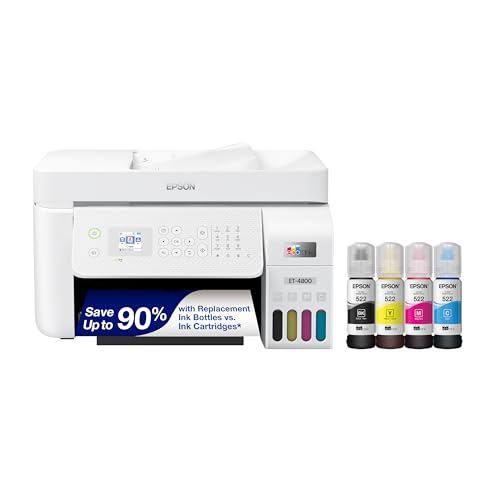 Epson EcoTank ET-4800
|
Budget | Cartridge-free EcoTank ink system | Dorms or small home offices needing low running costs | Check Price | ||
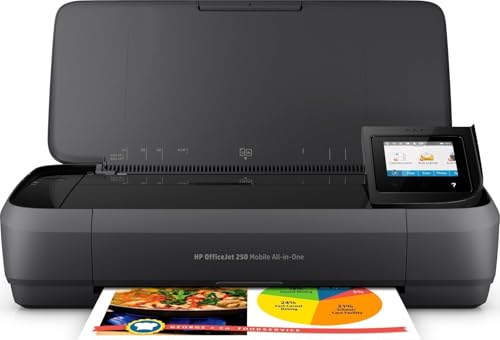 HP OfficeJet 250
|
Premium | Battery-powered portable printing | Students or professionals who print on the go | Check Price | ||
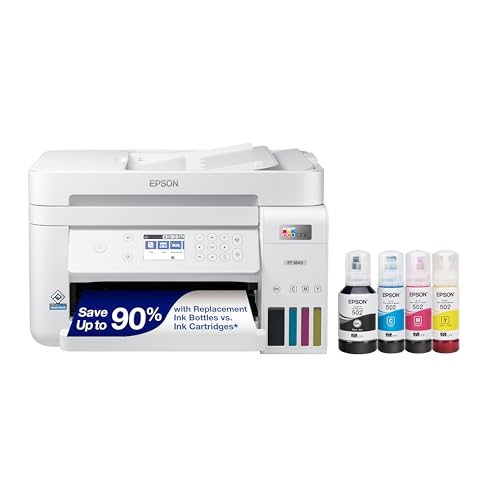 Epson EcoTank ET-3843
|
Mid-Range | Refillable EcoTank with large ink bottles | Moderate-volume users wanting low running costs | Check Price | ||
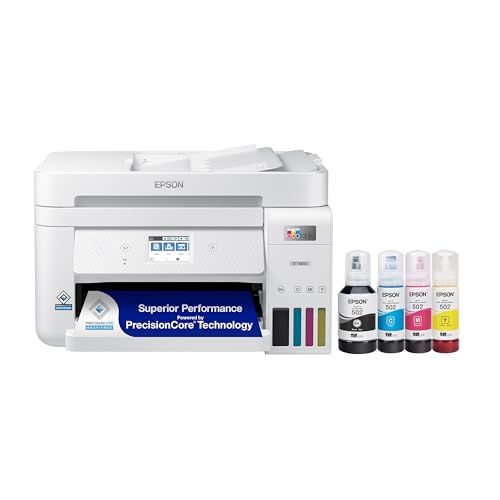 Epson EcoTank ET-4850
|
Premium | Very high-page yields with large ink tanks | Small offices needing high-volume printing | Check Price | ||
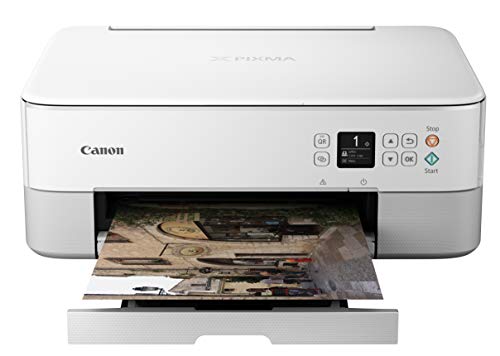 Canon PIXMA TS5320
|
Budget | Compact color printer with AirPrint | Budget-minded users who value small size | Check Price |
1. Epson EcoTank ET-4800 Wireless All-in-One Cartridge-Free Supertank Printer with Scanner, Copier, Fax, ADF and Ethernet Ideal-for Your Home Office, White
The ET-4800 pairs a compact all-in-one design with Epson's refillable EcoTank system, cutting long-term ink costs while keeping a full set of features (ADF, scanner, fax and Ethernet). It’s an excellent value pick if you want multifunction capability in a small footprint, though some users report occasional connectivity and paper-feed quirks.
Key Specs
- Cartridge-free EcoTank refillable ink tanks
- Micro Piezo heat-free print technology for sharp text
- Auto Document Feeder (ADF) and flatbed scanner
- Ethernet and wireless connectivity; color display
Pros
- Very low running costs with high-capacity ink bottles
- Full multifunction set — scanner, copier, ADF and fax
- Compact enough for dorm desks and small offices
Cons
- Some users report Wi‑Fi connectivity problems or dropouts
- Occasional paper jams, especially in the ADF
Best For: Dorms or small home offices needing low running costs
Check Latest Price on Amazon2. HP OfficeJet 250 Wireless Mobile Printer, Scanner, Copier - Black, Battery Included (CZ992A)
The OfficeJet 250 is a rare battery-powered all-in-one that fits into a backpack or car, with a built-in ADF, touchscreen and strong mobile app support for phone and cloud printing. It's ideal if portability is your priority, but expect cartridge-based running costs and mixed reports on wireless reliability.
Key Specs
- Battery included for untethered printing
- 10-page automatic document feeder
- HP Smart app and direct mobile/cloud printing
- 2.65-inch color touchscreen; charges in car or AC
Pros
- Truly portable — fits in a backpack and runs on battery
- Easy mobile printing from smartphone apps and cloud
- Simple setup and solid print quality for documents
Cons
- Cartridge-based ink can be more expensive over time
- Some users report intermittent wireless connectivity
Best For: Students or professionals who print on the go
Check Latest Price on Amazon3. Epson EcoTank ET-3843 Wireless Color All-in-One Cartridge-Free Supertank Printer with Scanner, Copier, ADF and Ethernet-for The Ultimate Home Office, White
The ET-3843 offers the EcoTank advantages in a mid-range package with an ADF and large color display. Users praise setup and ink savings, though color reproduction and Wi‑Fi behavior draw mixed feedback — a strong choice when ink cost matters and space is limited.
Key Specs
- EcoTank cartridge-free refill system
- Auto Document Feeder and high-resolution flatbed scanner
- Large color display for easy navigation
- Designed for ~200 pages/month average workloads
Pros
- Good value through ink-bottle refills
- Easy initial setup and straightforward controls
- Suitable footprint for small desks and dorms
Cons
- Mixed reports on color accuracy and photo vibrancy
- Some users experience Wi‑Fi connectivity or speed inconsistencies
Best For: Moderate-volume users wanting low running costs
Check Latest Price on Amazon4. Epson EcoTank ET-4850 Wireless All-in-One Cartridge-Free Supertank Printer with Scanner, Copier, Fax, ADF and Ethernet The Perfect Printer Office - White, Medium
The ET-4850 is the most feature-rich EcoTank here, with huge ink yields, a 250-sheet tray, duplex printing and voice-enabled options. It’s great for users who prioritize low recurring costs and robust paper handling, though some buyers report slower print speeds and occasional connectivity flakiness.
Key Specs
- Replacement ink bottles print up to ~7,500 B/W and ~6,000 color pages
- 250-sheet paper tray with auto 2-sided printing
- PrecisionCore/Heat-Free technology and pigment black ink
- 2.4-inch color touchscreen, Ethernet and wireless
Pros
- Extremely low ink cost per page for high-volume use
- Strong paper handling with large tray and duplexing
- Easy ink loading with EcoFit bottles
Cons
- Print speed can feel slow for some tasks
- Some users report intermittent connectivity or setup complexity
Best For: Small offices needing high-volume printing
Check Latest Price on Amazon5. Canon PIXMA TS5320 All in One Wireless Printer, Scanner, Copier with AirPrint, White, Works with Alexa
The PIXMA TS5320 is a colorful, compact all-in-one built for small desks and simple mobile printing via AirPrint and the Canon app. It’s a strong budget option offering decent photo and document output, though some shoppers report paper jams and variable print consistency.
Key Specs
- Compact design with optional color choices
- 1.44-inch OLED display and LED status bar
- 2-cartridge fine hybrid ink system for simple replacement
- AirPrint and Canon Print app support for mobile printing
Pros
- Very small footprint ideal for dorm rooms
- Simple mobile printing via AirPrint and Canon app
- Good value for basic document and photo tasks
Cons
- Reports of frequent paper jamming in some setups
- Print quality and reliability vary by user and media
Best For: Budget-minded users who value small size
Check Latest Price on AmazonWhich One Should You Choose?
If budget is tight → Canon PIXMA TS5320. It’s compact, easy to set up for mobile printing and fits the smallest desks. If you need portable/battery-powered printing → HP OfficeJet 250. It’s the best pick for printing and scanning on the move. If premium quality and very low running costs matter → Epson EcoTank ET-4850. For most students and small-space home offices looking for balance between price and long-term value → Epson EcoTank ET-4800.
Best for Specific Scenarios
- Dorm rooms & shared housing: Canon PIXMA TS5320 because its compact size and easy AirPrint setup help it fit on a small desk or bookshelf.
- On-the-go students or fieldwork: HP OfficeJet 250 because its battery and portable design let you print, scan and copy without access to a plug or office network.
- High-volume student printing or small home office: Epson EcoTank ET-4800 because refillable tanks and an ADF lower running costs and reduce trips to buy cartridges.
Frequently Asked Questions
Are EcoTank printers a good choice for dorms?
EcoTank printers cut long-term ink costs and reduce how often you replace cartridges, making them a smart choice if you print regularly. They can be a bit larger around the tank area than tiny cartridge printers, so check dimensions for your available space and be mindful of initial setup instructions for refilling.
Can I print from my phone or tablet?
Yes — these printers support mobile printing via vendor apps (Epson Smart Panel, HP Smart, Canon Print), AirPrint on iOS, or Mopria on many Android devices. Make sure your phone and the printer are on the same network (or use direct mobile printing features) and install the recommended app for easiest results.
How do I avoid paper jams in a small ADF-equipped printer?
Use good-quality, uncreased paper sized for the tray, fan the stack before loading, and avoid overfilling the feeder. Compact ADFs are more sensitive to thicker paper; if you frequently scan multi-page thicker originals, consider a model noted for robust paper handling or scan with the flatbed instead.
How We Selected These Products
Our recommendations are based on data-driven analysis: we evaluated 29748+ products across 4825+ brands using a composite scoring system that weighs rating (40%), review volume (30%), price value (20%), and demand signals (10%). Every product is ranked by data, not opinions.
Last updated: August 06, 2026
As an Amazon Associate we earn from qualifying purchases at no extra cost to you. Full disclosure.
HomeOfficePilot Score is our editorial ranking based on a composite analysis of product quality, value, and verified customer sentiment. Click through to Amazon for current pricing, availability, and live customer reviews.