As an Amazon Associate we earn from qualifying purchases. Learn more.
Best Portable Label Printers for Market & On-the-Go Sellers (2026 Guide)
If you sell at farmers' markets, craft fairs, pop-ups or run a mobile shop, you need labeling tools that are fast, compact and reliable. This guide tests options that suit on-the-go sellers: a true portable thermal label printer and two popular printable label sheet packs for in-house branding. You'll learn which option fits different market workflows, what features to prioritize (size, label type, connectivity and durability), and how each product performs for real sellers. Products were selected for portability, label compatibility, real-world usefulness and customer feedback on durability and value.
Quick Answer
For market and on-the-go sellers who need a compact, inkless printer with barcode support, the Phomemo M110 Thermal Label Maker (B0CJ8SHF5C) is the top pick for portability and versatility. If you need printable sheet labels for branded jar lids or high-volume runs, choose OnlineLabels' 3" round packs (OL2279WX / B09Y2JCFX3) depending on your quantity needs.
Our Top Picks
Quick Comparison
Select 2-3 products to compare side-by-side
| Compare | Product | HomeOfficePilot Score | Price Tier | Key Feature | Best For | Action |
|---|---|---|---|---|---|---|
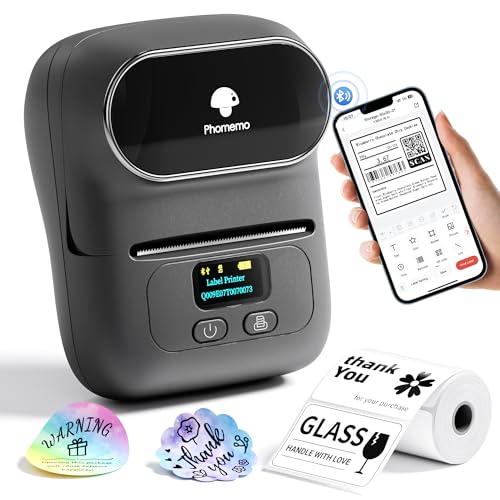 Phomemo M110 Thermal
|
Budget | Versatile thermal label widths | Mobile vendors needing compact barcode printing | Check Price | ||
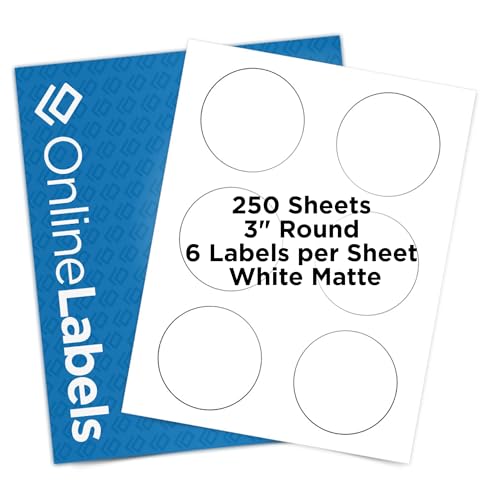 OnlineLabels 1,500 ct
|
Mid-Range | Printable 3" round matte sheets | Sellers making branded jar or product lid labels | Check Price | ||
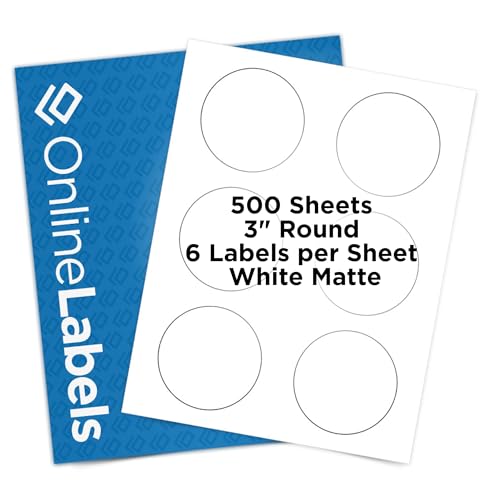 OnlineLabels 3,000 ct
|
Premium | High-volume printable sheets | High-volume sellers and branded packaging runs | Check Price |
1. Phomemo M110 Thermal Label Makers- Barcode Label Printer Bluetooth Label Maker Portable Printer for Small Business, Address, Logo, Clothing, Mailing, Sticker Printers for Phone & PC, Gray
A compact, inkless thermal label printer built for sellers who need quick price tags, barcodes and product labels on the go. It pairs with smartphone apps and a PC, supports multiple label widths and waterproof thermal labels, making it a practical portable choice.
Key Specs
- Supports label widths 20–50 mm
- Bluetooth pairing (up to ~10 m / 33 ft) and USB connection to PC
- Prints barcodes, text, icons and images via Print Master app
- Inkless thermal printing; black-and-white output; waterproof labels
Pros
- Compact and easy to store in a market bag
- Wide label compatibility (round, clear, cable, jewelry labels)
- User-friendly app with templates for fast label setup
Cons
- Print quality reported as inconsistent by some users
- Bluetooth/connectivity can be flaky for a minority of users
Best For: Mobile vendors needing compact barcode printing
Check Latest Price on Amazon2. OnlineLabels 3" Round Labels Permanent Adhesive, White Matte Great for Organization, Product Labeling, Jar Lids - for Inkjet & Laser Printers Pack of 1,500 Labels, 250 Sheets OL2279WX
Printable matte 3-inch round labels sold as sheet packs for inkjet and laser printers. These stick well to glass and plastic, come in a protective storage case, and work well for vendors who design labels on a laptop and print in batches.
Key Specs
- 3" round white matte, print-to-edge design
- Pack includes 100 sheets (600 labels) per clamshell case
- Compatible with inkjet and laser printers
- Permanent adhesive, smudge-resistant, non-yellowing finish
Pros
- Professional matte finish that prints cleanly
- Works on multiple surfaces like glass and tin
- Includes reusable storage case and design access
Cons
- Some users report alignment and template activation annoyances
- Per-sheet cost debated by budget-conscious sellers
Best For: Sellers making branded jar or product lid labels
Check Latest Price on Amazon3. OnlineLabels 3" Round Labels Permanent Adhesive, White Matte Great for Organization, Product Labeling, Jar Lids - for Inkjet & Laser Printers Pack of 3,000 Labels, 500 Sheets OL2279WX
The same 3" round matte labels offered in a larger, bulk pack for sellers who print large runs. Good for businesses that want consistent branded labels for jars, candles or packaged goods and prefer printing on a desktop printer.
Key Specs
- 3" round white matte, print-to-edge design
- Pack includes 500 sheets (3,000 labels)
- Compatible with inkjet and laser printers
- Permanent adhesive and smudge-resistant finish
Pros
- Bulk quantity reduces reordering frequency
- Consistent print quality across sheets
- Ideal for large batches of product labeling
Cons
- Alignment issues can appear if templates aren't set precisely
- Higher upfront cost for the premium bulk pack
Best For: High-volume sellers and branded packaging runs
Check Latest Price on AmazonWhich One Should You Choose?
If budget is tight → choose the Phomemo M110 (B0CJ8SHF5C) for a low-cost, portable solution that prints on-demand labels without ink. If you need portable printing on a smartphone and barcode support → choose the Phomemo M110 (B0CJ8SHF5C). If you want the best balance of professional finish and moderate quantity for jar lids or candles → choose OnlineLabels 3" Round Labels (B09Y2HCCWP). If you run higher-volume production and want to lower per-label cost for branded packaging → choose the bulk OnlineLabels 3" Round Labels (B09Y2JCFX3).
Best for Specific Scenarios
- Farmers' market vendor doing quick pricing and barcodes: Phomemo M110 because it's compact, quick to pair with a phone and prints waterproof price labels on demand.
- Etsy seller branding small-batch candles or bath products: OnlineLabels 3" Round Labels (B09Y2HCCWP) because the matte finish and print-to-edge design give a professional look for jar lids and product stickers.
- Wholesale or event seller printing large runs for a seasonal market: OnlineLabels 3" Round Labels bulk pack (B09Y2JCFX3) because the larger quantity reduces reorder frequency and keeps label appearance consistent across hundreds of units.
Frequently Asked Questions
Are thermal label printers like the Phomemo M110 suitable for outdoor markets?
Yes — thermal printers that use waterproof/water-resistant thermal labels work well outdoors and on food stalls, but always test the specific label stock for resistance to moisture and oils. Thermal labels are monochrome, so they’re best for price tags, ingredient lists and barcodes rather than full-color branding.
Can I use OnlineLabels sheets with a mobile printer or phone?
OnlineLabels sheets are designed for inkjet and laser desktop printers and aren’t intended for direct use with small mobile thermal printers. If you need mobile full-color printing, you’ll need a portable color printer compatible with label sheets or stick with thermal solutions for spot labeling.
How do I avoid alignment problems when printing sheet labels?
Download the label maker’s template or use the manufacturer’s design tool and print a test sheet on plain paper first. Load sheets straight in the tray, check printer settings for borderless or scaled printing, and ensure the template matches your printer’s margins to reduce misalignment.
How We Selected These Products
Our recommendations are based on data-driven analysis: we evaluated 29748+ products across 4825+ brands using a composite scoring system that weighs rating (40%), review volume (30%), price value (20%), and demand signals (10%). Every product is ranked by data, not opinions.
Last updated: May 22, 2026
As an Amazon Associate we earn from qualifying purchases at no extra cost to you. Full disclosure.
HomeOfficePilot Score is our editorial ranking based on a composite analysis of product quality, value, and verified customer sentiment. Click through to Amazon for current pricing, availability, and live customer reviews.