As an Amazon Associate we earn from qualifying purchases. Learn more.
Best Cable Trays & Under-Desk Organizers for Dual-Monitor Setups (2026)
If you run two monitors and a laptop — especially on a standing desk — cable clutter and awkward peripherals can steal valuable workspace and focus. This guide reviews robust under-desk organizers and cable trays built to support multi-screen setups and the frequent height changes of sit-stand desks. We tested for sturdiness, mounting options (clamp, screws, adhesive), capacity and real-world functionality using customer feedback and manufacturer specs. Read on to find the best tray for heavy monitor arms, clamp-on laptop storage, integrated standing-desk trays, and budget add-ons that keep cords and power strips out of sight.
Quick Answer
For most dual-monitor sit-stand workstations the best overall under-desk solution is the MAXECHO Desk Side Storage (B0DKP3GTT8) because it combines sturdy metal construction, a no-drill clamp, and integrated cable management. If you want the most budget-friendly metal tray, pick the COREMINDED Under Desk Storage Shelf (B0CHSJ6J28).
Our Top Picks
Quick Comparison
Select 2-3 products to compare side-by-side
| Compare | Product | HomeOfficePilot Score | Price Tier | Key Feature | Best For | Action |
|---|---|---|---|---|---|---|
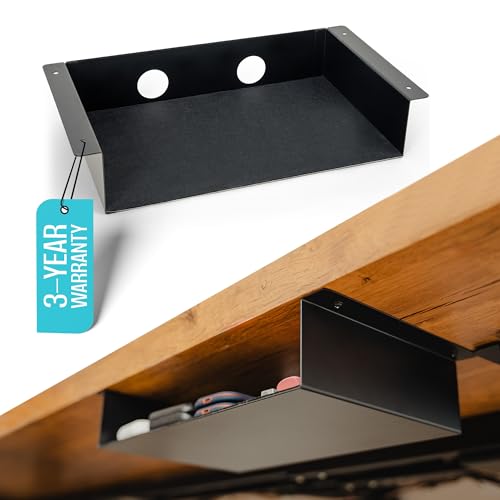 COREMINDED Under Desk Shelf
|
Budget | Carbon-steel build with felt pad | Minimalist add-on storage | Check Price | ||
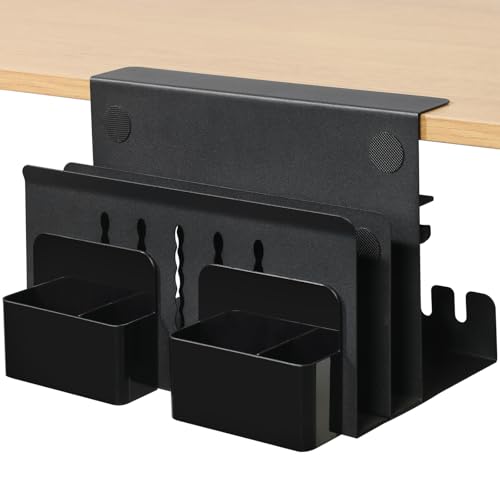 MAXECHO Clamp-On Organizer
|
Mid-Range | No-drill clamp-on mount | Clamp-on laptop & cable storage | Check Price | ||
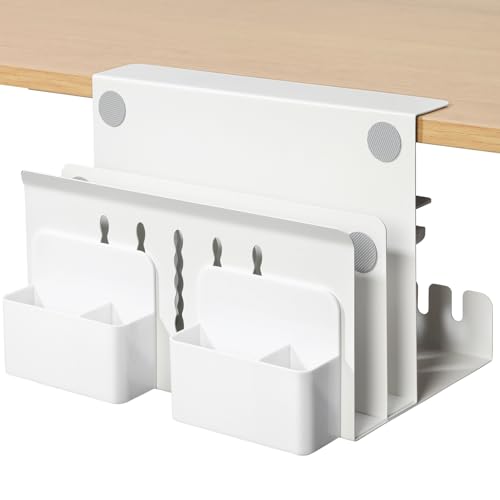 MAXECHO Side Rack (Variant)
|
Mid-Range | Clamp-on, multi-use storage | Laptop storage & power-strip hiding | Check Price | ||
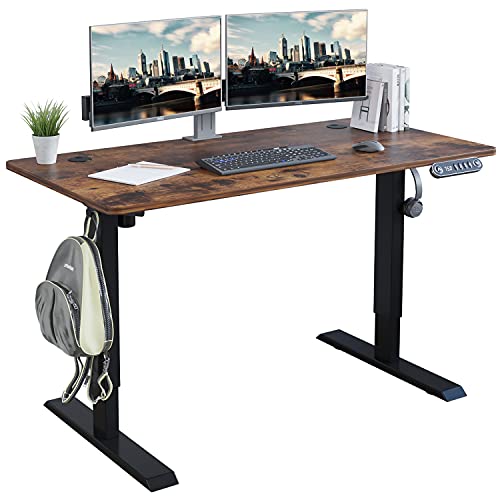 Radlove 48x24 Standing Desk
|
Premium | Integrated under-desk cable tray | Full standing-desk dual-monitor setups | Check Price | ||
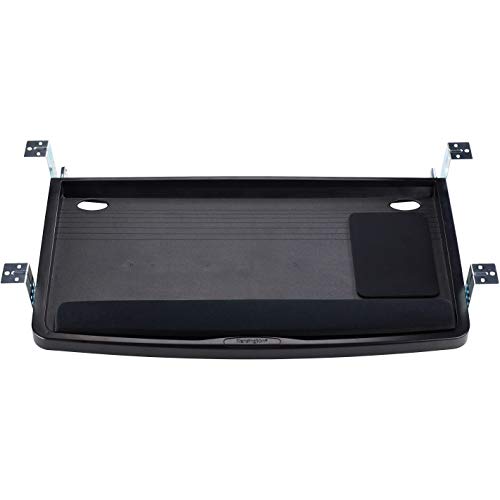 Kensington SmartFit Tray
|
Premium | SmartFit height-adjustable tray | Ergonomic keyboard + mouse placement | Check Price | ||
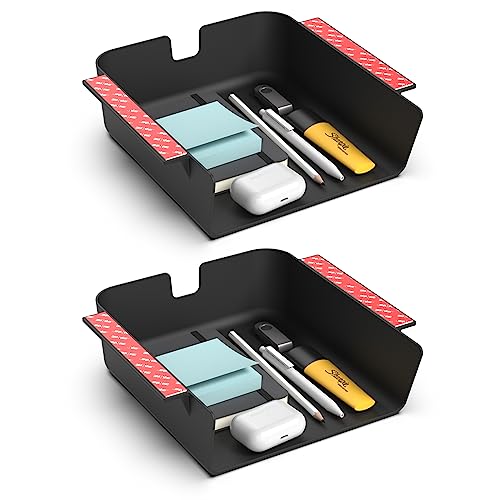 HumanCentric 2-Pack Drawer
|
Budget | 2-pack with adhesive or screw mount | Simple, low-cost accessory storage | Check Price |
1. Under Desk Storage Shelf - Carbon Steel Under Desk Tray with Cable Management, Mountable Add-On Shelf for Table & Office Desks (13" x 8" x 2.8")
A slim carbon-steel under-shelf that emphasizes clean looks and scratch protection thanks to a full wool-felt pad. It offers simple cable holes and comes with both 3M VHB tape and screws for mounting, making it a flexible budget metal option for sit-stand desks.
Key Specs
- Material: Carbon steel with matte black finish
- Dimensions: 13" x 8" x 2.8" (medium size option)
- Mounting: Screws or included 3M VHB tape
- Weight capacity: 15 lbs (VHB) / 20 lbs (screws)
Pros
- Durable carbon-steel construction
- Wool-felt pad protects items and looks premium
- Multiple mounting options (tape or screws)
Cons
- Some customers reported size/fit discrepancies
- Mixed opinions on value and ease of opening
Best For: Minimalist add-on storage
Check Latest Price on Amazon2. MAXECHO Desk Side Storage, Under Desk Laptop Mount, Table Side Hanging File Organizer, No Drill Clamp On Cable Management Tray, Laptop Holder with Magnetic Pen Holder for Office and Home, Load 22 Lbs
A versatile clamp-mounted metal organizer that holds laptops, power strips and accessories while hiding cables. Customers praise its build quality, quick tool-free install and magnetic holders — ideal for sit-stand desks where you need removable, strong storage.
Key Specs
- Material: High-quality iron metal
- Load capacity: Up to 22 lbs
- Clamp range: Fits desks 0.3" to 2.2" thick
- Extras: Magnetic pen holder, non-slip cushions, heat-dissipation holes
Pros
- Sturdy metal construction that feels durable
- Tool-free clamp installation (no drilling)
- Good storage capacity and cable-tray space
Cons
- Clamp fit limited to specified thickness range
- Side-mounted position can interfere on narrow desks
Best For: Clamp-on laptop & cable storage
Check Latest Price on Amazon3. Desk Side Storage, Under Desk Laptop Mount, Table Side Hanging File Organizer, No Drill Clamp On Cable Management Tray, Laptop Holder with Magnetic Pen Holder for Office and Home, Load 22 Lbs
A near-identical MAXECHO offering with carbon steel construction and clamp mounting. Reviews highlight reliable build, easy installation, and solid value — a practical mid-range choice for keeping chargers and thin devices tucked away.
Key Specs
- Material: Carbon steel
- Load capacity: 22 lbs
- Clamp range: 0.3" to 2.2" thickness
- Design: Non-slip pads and ventilation holes
Pros
- Well-built and functional design
- Easy to install without tools
- Good value for mid-range price tier
Cons
- Limited to desks within clamp thickness range
- Industrial look may not suit all decor
Best For: Laptop storage & power-strip hiding
Check Latest Price on Amazon4. Radlove Electric Standing Desk 48 x 24 Inches, Height Adjustable Computer Desk Sit Stand Desk Home Office Desks with Splice Board and A Under Desk Cable Management Tray, Rustic Brown Top/Black Frame
A full electric sit-stand desk that includes wire collection holes and an under-table cable basket, designed for a roomy dual-monitor layout. It uses a double-beam frame for stability, offers memory height presets and anti-collision technology — a complete integrated solution for cable management.
Key Specs
- Desktop: 48" x 24"
- Height range: 27" to 45"
- Weight capacity: 176 lbs
- Features: Under-desk cable tray, wire collection holes, anti-collision tech
Pros
- Integrated cable management for tidy dual-monitor setups
- Sturdy double-beam metal frame and high weight capacity
- Height memory presets and anti-collision safety
Cons
- Assembly can be time-consuming for some users
- Desktop dimensions may vary slightly (+/- up to 1")
Best For: Full standing-desk dual-monitor setups
Check Latest Price on Amazon5. Kensington Keyboard Tray Under Desk, SmartFit Ergonomic Slide-Out Keyboard Drawer with Cable Management, Extra-Wide Height Adjustable Keyboard Holder, 24.5" x 11.75", Black K60004US
An ergonomically focused slide-out keyboard drawer with the SmartFit system for multiple mounting heights. The extra-wide surface fits large keyboards and a mouse, and it frees desktop space — a strong option when keyboard ergonomics matter as much as cable control.
Key Specs
- Outer width: 26"; inner tray width: 24.5"
- Inner depth: 11.75"
- Mounting: Multi-height SmartFit system (3-4 positions)
- Includes mouse pad and wrist rest
Pros
- Ergonomic adjustability to find optimal typing height
- Extra-wide tray fits both keyboard and mouse
- Designed to free desktop space
Cons
- Installation and sliding action have mixed feedback
- Some users report the tray feels less sturdy than expected
Best For: Ergonomic keyboard + mouse placement
Check Latest Price on Amazon6. HumanCentric Under Desk Storage Shelf, Drawer Organizer for Office, Workstations, Tables, Sit Stand Desks, Gaming Setups, Mountable Storage Tray, Cable Management, Screw or Stick On, 2 Pack
An inexpensive plastic 2-pack that adds small hidden storage and basic cable routing beneath a desk. It’s an easy, lightweight way to hide chargers and stationery, but buyers should temper expectations for long-term durability compared with metal options.
Key Specs
- Material: Durable plastic
- Interior dimensions: 8.4" deep x 7.6" wide x 2.8" tall
- Mounting: Included VHB adhesive strips or wood screws
- Includes: Two cable clips and rear cutout for cords
Pros
- Two-pack provides immediate value
- Quick installation with tape or screws
- Compact size fits many small desks
Cons
- Plastic build may feel less durable than metal trays
- Small capacity not ideal for heavy power strips
Best For: Simple, low-cost accessory storage
Check Latest Price on AmazonWhich One Should You Choose?
If budget is tight → COREMINDED Under Desk Storage Shelf (B0CHSJ6J28) is an affordable metal option with a premium felt pad and multiple mounting choices. If you need something portable and tool-free → MAXECHO Desk Side Storage (B0DKP3GTT8) clamp-on organizer moves between desks and holds laptops and chargers securely. If premium, integrated cable management with your standing desk matters most → the Radlove Electric Standing Desk (B09C5CSXJ4) includes an under-desk tray and wire routing built into the desk.
Best for Specific Scenarios
- Dual-monitor standing workstation: Radlove (B09C5CSXJ4) because it combines a large desktop, height memory and built-in cable basket for a clean, stable setup.
- Minimalist, low-profile storage: COREMINDED (B0CHSJ6J28) because its slim carbon-steel shelf and felt pad keep small devices hidden without changing desk aesthetics.
- Portable laptop & accessory storage: MAXECHO clamp-on organizers (B0DKP3GTT8 / B0DKP5WBTV) because they clamp on without drilling and hold laptops, power strips and cables securely.
Frequently Asked Questions
Can I use adhesive-mounted trays on a sit-stand desk?
You can, but choose high-strength VHB adhesives and follow surface prep instructions. Adhesive is best on smooth, non-porous surfaces; for heavier loads or frequent height changes, screws or clamps are more reliable.
Will a clamp-on organizer damage my desktop?
Clamps typically include rubber pads or cushions to prevent scratches. Ensure the clamp pressure is adjusted correctly and that you don’t overtighten; remove periodically to check for marks on delicate finishes.
How do I hide a power strip in an under-desk tray?
Place the power strip inside a long tray or basket, route cables through the tray’s cutout or holes, and use cable clips to bundle cords. Keep ventilation in mind: avoid completely sealing chargers in a closed plastic drawer.
How We Selected These Products
Our recommendations are based on data-driven analysis: we evaluated 29748+ products across 4825+ brands using a composite scoring system that weighs rating (40%), review volume (30%), price value (20%), and demand signals (10%). Every product is ranked by data, not opinions.
Last updated: September 12, 2026
As an Amazon Associate we earn from qualifying purchases at no extra cost to you. Full disclosure.
HomeOfficePilot Score is our editorial ranking based on a composite analysis of product quality, value, and verified customer sentiment. Click through to Amazon for current pricing, availability, and live customer reviews.