As an Amazon Associate we earn from qualifying purchases. Learn more.
Best Cable Management Solutions for Dual Monitors (2026 Guide)
If you run two monitors, cables quickly multiply and a messy underside undermines ergonomics and focus. This 2026 guide helps home-office users and remote workers pick cable management that tucks wires out of sight, improves posture, and frees desk space. We tested and compared clamp-on organizers, under-desk trays, a sit-stand desk with an integrated basket, and ergonomic keyboard solutions. Products were selected for build quality, mounting options (clamp, screws, adhesive), capacity, and how well they support tidy dual-monitor setups without constant rework.
Quick Answer
For the best overall cable management for dual-monitor setups choose the MAXECHO Desk Side Storage (B0DKP3GTT8) — a sturdy clamp-on tray that hides power strips and bundles cables without drilling. For tight budgets pick the COREMINED under-desk tray (B0CHSJ6J28); for the most ergonomic keyboard and cable integration choose the Kensington K60004US.
Our Top Picks
Quick Comparison
Select 2-3 products to compare side-by-side
| Compare | Product | HomeOfficePilot Score | Price Tier | Key Feature | Best For | Action |
|---|---|---|---|---|---|---|
 MAXECHO Desk Side Storage
|
Mid-Range | Clamp-on metal organizer | Under-desk cable & laptop storage | Check Price | ||
 Kensington Keyboard Tray
|
Premium | SmartFit adjustable height | Ergonomic keyboard & cable routing | Check Price | ||
 Radlove Standing Desk
|
Premium | Integrated under-desk cable basket | Full sit-stand dual-monitor setups | Check Price | ||
 COREMINED Under Shelf
|
Budget | Carbon steel, wool felt pad | Budget under-desk organization | Check Price | ||
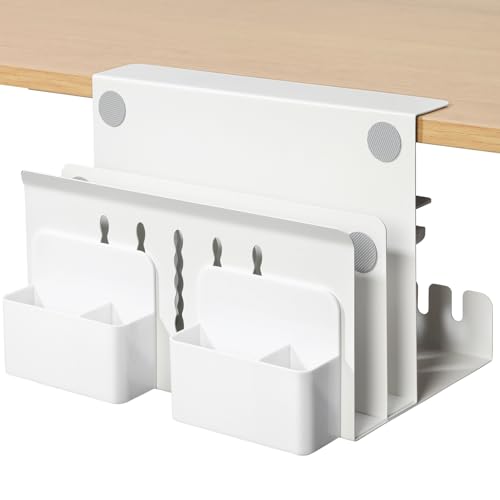 MAXECHO Side Rack (2)
|
Mid-Range | Clamp-on file & cable organizer | Sit-stand desks & side storage | Check Price | ||
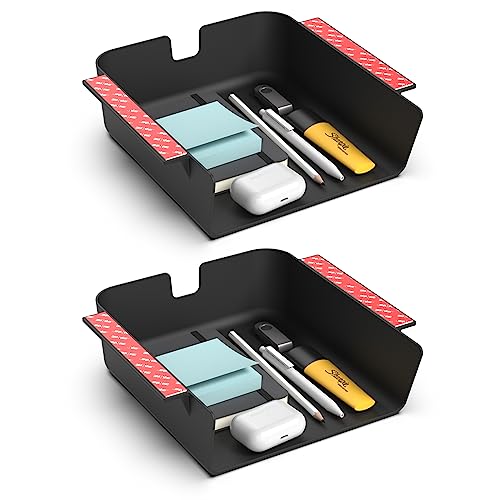 HumanCentric 2-Pack Tray
|
Budget | Stick-or-screw mounting | Small accessory storage & charging | Check Price |
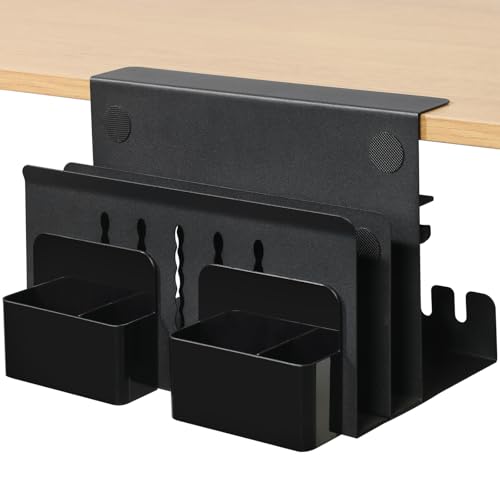
1. MAXECHO Desk Side Storage, Under Desk Laptop Mount, Table Side Hanging File Organizer, No Drill Clamp On Cable Management Tray, Laptop Holder with Magnetic Pen Holder for Office and Home, Load 22 Lbs
A versatile clamp-on metal tray that hides power strips, stores a laptop or accessories, and includes magnetic pen holders. Customers praise its build quality and quick tool-free installation, making it a strong option for dual-monitor desks that need under-edge storage.
Key Specs
- Material: High-quality iron/carbon steel
- Dimensions: Width 11.8" x Height 7.9"
- Clamp range: Fits 0.3" to 2.2" desk panels
- Load capacity: Up to 22 lbs; heat dissipation holes
Pros
- Sturdy metal construction holds heavier power strips and laptops
- No-drill clamp mounts quickly and protects desk surface
- Built-in cable space and magnetic holders improve organization
Cons
- Internal width limits very large items or oversized power strips
- Requires adequate side/underside clearance where it clamps
Best For: Under-desk cable & laptop storage
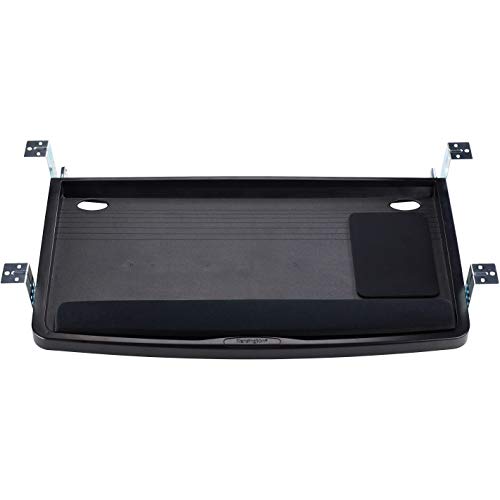
Check Latest Price on Amazon2. Kensington Keyboard Tray Under Desk, SmartFit Ergonomic Slide-Out Keyboard Drawer with Cable Management, Extra-Wide Height Adjustable Keyboard Holder, 24.5" x 11.75", Black K60004US
An extra-wide, slide-out keyboard drawer with SmartFit height settings and integrated mouse area. It frees desktop space and routes keyboard and mouse cables neatly; reviewers highlight quality and functionality but note mixed experiences on installation and perceived sturdiness.
Key Specs
- Tray inner width: 24.5"; outer drawer width: 26"
- Depth: 11.75"; fits wide keyboards and wrist rest
- Mounts at multiple heights for ergonomic positioning
- Includes integrated mousing area and cable management
Pros
- Designed for ergonomic typing and declutters the desk surface
- Extra-wide tray accommodates keyboard and mouse
- SmartFit height options help customize comfort
Cons
- Installation can be fiddly for some desk types
- Some users report mixed impressions of long-term sturdiness
Best For: Ergonomic keyboard & cable routing
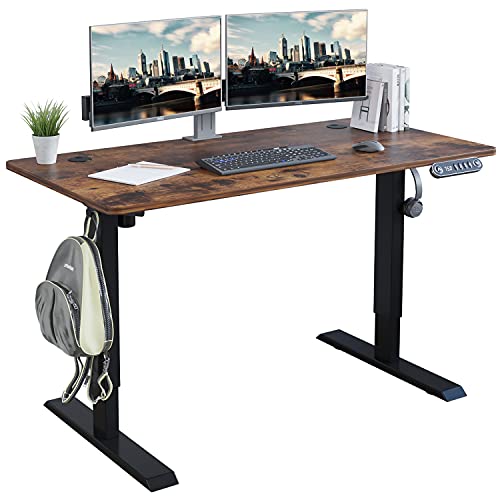
Check Latest Price on Amazon3. Radlove Electric Standing Desk 48 x 24 Inches, Height Adjustable Computer Desk Sit Stand Desk Home Office Desks with Splice Board and A Under Desk Cable Management Tray, Rustic Brown Top/Black Frame
A robust electric sit-stand desk with a built-in cable basket and two wire grommets to keep dual-monitor setups tidy while supporting adjustable ergonomics. It offers a stable double-beam frame and anti-collision protection — ideal if you want the desk and cable management combined.
Key Specs
- Desktop: 48 x 24 inches; water- and wear-resistant
- Height range: 27" to 45" with 4 memory presets
- Weight capacity: 176 lbs; double-beam metal frame
- Includes under-desk cable tray and wire collection holes
Pros
- Large surface fits two monitors and delivers strong stability
- Integrated cable basket keeps cords off the floor
- Height memory and anti-collision tech improve ergonomic use
Cons
- Heavier assembly and larger footprint than simple trays
- Overkill if you only need a small cable organizer
Best For: Full sit-stand dual-monitor setups
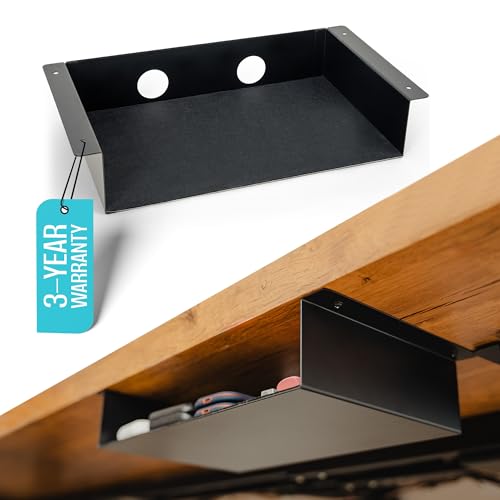
Check Latest Price on Amazon4. Under Desk Storage Shelf - Carbon Steel Under Desk Tray with Cable Management, Mountable Add-On Shelf for Table & Office Desks (13" x 8" x 2.8")
A minimalist carbon-steel under-desk shelf with a felt lining and cable-routing holes. It’s a plastic-free option that looks neat under modern desks and offers screw or VHB tape mounting; users praise solid build but note size and perceived value are debated.
Key Specs
- Material: Carbon steel with matte black finish
- Size options: small and medium; example 13" x 8" x 2.8"
- Mounting: screws or 3M VHB tape included
- Weight capacity: 15 lbs (tape) / 20 lbs (screws); felt pad
Pros
- Durable, plastic-free construction with upscale feel
- Felt pad protects stored items and reduces noise
- Multiple mounting options for flexibility
Cons
- Some buyers report confusion over actual dimensions
- Value-for-money impressions are mixed
Best For: Budget under-desk organization
Check Latest Price on Amazon5. Desk Side Storage, Under Desk Laptop Mount, Table Side Hanging File Organizer, No Drill Clamp On Cable Management Tray, Laptop Holder with Magnetic Pen Holder for Office and Home, Load 22 Lbs
A close sibling to the top pick, this clamp-on carbon-steel rack holds laptops, power strips, and accessories while hiding cables. Customers appreciate the build and magnet attachments — a flexible add-on for sit-stand setups that need side-access storage.
Key Specs
- Material: Carbon steel; clamp-on design
- Dimensions: Width 11.8" x Height 7.9"
- Clamp range: 0.3" to 2.2" thickness
- Load capacity: up to 22 lbs; non-slip inner pads
Pros
- Tool-free clamp installation preserves desk finish
- Good storage capacity for laptops, power bricks, and cords
- Non-slip pads and heat-dissipation holes
Cons
- Takes up side space and may interfere with drawer clearance
- Limited internal width for very wide power strips
Best For: Sit-stand desks & side storage
Check Latest Price on Amazon6. HumanCentric Under Desk Storage Shelf, Drawer Organizer for Office, Workstations, Tables, Sit Stand Desks, Gaming Setups, Mountable Storage Tray, Cable Management, Screw or Stick On, 2 Pack
A practical, low-profile plastic under-desk storage drawer available in a 2-pack. It mounts with adhesive or screws, includes cable clips and a back cutout, and is useful for chargers and small accessories — a simple, affordable way to keep cords and small items out of sight.
Key Specs
- Material: Durable plastic
- Interior: 8.4" deep x 7.6" wide x 2.8" tall
- Mounting: VHB adhesive strips or wood screws included
- Includes two cable clips and rear cutout for routing cords
Pros
- Easy, tool-free installation option with adhesive
- Good for hiding phone chargers and small cables
- Low-profile design keeps items out of view
Cons
- Plastic construction feels less premium than metal options
- Limited internal size for larger power adapters
Best For: Small accessory storage & charging
Check Latest Price on AmazonWhich One Should You Choose?
If budget is tight → choose the COREMINED under-desk shelf (B0CHSJ6J28) for a sturdy, low-cost metal option. If you need a portable, no-drill fix → pick the MAXECHO clamp-on organizer (B0DKP3GTT8 or B0DKP5WBTV) for tool-free mounting and good load capacity. If your priority is ergonomic typing and tidy mouse/keyboard routing → the Kensington K60004US (B00004Z6N4) is the best option. If you want an all-in-one workstation upgrade with integrated cable routing and sit-stand functionality → the Radlove standing desk (B09C5CSXJ4) offers the most complete solution.
Best for Specific Scenarios
- Small apartment or renters: MAXECHO Desk Side Storage (B0DKP3GTT8) because the clamp-on design avoids drilling and protects surfaces.
- Budget-conscious organizers: COREMINED Under Desk Tray (B0CHSJ6J28) because carbon-steel construction and felt lining provide a premium look at a low price.
- Sit-stand dual-monitor workstation: Radlove Standing Desk (B09C5CSXJ4) because it combines height adjustability with an integrated cable basket to keep cords tidy through transitions.
Frequently Asked Questions
Will a clamp-on cable tray fit my desk?
Check the clamp range against your desk panel thickness before buying. Clamp models in this guide fit a range from thin tabletops to thicker panels, but very thick or irregular edges may need a screw-mounted tray instead.
Can adhesive-mounted trays hold power strips?
High-quality VHB tape can support moderate loads, but manufacturers often specify different capacities for tape vs screws (for example 15 lbs vs 20 lbs). For heavier surge protectors use screws for long-term security.
How do I manage cables on a sit-stand desk?
Use a flexible cable basket and leave gentle slack for the lift stroke; route cables through grommets and secure them to the underside with clips so cords don’t get pinched when moving between heights.
How We Selected These Products
Our recommendations are based on data-driven analysis: we evaluated 29748+ products across 4825+ brands using a composite scoring system that weighs rating (40%), review volume (30%), price value (20%), and demand signals (10%). Every product is ranked by data, not opinions.
Last updated: September 25, 2026
As an Amazon Associate we earn from qualifying purchases at no extra cost to you. Full disclosure.
HomeOfficePilot Score is our editorial ranking based on a composite analysis of product quality, value, and verified customer sentiment. Click through to Amazon for current pricing, availability, and live customer reviews.