As an Amazon Associate we earn from qualifying purchases. Learn more.
Storage Cart vs Under-Desk Drawer vs Shelf: Best Choice for Small Rooms (2026)
Small rooms and dorm desks force tradeoffs between mobility, capacity, and footprint. This guide focuses on under-desk drawers — a popular way to free desktop space without adding a rolling cart or wall shelf — comparing three clamp-on VIVO trays that represent the common size choices: small, large, and extra-long. You’ll learn installation limits, capacity differences, and how each size affects desk real estate and ergonomics. Products were chosen from VIVO’s clamp-on slider line because they clearly show the footprint vs. capacity tradeoffs shoppers care about in tight workspaces.
Quick Answer
For most small rooms and dorms the VIVO Large Clamp-on Under-Desk Slider Tray (B08STGQZC6) is the best balance of footprint, capacity, and ease of installation — it fits full-size keyboards and a mouse without expanding your floor footprint. Choose the VIVO Small (B0BPN6C2HZ) if you need the smallest under-desk profile on a tight desk, or the VIVO Extra Long (B0C1LB7TMN) when you want the widest surface for multiple input devices.
Our Top Picks
Quick Comparison
Select 2-3 products to compare side-by-side
| Compare | Product | HomeOfficePilot Score | Price Tier | Key Feature | Best For | Action |
|---|---|---|---|---|---|---|
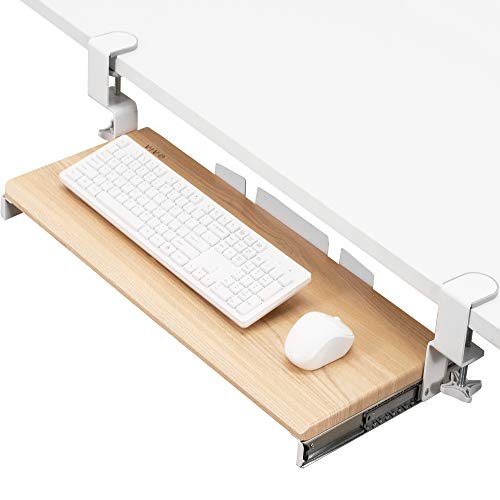 VIVO Large 27 x 11
|
Mid-Range | Spacious 27" tray for keyboard + mouse | Users who want full-size keyboard fit | Check Price | ||
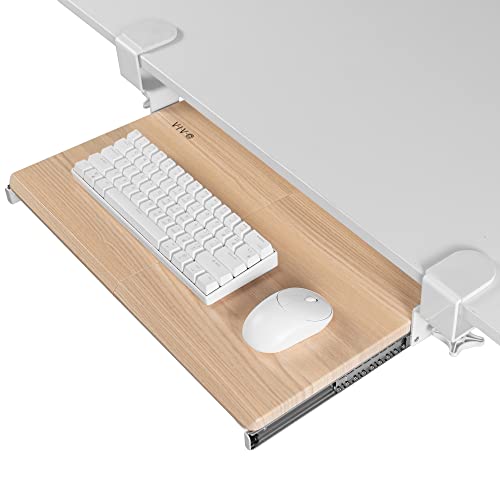 VIVO Small 20 x 11
|
Budget | Compact 20" tray for small desks | Tight desks and dorm-room setups | Check Price | ||
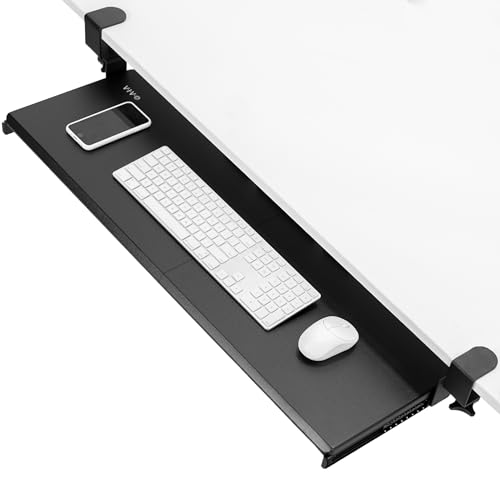 VIVO Extra Long 34 x 11
|
Premium | Extra-wide 33.9" tray surface | Power users with multiple input devices | Check Price |
1. VIVO Large Clamp-on Computer Keyboard and Mouse Under Desk Slider Tray, 27 x 11 inch Pull Out Platform Drawer, Light Wood, MOUNT-KB05A
The VIVO Large tray balances surface area and a low profile: it stores a full keyboard and mouse beneath the desk without taking floor space. It clamps on (no drilling) and delivers reliable clamps and easy assembly, though some buyers report mixed long-term smoothness of the slide mechanism.
Key Specs
- Tray size: 26.8" x 11" (32.5" total clamp-to-clamp)
- Max extension: 8.5" from desk edge
- Weight capacity: up to 11 lbs
- Desktop compatibility: up to 1.25" thickness; not for beveled edges
Pros
- More compact footprint than extra-long model, better for tight desks
- Holds full-size keyboards and mice—wider usable surface than the small tray
- Sturdier clamps and easier assembly than many budget under-desk options
Cons
- Slide smoothness is debated—some users report less smooth operation than the premium long model
- Not compatible with beveled desktop edges and thicker tops over 1.25"
Best For: Users who want full-size keyboard fit
Check Latest Price on Amazon2. VIVO Small Clamp-on Computer Keyboard and Mouse Under Desk Slider Tray, 20 x 11 inch Pull Out Platform Drawer, Light Wood, MOUNT-KB05ES-A
The VIVO Small tray is the budget-friendly, low-footprint choice for cramped desks. It clamps on easily and is praised for value and straightforward assembly, but it limits surface width — tight if you use a wide keyboard plus a mouse with a wrist rest.
Key Specs
- Tray size: 20" x 11" (26" total including clamps)
- Max extension: 8.5" from desk edge
- Weight capacity: up to 11 lbs
- Desktop compatibility: up to 1.25" thickness; not for beveled edges; 3-year limited warranty
Pros
- Smaller footprint than large and extra-long — better for the smallest desks
- Cheaper option while keeping similar clamp design and load capacity
- Easy assembly and solid clamps compared with similarly priced sliders
Cons
- Too narrow for users who prefer large keyboards or full mouse mats
- Same slide mechanism complaints as other sizes—some buyers see reduced longevity
Best For: Tight desks and dorm-room setups
Check Latest Price on Amazon3. VIVO Extra Long Clamp-on Computer Keyboard and Mouse Under Desk Slider Tray, 34 x 11 inch Pull Out Platform Drawer, Black, MOUNT-KB15EB
The Extra Long VIVO tray gives the broadest usable surface for two keyboards, keyboard + tablet, or wide mouse setups — good when desktop real estate is tight but you need width. It uses the same clamp mount and specs as the other VIVO trays, but its larger span needs more clamp-to-clamp clearance and a sturdier desk edge to avoid flex.
Key Specs
- Tray size: 33.9" x 11" (39.4" total including clamps)
- Max extension: 8.5" from desk edge
- Weight capacity: up to 11 lbs
- Desktop compatibility: up to 1.25" thickness; not for beveled edges
Pros
- Widest surface—better for multiple input devices than the small and large trays
- Same clamp design as others but spreads weight over longer span
- Premium choice when width matters more than the tiniest footprint
Cons
- Largest clamp-to-clamp span reduces usable desk edge area and may conflict with monitor stands or legs
- Heavier visual footprint than small/mid options—less discreet in tiny rooms
Best For: Power users with multiple input devices
Check Latest Price on AmazonWhich One Should You Choose?
If you want the best balance of footprint, capacity, and ease of installation, buy the VIVO Large Clamp-on Under-Desk Slider Tray (B08STGQZC6) — it fits a full-size keyboard and mouse while keeping the floor clear. If budget is tight or your desk edge is very narrow, get the VIVO Small (B0BPN6C2HZ) for the smallest clamp-to-clamp span and lowest visual impact. If you need the widest surface for two input devices, extended mouse pads, or a compact secondary keyboard, choose the VIVO Extra Long (B0C1LB7TMN) and make sure you have the required edge clearance.
Best for Specific Scenarios
- Tight dorm desk: VIVO Small (B0BPN6C2HZ) because it minimizes clamp span and keeps the desktop tidy without taking floor space.
- Work-from-home primary setup: VIVO Large (B08STGQZC6) because it supports full-size keyboards and a mouse while maintaining a low profile and straightforward installation.
- Multi-device or creative workspace: VIVO Extra Long (B0C1LB7TMN) because the extra width accommodates multiple input devices and provides more layout flexibility.
Frequently Asked Questions
Will these under-desk trays fit my desk?
Check two things: desktop thickness (must be 1.25" or less) and the clamp-to-clamp span (measure your desk edge clear width). Also note these trays are not compatible with beveled edges. If your desk exceeds those limits, consider a different mounting style or a rolling cart.
How much weight can the trays hold?
All three VIVO trays list a capacity of up to 11 pounds — enough for a keyboard, mouse, and a few small accessories. For heavier gear or monitors, use a shelf or cart rated for higher loads.
Are these drawers easy to install and remove?
Yes — they use clamp-on hardware and include installation instructions. Customers frequently praise ease of assembly and solid clamps. Keep in mind slide smoothness and long-term durability can vary; inspect operation after installation and during any warranty period.
How We Selected These Products
Our recommendations are based on data-driven analysis: we evaluated 29748+ products across 4825+ brands using a composite scoring system that weighs rating (40%), review volume (30%), price value (20%), and demand signals (10%). Every product is ranked by data, not opinions.
Last updated: August 14, 2026
As an Amazon Associate we earn from qualifying purchases at no extra cost to you. Full disclosure.
HomeOfficePilot Score is our editorial ranking based on a composite analysis of product quality, value, and verified customer sentiment. Click through to Amazon for current pricing, availability, and live customer reviews.