As an Amazon Associate we earn from qualifying purchases. Learn more.
Label Printer Roll vs Sheet Labels: Which Should You Use for Markets? (2026)
Running a farmers market stall or pop-up shop means balancing speed, cost and portability when you label products and prices. This guide compares sheet label packs you can print with laser/inkjet (three popular sheet options) and explains when a roll-based thermal printer is the smarter pick. Products here were selected for real-world market use: print quality, adhesive reliability, label counts, and ease of use. Read on to learn which option minimizes jams, reduces per-label cost, and fits a mobile setup.
Quick Answer
For most pop-up markets, sheet labels like LabelMore Mailing Address Labels (B09BJT5LB9) are the best choice when you need high print quality and low cost per label; if speed and portability matter more, thermal label printer rolls beat sheets for on-the-spot printing.
Our Top Picks
Quick Comparison
Select 2-3 products to compare side-by-side
| Compare | Product | HomeOfficePilot Score | Price Tier | Key Feature | Best For | Action |
|---|---|---|---|---|---|---|
 LabelMore 30-up Address Sheets
|
Premium | Very high total label count | High-volume printing at a fixed location | Check Price | ||
 PAPRMA 3-1/3" x 4" Sheets
|
Budget | Strong adhesive and matte finish | Low-cost shipping and general-purpose labels | Check Price | ||
 PAPRMA 2" x 4" Sheets
|
Budget | Higher label density per sheet | Small businesses wanting mid-size shipping labels | Check Price |
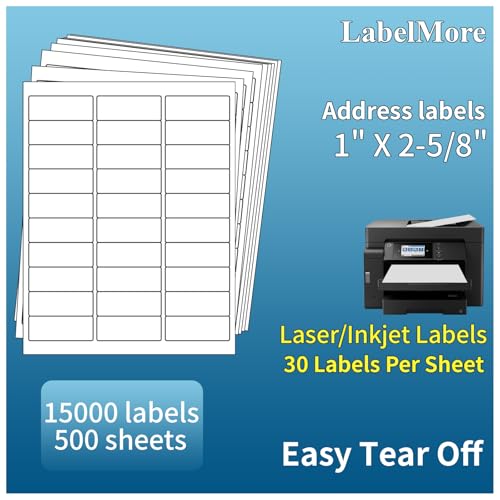
1. LabelMore Mailing Address Labels, 1" x 2-5/8", 30 up Labels for Laser or Inkjet Printable, 30-Up FBA Labels, 15000 Labels - 500 Sheets
LabelMore offers a massive pack (15,000 labels) and produces crisp prints on laser and inkjet machines, making it an efficient choice for merchants who print many labels in batches. Customers praise print quality and functionality, though some report curling at page corners that can cause jams and mixed experiences with adhesive handling.
Key Specs
- 30 labels per sheet; 500 sheets (15,000 labels)
- Label size: 1" x 2-5/8"; sheet: 8.5" x 11"
- Compatible with laser and inkjet printers
- White matte finish for barcodes and address labels
Pros
- Much higher label-count per pack than the PAPRMA sheets (better cost per label)
- Produces crisper print output than typical budget sheets
- Good compatibility with common label templates and printers
Cons
- Some pages curl at corners and can cause printer jams
- Adhesion quality is mixed for certain surfaces and removal tasks
Best For: High-volume printing at a fixed location
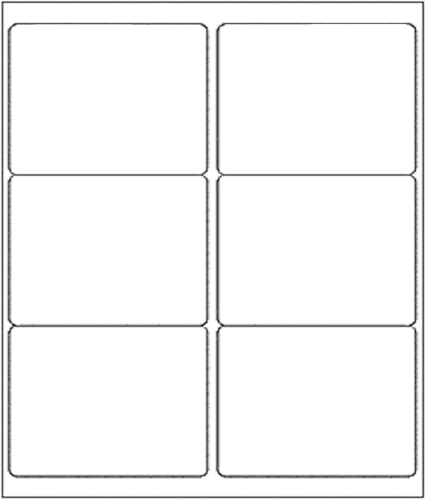
Check Latest Price on Amazon2. 3-1/3" x 4" Shipping Address Label 500 Sheets, Laser&Inkjet Printer Label 8.5x11in Printable Sticker Paper 6up/Page, White Mailing Labels for Package Envelope
PAPRMA's 3-1/3" x 4" sheets are a budget-friendly option praised for strong adhesion and reliable print clarity, making them practical for shipping or product labels at markets. They feed well in many printers, though some users still report occasional printer jams.
Key Specs
- 6 labels per sheet; 500 sheets (3,000 labels)
- Label size: 3-1/3" x 4"; sheet: 8.5" x 11"
- Matte finish, compatible with inkjet and laser printers
- BPA/BPS free wood-pulp material with strong adhesive
Pros
- Stronger adhesive and easier removal from backing than some premium sheets
- Better feed reliability in many printers compared with curled sheets
- Clear printing and strong value for the budget price tier
Cons
- Lower total label count per pack than LabelMore (higher cost per label)
- Some customers still experience occasional printer jams
Best For: Low-cost shipping and general-purpose labels
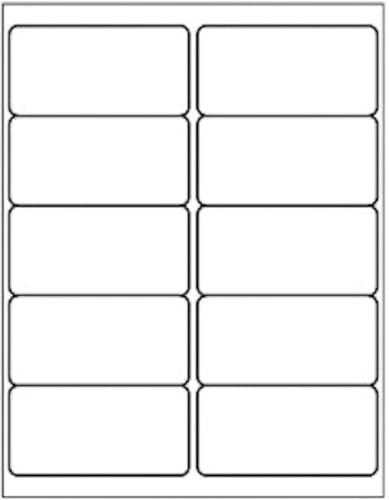
Check Latest Price on Amazon3. 2" x 4" Shipping Address Label for Laser Inkjet Printer 500 Sheets, 8.5x11 Printable Sticker 10up/Page, 5163 White Adhesive Mailing Labels for Package Envelope
This PAPRMA 2" x 4" sheet pack balances label count and versatility: 10 labels per sheet for a total useful run of product or shipping labels. Users like adhesion and print quality; it’s a solid middle-ground budget pick though a few report printer feed issues depending on their printer model.
Key Specs
- 10 labels per sheet; 500 sheets (5,000 labels)
- Label size: 2" x 4"; sheet: 8.5" x 11"
- Matte finish, compatible with laser and inkjet printers
- BPA/BPS free, strong adhesive backing
Pros
- Higher label-count per pack than the 3-1/3" x 4" PAPRMA option (better unit value)
- Good adhesion across many surfaces commonly used at markets
- Versatile size for barcodes, FBA, and shipping labels
Cons
- Printer jamming reported by some buyers depending on printer type
- Budget paper quality may feel thinner than premium sheets
Best For: Small businesses wanting mid-size shipping labels
Check Latest Price on AmazonWhich One Should You Choose?
If you run a high-volume stall and print most labels in batches off-site, choose LabelMore Mailing Address Labels (B09BJT5LB9) — its huge label count and consistently crisp prints make it the best overall sheet option despite occasional curling on some pages.
If budget is tight and you want low upfront spend with decent adhesive and print clarity, pick PAPRMA 3-1/3" x 4" Shipping Labels (B0DLGM9M28).
If you need a versatile mid-size shipping label with a better unit count than the 3x4 option, go with PAPRMA 2" x 4" Shipping Labels (B0DLGLK1C9).
Finally, if portability and on-the-spot speed are the priority at markets, consider adding a compact thermal label printer and roll labels to your setup — rolls win for speed and convenience, but sheets win for low cost per label and batch-quality prints.
Best for Specific Scenarios
- High-volume pre-printing: LabelMore (B09BJT5LB9) because its high pack count lowers your per-label cost.
- Lowest upfront cost: PAPRMA 3-1/3" x 4" (B0DLGM9M28) because it’s budget-friendly with strong adhesive.
- Versatile shipping & product labels: PAPRMA 2" x 4" (B0DLGLK1C9) because its label size fits many barcode and FBA needs.
Frequently Asked Questions
Are sheet labels faster than rolls for a pop-up stall?
No—sheet labels require a laptop and full printer for each batch and are slower on-site. Rolls with a thermal printer are faster for printing single labels on demand, though sheets can be faster overall if you pre-print many labels at once.
Will these sheets work with my inkjet or laser printer?
All three reviewed sheet products are compatible with both inkjet and laser printers, but always run a single-sheet test to check feed reliability and print settings before committing to a large pack.
How do I avoid printer jams with label sheets?
Store sheets flat to prevent curling, use the recommended printer setting for labels, and feed one sheet at a time if your printer struggles. If you encounter repeated jams, try a different label size or test a different brand known for flatter sheets.
How We Selected These Products
Our recommendations are based on data-driven analysis: we evaluated 29748+ products across 4825+ brands using a composite scoring system that weighs rating (40%), review volume (30%), price value (20%), and demand signals (10%). Every product is ranked by data, not opinions.
Last updated: May 29, 2026
As an Amazon Associate we earn from qualifying purchases at no extra cost to you. Full disclosure.
HomeOfficePilot Score is our editorial ranking based on a composite analysis of product quality, value, and verified customer sentiment. Click through to Amazon for current pricing, availability, and live customer reviews.