As an Amazon Associate we earn from qualifying purchases. Learn more.
How to Build a Compact Dual-Monitor Sit-Stand Workstation (2026 Guide)
Small desks and dual monitors are a common mismatch: you want the ergonomics of a sit‑stand setup but don’t have the surface area or the structural support for bulky solutions. This guide is for people who need a compact, stable dual‑monitor sit‑stand workstation that fits a tight footprint without wobble or cable chaos. You’ll learn which converters fit best, how to add a sturdy monitor arm or clamp to reduce desk clutter, and simple cable‑management hacks that improve stability and daily use. Products were chosen for compact footprint, build quality, lift range, and value — and checked against real user feedback about stability, assembly, and durability.
Quick Answer
Build a compact, stable dual-monitor sit‑stand setup by pairing a slim sit‑stand converter with a clamp VESA monitor arm and an under‑desk cable tray. Our top pick for stability and space is the VIVO 42 inch Desk Converter (DESK-V042KW) because it gives room for two screens plus a wide keyboard tray while supporting heavier monitors.
Our Top Picks
Quick Comparison
Select 2-3 products to compare side-by-side
| Compare | Product | HomeOfficePilot Score | Price Tier | Key Feature | Best For | Action |
|---|---|---|---|---|---|---|
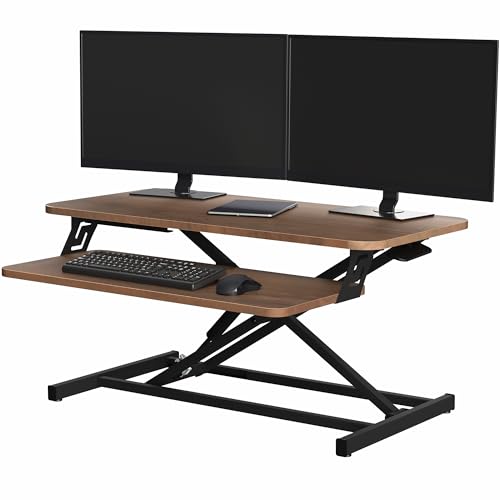 VIVO 32" Converter (V000SD)
|
Budget | 32" slim top surface | Tight desks needing dual-monitor riser | Check Price | ||
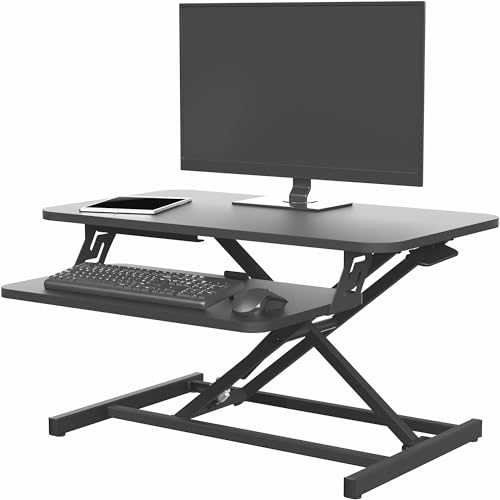 VIVO 28" Converter (V028S)
|
Budget | Narrow footprint for small desks | Very compact desks and single + laptop setups | Check Price | ||
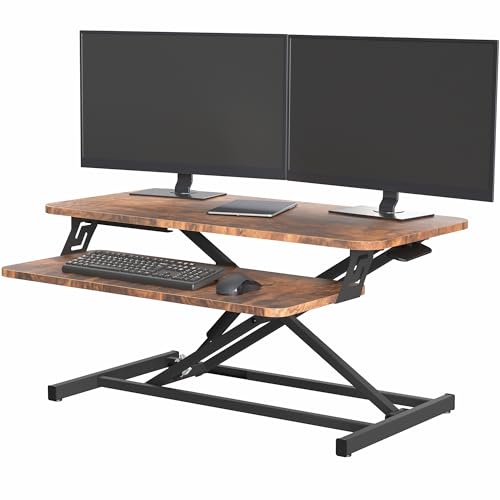 VIVO 32" Rustic (V000SN)
|
Budget | Same 32" platform in rustic finish | Users wanting a warmer desktop look | Check Price | ||
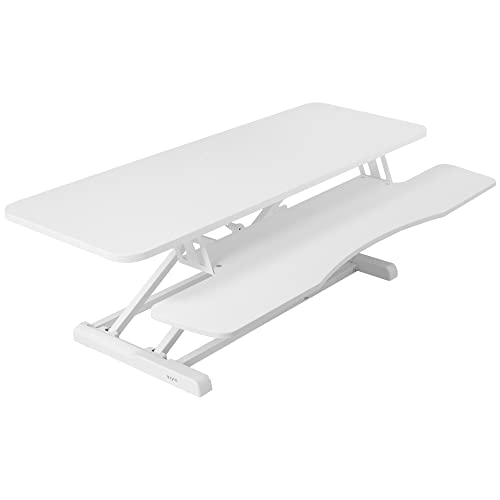 VIVO 42" K Series (V042KW)
|
Premium | Wide 42" surface for larger dual monitors | Users who need extra surface and sturdiness | Check Price |
1. VIVO Height Adjustable 32 inch Stand Up Desk Converter, Quick Sit to Stand Tabletop Dual Monitor Riser Workstation, Dark Walnut Desktop, Black Frame, DESK-V000SD
A compact, budget-friendly converter that maximizes usable top space while keeping a low profile. It solves space constraints by providing a 31.5 x 15.8" surface and an integrated keyboard tray, and addresses stability with a high-grade steel frame and straight‑up lift design — although some users note slight wobble when fully extended.
Key Specs
- Top surface: 31.5 x 15.8 inches
- Lift range: 4.9 to 19.7 inches
- Weight capacity: 26 lbs desktop
- Materials: steel frame with wood-look desktop
Pros
- Large, space-efficient top fits two small/medium monitors
- Straight-lift pneumatic assist moves smoothly
- Minimal assembly — quick to set up
Cons
- Some customers report wobble when fully extended
- 26 lb capacity limits very heavy monitor pairings
Best For: Tight desks needing dual-monitor riser
Check Latest Price on Amazon2. VIVO Height Adjustable 28 inch Stand Up Desk Converter, Quick Sit to Stand Tabletop Dual Monitor Riser Workstation, Black, DESK-V028S
Smaller than the 32" model, this 28" riser is designed to free up desk edge space while still providing synchronized keyboard and monitor elevation. The steel frame and pneumatic lift make switching positions fast; customers praise its ease of assembly and value, though some experience the same stability variance at full height.
Key Specs
- Top surface: 27.6 x 15.8 inches
- Lift range: 4.9 to 17.2 inches
- Weight capacity: 28.6 lbs desktop
- Materials: high-grade steel frame
Pros
- Smaller footprint fits narrow desks and shared surfaces
- Good value and easy to assemble
- Supports laptop/monitor combos well
Cons
- When extended, some feel it wobbles slightly
- Keyboard tray is compact — not ideal for full-size ergonomic keyboards
Best For: Very compact desks and single + laptop setups
Check Latest Price on Amazon3. VIVO Height Adjustable 32 inch Stand Up Desk Converter, Quick Sit to Stand Tabletop Dual Monitor Riser Workstation, Rustic Vintage Brown Desktop, Black Frame, DESK-V000SN
This model matches the 32" footprint but in a rustic finish for a more polished desk aesthetic. It offers the same straight upward lift and synchronized keyboard tray to keep your posture correct while standing. It’s a good space-saving option but carries the same trade-offs around stability at full extension and a modest weight limit.
Key Specs
- Top surface: 31.5 x 15.8 inches
- Lift range: 4.9 to 19.7 inches
- Weight capacity: 26 lbs desktop
- Materials: steel frame with vintage brown desktop
Pros
- Attractive finish that fits home office decor
- Easy setup with limited parts
- Good for dual-screen layouts within weight limits
Cons
- May wobble when raised high
- Not rated for very heavy monitor setups
Best For: Users wanting a warmer desktop look
Check Latest Price on Amazon4. VIVO 42 inch Desk Converter, K Series, Height Adjustable Sit to Stand Riser, Dual Monitor and Laptop Workstation with Wide Keyboard Tray, White, DESK-V042KW
The largest option here, the 42" K Series gives the most room for a true dual-monitor desktop and a wider keyboard tray so you can keep peripherals on the riser. Its heavier-duty steel frame and higher weight capacity reduce wobble concerns common on smaller converters, making it the best choice if you need room and extra stability.
Key Specs
- Top surface: 42 x 15.7 inches
- Keyboard tray: 42 x 11.8 inches (10.2" center)
- Lift range: 4.5 to 20 inches
- Weight capacity: 33 lbs desktop
Pros
- Spacious top supports larger dual-monitor layouts
- Sturdier steel frame and higher capacity
- Smooth pneumatic lift praised for ease of use
Cons
- Wider footprint may not fit very small desks
- Takes more desk real estate than compact converters
Best For: Users who need extra surface and sturdiness
Check Latest Price on AmazonWhich One Should You Choose?
If you want the most stable dual‑monitor surface and have some desk space → VIVO 42 inch Desk Converter (DESK-V042KW). If budget and compact footprint are critical → VIVO 32 inch Desk Converter (DESK-V000SD) gives the best size/value mix. If your desk is very narrow or you need a smaller keyboard tray → VIVO 28 inch Desk Converter (DESK-V028S) is the most space‑efficient. If you want the 32" platform but prefer a warmer finish to match furniture → VIVO 32 inch Rustic (DESK-V000SN).
Best for Specific Scenarios
- Small apartment desk: VIVO 28" (DESK-V028S) because its narrow footprint leaves more room for lighting and papers.
- Home office with two medium monitors: VIVO 42" (DESK-V042KW) because the wide surface and higher weight capacity reduce wobble and fit larger displays.
- Shared workspace or hot desk: VIVO 32" (DESK-V000SD) because it’s quick to assemble, portable, and balances surface area with a compact footprint.
Frequently Asked Questions
How can I stop my sit‑stand converter from wobbling?
Reduce wobble by keeping the combined monitor weight well under the converter’s rated capacity, lower the converter when not needed, and anchor monitors with a desk‑clamp VESA arm mounted to the desk behind the converter. Adding an under‑desk cable tray and routing cables neatly removes cable pull that can magnify movement.
Will two monitors fit on a compact converter?
Measure each monitor’s stand footprint or VESA width and compare to the converter’s top surface dimensions (e.g., 27.6–31.5" widths for compact models). For larger screens, use a dual‑monitor arm clamped to the desk to free surface space and secure weight off the riser.
What cable management fixes work best for small desks?
Use a shallow under‑desk cable tray or adhesive clips behind the converter to collect cables, route monitor cables through monitor‑arm channels, and secure excess length with Velcro ties. Keeping cords bundled and off the riser reduces tugging and improves stability.
How We Selected These Products
Our recommendations are based on data-driven analysis: we evaluated 29748+ products across 4825+ brands using a composite scoring system that weighs rating (40%), review volume (30%), price value (20%), and demand signals (10%). Every product is ranked by data, not opinions.
Last updated: August 15, 2026
As an Amazon Associate we earn from qualifying purchases at no extra cost to you. Full disclosure.
HomeOfficePilot Score is our editorial ranking based on a composite analysis of product quality, value, and verified customer sentiment. Click through to Amazon for current pricing, availability, and live customer reviews.