As an Amazon Associate we earn from qualifying purchases. Learn more.
Best Shipping Label Printers for Early Holiday Fulfillment (2026)
If you’re prepping for early holiday fulfillment, speed, reliability and low per-label cost matter more than ever. This guide helps busy sellers and office managers choose label media that keeps packing lines moving and postage printing fast. We evaluated products for throughput (thermal roll vs. sheet-fed), adhesion and print reliability, and the unit cost and waste at scale. The selection prioritizes fast, dependable output and low label cost for heavy seasonal volumes—so you’ll learn which labels minimize jams, reduce material cost, and work with popular printers.
Quick Answer
For heavy holiday volumes, Coopaty Full Sheet Address Labels (ASIN B0995RHVW7) are the top pick for low per-label cost and full-sheet flexibility. If you need the fastest, no-ink output and the lowest per-label time, thermal Dymo roll labels are the better choice.
Our Top Picks
Quick Comparison
Select 2-3 products to compare side-by-side
| Compare | Product | HomeOfficePilot Score | Price Tier | Key Feature | Best For | Action |
|---|---|---|---|---|---|---|
 Coopaty Full Sheet
|
Premium | 5000 full-sheet, 8.5"x11" labels | High-volume custom printing | Check Price | ||
 Online Labels Combo
|
Mid-Range | Two common label sizes per sheet | Sellers using Click-N-Ship and mixed sizes | Check Price | ||
 DYMO Large Roll
|
Budget | Direct thermal rolls — no ink | Speed-focused, low-cost-per-label printing | Check Price | ||
 MBLABEL Half Sheet
|
Mid-Range | Half-sheet 8.5" x 5.5" labels | Large address blocks or small printers | Check Price | ||
 DYMO Standard Roll
|
Mid-Range | Bulk roll pack (1320 labels) | Sustained, high-throughput thermal printing | Check Price |
1. Coopaty Full Sheet Address Labels for Laser/Inkjet Printers, White, 8.5" x 11" Shipping Label, 5000 Labels
Coopaty’s full-sheet labels give you maximum layout flexibility and a very low per-label cost when you need large runs of custom shipping labels or oversized postage. They print cleanly on both inkjet and laser machines and are easy to peel and apply; some users do report occasional curling and mixed adhesive performance on certain box types.
Key Specs
- Package includes 5000 labels (1 label per 8.5" x 11" sheet)
- Self-adhesive peel-and-stick surface for cardboard, paper, glass
- Compatible with inkjet, laser printers and copiers
- Designed for large or custom labels and full-sheet layouts
Pros
- Very low cost per label for high-volume runs
- Works with both inkjet and laser printers
- Large full-sheet size supports oversized or custom layouts
Cons
- Adhesive performance is mixed on some surfaces
- Edges can curl for some customers, increasing handling time
Best For: High-volume custom printing
Check Latest Price on Amazon2. Online Labels 6.78 x 4.75 and 3.5 x 3.75 Shipping Labels- Compatible with USPS Click-N-Ship - Pack of 250 Sheets - Inkjet/Laser Printer
Online Labels offers a practical mid-range option with two convenient label sizes per sheet and a matte, permanent adhesive that holds well to cardboard and wood. The included storage clamshell and Maestro design activation add value, though a minority of users report slight edge alignment issues on some printers.
Key Specs
- Includes 250 sheets with 6.78" x 4.75" and 3.5" x 3.75" labels
- Matte white, smudge-proof material with permanent adhesive
- Rounded corners for easier peeling and print-to-edge capable
- Includes protective clamshell case and Maestro Label Designer activation
Pros
- Good stickiness and smudge-resistant print surface
- Works well with USPS Click-N-Ship and common label workflows
- Handy clamshell packaging for storage
Cons
- Some users report minor alignment/print edge offsets
- Not as cost-effective as bulk roll labels at very high volumes
Best For: Sellers using Click-N-Ship and mixed sizes
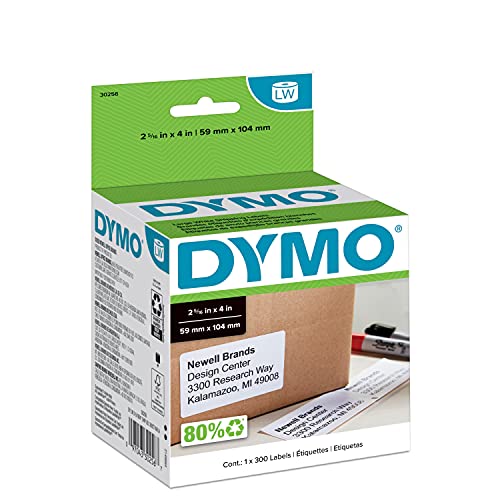
Check Latest Price on Amazon3. DYMO Authentic LW Large Shipping Labels DYMO Labels for LabelWriter Label Printers Print Up to 6-Line Addresses 2-5/16" x 4" 1 Roll of 300
These Dymo thermal roll labels are ideal when throughput matters: no ink or toner to replace, quick heat-based printing, and minimal waste from sheets. They’re budget-friendly and dependable in many LabelWriter machines, though a few users report occasional jams and some model compatibility quirks.
Key Specs
- Direct thermal labels (no ink/toner) — 300 labels per roll
- Each label measures 2-5/16" x 4" (prints up to 6-line addresses)
- Packaged in rolls to avoid sheet jams and waste
- Designed for Dymo LabelWriter series printers
Pros
- Very fast printing and ideal for continuous output
- No ink or toner keeps running costs and downtime down
- Packaged as rolls to reduce sheet jams and waste
Cons
- Some users report jamming in certain printer setups
- Requires a compatible Dymo label printer (not sheet-fed)
Best For: Speed-focused, low-cost-per-label printing
Check Latest Price on Amazon4. Round Corner Half Sheet Shipping Labels for Laser and Inkjet Printers,8.5" x 5.5" Address Labels Self Adhesive Mailing Labels(500 Sheets, 1000 Labels)
MBLABEL’s half-sheet format is a good middle ground between full-sheet flexibility and smaller address labels — two labels per page make layout easy and rounded corners simplify peeling. The adhesive holds well for most customers, though a few report occasional printer jams with some machines.
Key Specs
- Label size 8.5" x 5.5" with 2 labels per 8.5" x 11" sheet
- Rounded corners for easier peeling
- Self-adhesive, compatible with inkjet, laser printers and copiers
- Pack contains 500 sheets (1000 half-sheet labels)
Pros
- Strong adhesive and good print quality for shipping
- Rounded corners improve peel speed and reduce snags
- Works across inkjet and laser printers
Cons
- Some customers report printer jams with certain feeders
- Half-sheet size still requires manual alignment for some templates
Best For: Large address blocks or small printers
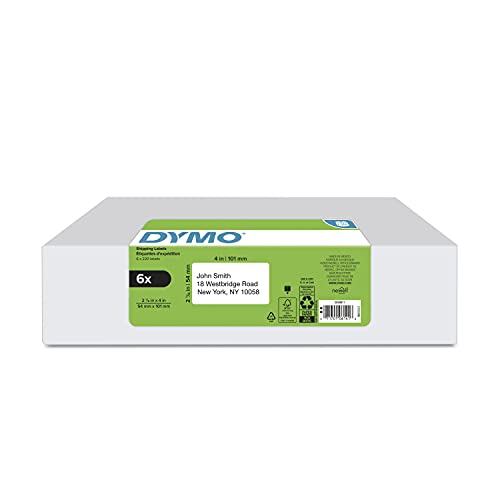
Check Latest Price on Amazon5. DYMO Authentic LW Standard Shipping Labels for LabelWriter Label Printers, White, 2-1/8" x 4", 6 rolls of 220 (1320 Total)
The DYMO standard rolls give you a large supply of reliable thermal labels that print consistently and stick well in transit. They’re an excellent choice when you already own a LabelWriter printer and need steady, quick output; the main limitations are label size for larger parcels and the need for a compatible thermal printer.
Key Specs
- 6 rolls of 220 labels (2-1/8" x 4") — 1320 labels total
- Direct thermal printing — no ink or toner required
- Designed for Dymo LabelWriter 4XL, 450 series and others
- Roll format reduces waste and speeds continuous printing
Pros
- Consistent print quality ideal for rush fulfillment
- Good adhesive that holds in transit
- Bulk packaging reduces restocking during peak periods
Cons
- Label width may be small for oversized shipping needs
- Only usable with compatible Dymo label printers
Best For: Sustained, high-throughput thermal printing
Check Latest Price on AmazonWhich One Should You Choose?
If budget is tight → choose the DYMO Large Roll (ASIN B00004Z64O) for fast, no-ink thermal printing and low per-label runtime cost. If you need the fastest output and the smoothest continuous printing for thousands of holiday parcels → choose the DYMO Standard Roll bulk pack (ASIN B07CQDMM2F). If you want full-sheet flexibility or oversized, custom labels and the absolute lowest per-label cost at high volume → choose Coopaty Full Sheet Labels (ASIN B0995RHVW7). If you need a balanced mid-range option with good adhesion and convenience extras → Online Labels (ASIN B003WKV7X4) is the best compromise.
Best for Specific Scenarios
- High-volume eCommerce warehouse: DYMO Standard Roll (B07CQDMM2F) because roll-fed thermal printing keeps packing lanes moving with minimal downtime.
- Home or small pack-and-ship operation with custom layouts: Coopaty Full Sheet (B0995RHVW7) because full 8.5"x11" sheets let you print oversized or branded labels on existing inkjet/laser equipment.
- Sellers using USPS Click‑N‑Ship or mixed label sizes: Online Labels (B003WKV7X4) because the two common sizes, matte finish and storage clamshell make daily workflows easier.
Frequently Asked Questions
Can thermal roll labels be used in inkjet or laser printers?
No. Thermal roll labels are designed for direct thermal printers that use heat to create the image; they won’t work in inkjet or laser machines. For sheet-fed inkjet/laser printing choose full-sheet or half-sheet labels labeled as compatible with those printers.
How do I reduce printer jams and curling during high-volume runs?
Use labels recommended for your specific printer model, keep humidity and temperature stable in the packing area, store sheets/rolls in original packaging until use, and match label thickness to the printer’s feed specs. For sheet-fed workflows, avoid overloading trays and let freshly printed sheets cool before stacking. Thermal roll users should ensure proper roll loading and regular printer cleaning.
Which is cheaper long-term: rolls or sheets?
Thermal rolls typically deliver the lowest long-term cost per label because they eliminate ink/toner and reduce handling time. Sheets can be more economical for oversized or occasional custom-print needs, but for sustained, high-volume shipping you’ll often save money with roll labels and a thermal printer.
How We Selected These Products
Our recommendations are based on data-driven analysis: we evaluated 29748+ products across 4825+ brands using a composite scoring system that weighs rating (40%), review volume (30%), price value (20%), and demand signals (10%). Every product is ranked by data, not opinions.
Last updated: September 12, 2026
As an Amazon Associate we earn from qualifying purchases at no extra cost to you. Full disclosure.
HomeOfficePilot Score is our editorial ranking based on a composite analysis of product quality, value, and verified customer sentiment. Click through to Amazon for current pricing, availability, and live customer reviews.