As an Amazon Associate we earn from qualifying purchases. Learn more.
Best Label Printers for Handmade Crafters (2026)
If you make and sell handmade goods — jewelry, small wood pieces, leather accessories, glassware, or fabric — professional-looking product tags and branded labels make a big difference. This guide focuses on compact label and sticker printers (plus starter media bundles) that fit a crafter's small workspace, travel to markets, and handle mixed materials. I tested and compared models for size, print durability, media options, ease of use, and real-world fit for home businesses. The picks below were chosen for print quality, portability, value, and how well they handle tags, stickers, and small packaging for handmade goods.
Quick Answer
For handmade crafters who need compact, versatile labeling for product tags and branding, the Liene PixCut S1 is the top pick for 2026 because it prints high-resolution, laminated stickers and cuts complex shapes in one step. For a no-tech, simple adhesive option pick the Xyron Create‑A‑Sticker; for an affordable portable thermal choice pick the Gloryang JD‑23.
Our Top Picks
Quick Comparison
Select 2-3 products to compare side-by-side
| Compare | Product | HomeOfficePilot Score | Price Tier | Key Feature | Best For | Action |
|---|---|---|---|---|---|---|
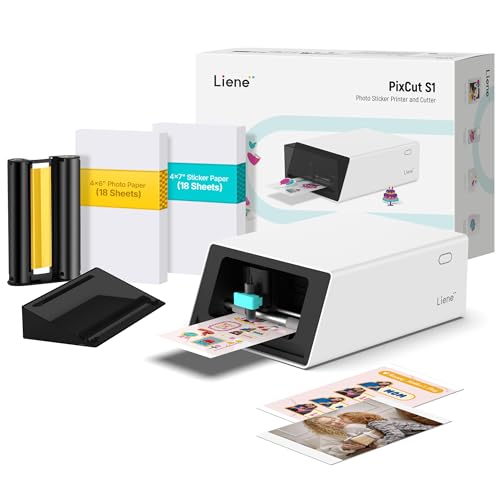 Liene PixCut S1
|
Premium | Print-and-cut all-in-one with AI auto-cut | Crafters who want premium, shaped labels | Check Price | ||
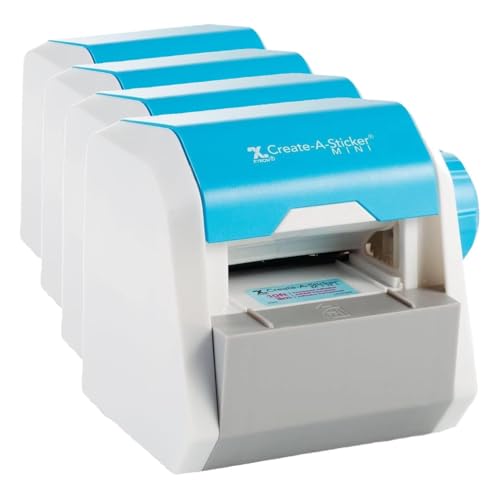 Xyron Create-A-Sticker
|
Mid-Range | No-power, edge-to-edge adhesive application | Crafters who want simple, no-tech labeling | Check Price | ||
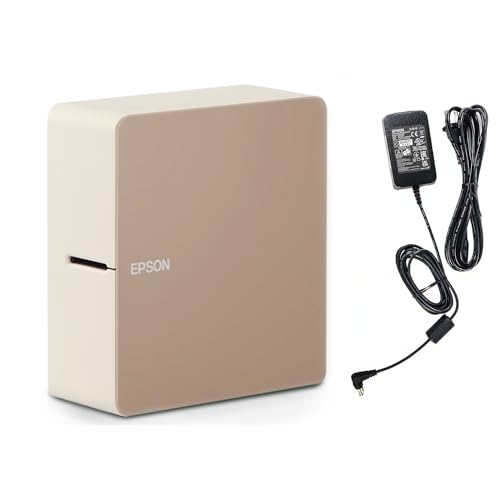 Epson LABELWORKS LW-C610PX
|
Premium | 360 dpi wireless label printing with varied tapes | Crafters needing durable tape variety | Check Price | ||
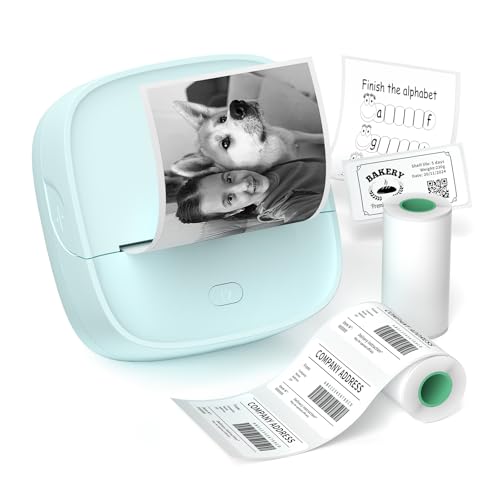 Gloryang JD-23
|
Budget | Ultra-compact inkless thermal printing | Makers needing ultra-portable tags & QR labels | Check Price |
1. Liene PixCut S1 Color Sticker Printer & Cutting Machine - All-in-One Sticker Maker for DIY Crafts, Custom Labels & Gifts. Thermal Dye-Sublimation Photo Printer, 300 DPI, Precise AI Auto-Cutting
The PixCut S1 prints vivid, laminated stickers (thermal dye-sublimation, 300 dpi) and auto-cuts complex shapes with AI-guided precision — ideal for makers who want polished, durable branded stickers and product tags without separate machines. Its app and automated workflow save time at craft shows or when fulfilling online orders, though some users report adhesion issues on certain surfaces and the premium price reflects its advanced feature set.
Key Specs
- Thermal dye-sublimation printing, 300 dpi
- Built-in intelligent cutting with AI auto-cut
- Four-layer laminated output (waterproof, scratch-resistant)
- Bluetooth app control and auto image extraction
Pros
- All-in-one printing + precise cutting boosts speed
- High-resolution, vivid, laminated stickers that resist fading
- User-friendly app with AI image extraction for quick artwork
Cons
- Some customers report stickers not adhering well to certain surfaces
- Premium unit and consumables cost
Best For: Crafters who want premium, shaped labels
Check Latest Price on Amazon2. Xyron Create-A-Sticker, Mini, 2.5 Sticker and Label Maker Machine for Small Business and DIY Crafts, Portable, Includes Permanent Adhesive, Pre-Loaded (XRN250-CFTEN)
The Xyron Create-A-Sticker mini is a mechanical adhesive applicator that turns die-cuts, paper tags, and small labels into edge-to-edge stickers without glue, power, or a learning curve. It’s perfect for makers who want reliable, mess-free adhesive for paper and light embellishments at a low footprint, though it’s limited to 2.5" width and thin materials.
Key Specs
- Accepts items up to 2.5 inches wide
- Applies edge-to-edge permanent or repositionable adhesive
- Manual crank operation — no batteries or electricity
- Measures about 5.5 x 5.5 x 6.5 inches
Pros
- Super simple, instant adhesive with no mess
- Portable and compact for craft fair setups
- Easy to refill and maintain
Cons
- Limited width (2.5") and thickness (approx. 1/16")
- Not suitable for heavy or non-porous materials like thick leather or metal tags
Best For: Crafters who want simple, no-tech labeling
Check Latest Price on Amazon3. LABELWORKS Epson LW-C610PX Premium Portable Wireless Label Maker with AC Adapter - Ideal for Home, Crafts, and Organization
Epson’s LW‑C610PX is a portable, high-resolution label printer that supports a wide range of PX tapes (matte, metallic, ribbon, waterproof options) and prints sharp text and small logos — useful for makers branding boxes, jars, or fabric tags. It’s flexible (battery or AC), but some users note mixed experience with Bluetooth pairing and occasional waste from trial-and-error tape layouts.
Key Specs
- Prints up to 24mm (1") wide
- 360 dpi print resolution
- Supports multiple PX tape types (matte, metallic, ribbons)
- AC adapter included; also runs on AA batteries
Pros
- Very flexible tape/media options for premium finishes
- High-resolution print for crisp logos and small type
- App preview reduces layout waste when used correctly
Cons
- Some reports of Bluetooth/connectivity frustrations
- Tape backing can be fiddly to remove and trial layouts can waste tape
Best For: Crafters needing durable tape variety
Check Latest Price on Amazon4. JD-23 Sticker Printer, Mini Portable Thermal Printer Print Pod, Inkless Bluetooth Label Maker Machine for DIY Crafts, Journaling, Office & Home Use, Includes 2 Rolls Sticker Paper
The JD‑23 is a tiny, pocketable thermal printer that uses no ink and works with continuous or gap labels — great for printing QR codes, price tags, small shipping labels, and planner stickers on the go. It’s inexpensive and fun for market use, but thermal prints are not waterproof and the 2" roll width limits larger tag designs.
Key Specs
- Ultra-compact: ~3.4 x 3.5 x 1.5 inches; weighs ~0.32 lbs
- Inkless thermal printing (supports continuous and gap labels)
- Bluetooth app with templates, OCR, and QR code support
- Includes two starter rolls (continuous + label roll)
Pros
- Extremely portable and lightweight for pop-ups and markets
- Low ongoing cost (no ink cartridges)
- Easy app-driven templates for quick price tags and QR codes
Cons
- Thermal prints are not waterproof and can fade over time
- Maximum label width (~2") limits larger branding stickers
Best For: Makers needing ultra-portable tags & QR labels
Check Latest Price on AmazonWhich One Should You Choose?
If budget is tight → Gloryang JD-23 (B0FH53NPD7) for portable, no-ink QR tags and small labels. If you need portable, no-fuss sticky labels and die-cut adhesive — pick Xyron Create‑A‑Sticker (B07XW3674V). If premium quality, laminated durability and cut shapes matter most for branded stickers and product tags → Liene PixCut S1 (B0DHKZ3CCL). If you want a tape-style finish with many material choices (metallic, ribbon, waterproof tape) → Epson LABELWORKS LW-C610PX (B0CNKWY6VZ).
Best for Specific Scenarios
- Farmers' market seller with limited table space: Gloryang JD-23 because it's pocket-sized and prints quick price tags and QR codes on the spot.
- Jewelry maker who wants shaped logo stickers for packaging: Liene PixCut S1 because it prints laminated, full-color stickers and precisely auto-cuts custom shapes that elevate small boxes and bags.
- Papercraft or sticker-based business with low-tech workflow: Xyron Create‑A‑Sticker because it turns die-cuts and paper tags into adhesive pieces instantly without power or software.
- Ceramics or glass seller needing durable tape labels: Epson LABELWORKS LW-C610PX because of its waterproof and specialty tape options that adhere to glass and ceramic finishes.
Frequently Asked Questions
Are thermal labels waterproof?
Most direct thermal prints (like from tiny pocket thermal printers) are not inherently waterproof and can fade with heat or sunlight. Look for laminated or dye-sublimated outputs (or waterproof tape media) if you need long-term water resistance for jars, outdoor tags, or items that will be handled frequently.
Which printer is best for printing custom-shaped stickers for product packaging?
Choose an all-in-one print-and-cut machine such as the Liene PixCut S1 — it prints vibrant, laminated stickers and has AI-assisted cutting for complex shapes, so you don’t need a separate cutter or hand-trimming for shaped labels.
Can I use these printers on wood, leather, or metal tags?
Adhesive labels work best on smooth, clean surfaces. Laminated stickers and specialty tapes adhere reasonably to painted wood, glass, and some plastics. For porous or very textured materials like raw leather or rough wood and metal, consider combining a printed sticker with a mechanical attachment (string, rivet) or use heavier-duty adhesive tapes specifically rated for those surfaces.
How We Selected These Products
Our recommendations are based on data-driven analysis: we evaluated 29748+ products across 4825+ brands using a composite scoring system that weighs rating (40%), review volume (30%), price value (20%), and demand signals (10%). Every product is ranked by data, not opinions.
Last updated: September 26, 2026
As an Amazon Associate we earn from qualifying purchases at no extra cost to you. Full disclosure.
HomeOfficePilot Score is our editorial ranking based on a composite analysis of product quality, value, and verified customer sentiment. Click through to Amazon for current pricing, availability, and live customer reviews.