As an Amazon Associate we earn from qualifying purchases. Learn more.
Best Desktop Label Printers for Small Home Offices (2026)
If your desk space is tight and you need a compact, quiet label printer for shipping, organizing, or a small packing station, this guide helps you pick the right model in 2026. I tested and compared three popular thermal label printers on footprint, noise, connectivity, print quality and real-world ease of use. The selections focus on models that fit small desks, run quietly, and deliver reliable labels for small home offices and online sellers. Products were chosen from recent releases, customer feedback, and technical specs like DPI, connectivity, and label-width support.
Quick Answer
For most small home offices the JADENS Bluetooth Thermal Shipping Label Printer is the best overall pick — it balances fast, high-quality 203 DPI thermal printing with USB and Bluetooth connectivity in a compact footprint. If you need the smallest, most portable option choose the Nelko P21; for heavy shipping volumes with Wi‑Fi and high speed pick the Rollo.
Our Top Picks
Quick Comparison
Select 2-3 products to compare side-by-side
| Compare | Product | HomeOfficePilot Score | Price Tier | Key Feature | Best For | Action |
|---|---|---|---|---|---|---|
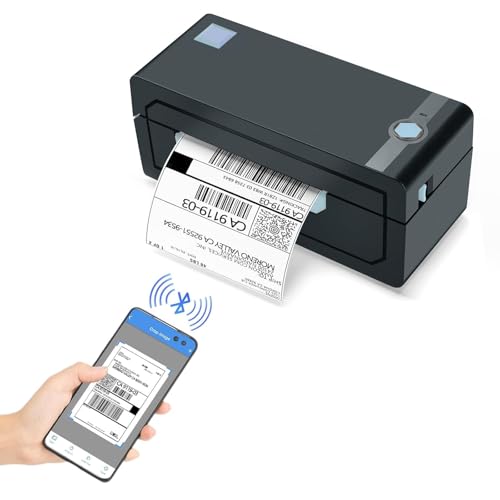 JADENS 4x6 Thermal Printer
|
Mid-Range | 203 DPI thermal print head | Small e‑commerce shipping stations | Check Price | ||
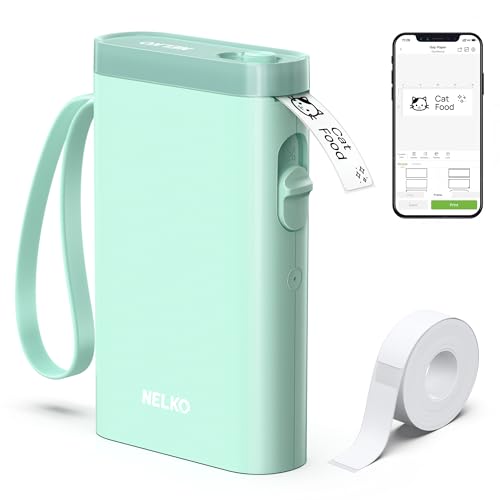 Nelko P21 Pocket Labeler
|
Budget | Ultra-compact, pocketable design | Portable labeling and small organizers | Check Price | ||
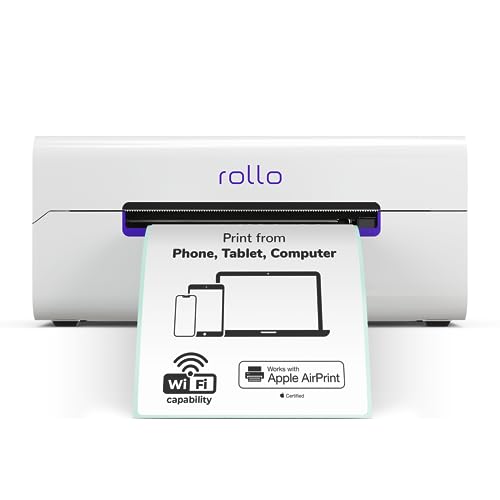 Rollo Wireless 4x6
|
Premium | High-speed Wi‑Fi/AirPrint support | High-volume home shippers needing Wi‑Fi | Check Price |
1. JADENS Bluetooth Thermal Shipping Label Printer Wireless 4x6 Shipping Label Printer, Compatible with Android, iPhone, Windows & Mac, Widely Used for Ebay, Amazon, Shopify, Etsy, USPS
A compact 4x6 thermal shipping printer that balances speed, print clarity and platform compatibility. It offers USB and Bluetooth connectivity, works with common shipping platforms, and is designed for quick setup and consistent label output for small home offices.
Key Specs
- 203 DPI Japanese thermal print head
- Print width: 1.57" to 4.1" (rolls and fanfold)
- Connectivity: USB; Bluetooth (phones require Jadens app)
- Compatible OS: Windows 7+/Mac OS 10.9+; Android/iOS via app
- 1-year warranty; no-ink thermal printing
Pros
- Clean, ink‑free thermal printing with good clarity
- Fast print speed and reliable performance for shipping labels
- Relatively compact footprint suited to small desks
Cons
- Bluetooth printing from phones requires the vendor app and can be hit-or-miss
- Needs manual label calibration after rolls are changed
Best For: Small e‑commerce shipping stations
Check Latest Price on Amazon2. Nelko Label Maker Machine with Tape, P21 Bluetooth Label Printer, Wireless Mini Label Makers with Multiple Templates for Organizing Office Home, Green
A very small Bluetooth labeler focused on portability and simple phone-driven label creation. It uses direct thermal printing at 203 DPI, includes a rechargeable battery and an app with templates, and is ideal for labeling shelves, bins and price tags on the go.
Key Specs
- 203 DPI direct thermal printing
- Bluetooth connection to iOS & Android (app required)
- Built‑in rechargeable battery (charger not included)
- Fixed label lengths (various widths like 12×40mm, 14×50mm)
- App templates: fonts, barcodes, QR codes and images
Pros
- Extremely compact and lightweight — fits a small desk or pocket
- Easy to use with a phone app and many label templates
- Good value for basic organizing and price tags
Cons
- Not compatible with computers and has known Android 14 limitations
- Doesn't include a charging adapter and doesn't support continuous label tape
Best For: Portable labeling and small organizers
Check Latest Price on Amazon3. Rollo Wireless Shipping Label Printer - Wi-Fi Thermal Label Printer 4x6 for Shipping Packages - AirPrint from iPhone, iPad, Mac - Supports Windows, Chromebook, Android, Linux
A faster, Wi‑Fi-capable thermal label printer built for heavier shipping needs. It supports AirPrint, a broad set of platforms, and produces labels rapidly at 203 DPI. It’s a strong choice if you want a robust, fast machine for a busy packing table.
Key Specs
- 203 DPI direct thermal print head
- Print speed up to ~150mm/s (fast 4x6 output)
- Connectivity: Wi‑Fi (AirPrint), USB; works with major OSes
- Label width support: 1.57" to 4.1"
- Long-life print head rated for heavy duty use
Pros
- Very fast printing and native AirPrint/Wi‑Fi convenience
- Excellent platform compatibility for shipping workflows
- Sturdy build intended for frequent use
Cons
- Some users report intermittent connectivity or configuration issues
- Higher cost and larger footprint than pocket labelers
Best For: High-volume home shippers needing Wi‑Fi
Check Latest Price on AmazonWhich One Should You Choose?
If budget is tight → Nelko P21 (Budget). It’s the most compact and inexpensive option for basic organization and occasional labels. If you need a balanced, quiet desktop printer for regular shipping → JADENS (Mid-Range). It offers strong thermal print quality, USB and Bluetooth options, and a compact footprint for small desks. If premium speed, Wi‑Fi and heavy daily volume matter → Rollo (Premium) — built for fast output and seamless AirPrint/Wi‑Fi workflows.
Best for Specific Scenarios
- Light organizers and price tags: Nelko P21 because it’s pocketable, easy to use from your phone, and ideal for small labels.
- Small e-commerce sellers printing daily shipping labels: JADENS because it balances print clarity, USB connectivity and compact size for a small packing table.
- High-volume shippers with multiple devices: Rollo because Wi‑Fi/AirPrint support and higher speed save time during busy shipping days.
Frequently Asked Questions
Do these label printers use ink or toner?
No — all three models use direct thermal technology, which means labels are printed by heat on thermal paper and require no ink, toner or ribbon. That keeps ongoing maintenance simple, but you should buy compatible thermal label rolls or tapes.
Will these printers work with my phone or computer?
Check each model's connectivity: Nelko P21 connects via Bluetooth to iOS/Android through its app (it does not support computers). JADENS supports USB for Windows/Mac and Bluetooth via the vendor app for phones. Rollo supports Wi‑Fi/AirPrint and USB, offering the broadest OS compatibility for desktops and mobile devices.
How quiet are thermal label printers? Can I use one on a small desk?
Thermal printers are generally quiet compared with inkjet or impact printers. Pocket labelers are the quietest; 4x6 shipping printers make soft mechanical sounds when feeding labels but are still suitable for small desks and home packing stations. If near-silence is crucial, choose a compact model and place it on a soft mat to reduce vibration noise.
How We Selected These Products
Our recommendations are based on data-driven analysis: we evaluated 29748+ products across 4825+ brands using a composite scoring system that weighs rating (40%), review volume (30%), price value (20%), and demand signals (10%). Every product is ranked by data, not opinions.
Last updated: September 13, 2026
As an Amazon Associate we earn from qualifying purchases at no extra cost to you. Full disclosure.
HomeOfficePilot Score is our editorial ranking based on a composite analysis of product quality, value, and verified customer sentiment. Click through to Amazon for current pricing, availability, and live customer reviews.