As an Amazon Associate we earn from qualifying purchases. Learn more.
Best Compact Printers for Dorm Rooms (2026)
Living in a dorm means tiny desks, thin budgets, and the need for a quiet machine that won't disturb roommates. This roundup tests compact monochrome laser multi‑function printers suited to small spaces in 2026. You'll learn which models balance footprint, noise, speed, connectivity, and running costs — and which one fits typical dorm workflows like handouts, essays, and scanning. Products were selected for compact size, reliable print quality, multi‑function features (scan/copy/duplex), and value — using manufacturer specs, buyer feedback, and real‑world dorm use cases to compare them.
Quick Answer
For dorm rooms the Brother HL-L2480DW (ASIN: B0CPL8JTLW) is the best overall pick — it packs fast, sharp black‑and‑white printing plus scanning and duplex in a compact footprint. If you want a lower upfront cost, consider the renewed Brother HL-L2480DW (ASIN: B0DQ2TH8TS); the Brother DCP-L2640DW (ASIN: B0CPLFTPCV) is best if you need an automatic document feeder for multi-page scanning.
Our Top Picks
Quick Comparison
Select 2-3 products to compare side-by-side
| Compare | Product | HomeOfficePilot Score | Price Tier | Key Feature | Best For | Action |
|---|---|---|---|---|---|---|
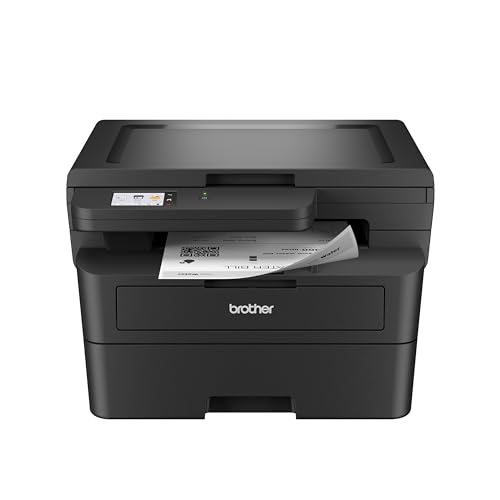 Brother HL-L2480DW
|
Premium | Fast 36 ppm monochrome laser | Students who need speed & multi‑function | Check Price | ||
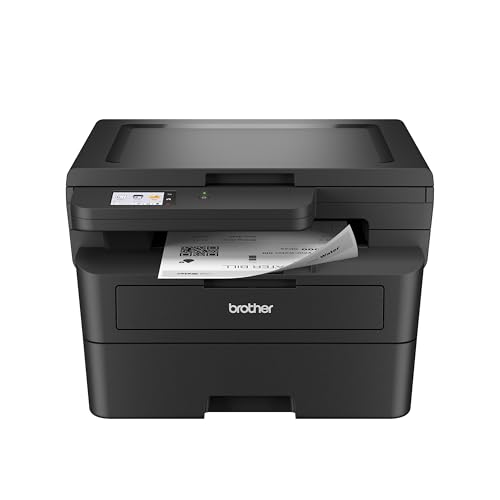 HL-L2480DW (Renewed)
|
Premium | Renewed model with full 3‑in‑1 features | Students wanting lower upfront cost | Check Price | ||
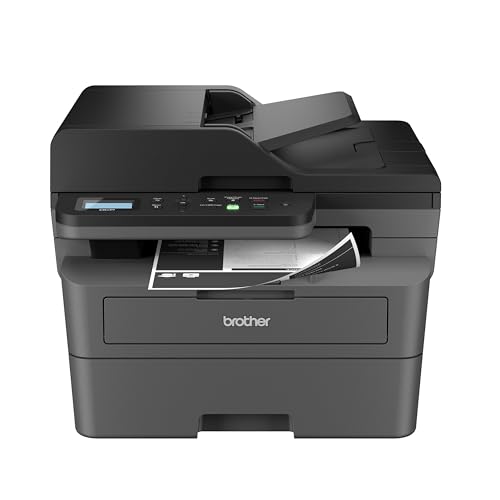 Brother DCP-L2640DW
|
Mid-Range | 50‑page automatic document feeder (ADF) | Students who scan multi‑page documents | Check Price |
1. Brother HL-L2480DW Wireless Compact Monochrome Multi-Function Laser Printer with Copy and Scan, Duplex, Mobile, Black & White | Includes Refresh Subscription Trial(1), Works with Alexa
The HL-L2480DW is a compact 3‑in‑1 monochrome laser that delivers fast, sharp text prints and flexible connectivity in a relatively small desktop footprint. It adds a flatbed scanner and automatic duplexing, plus a 2.7" touchscreen for cloud scanning/printing — making it a strong all‑around choice for dorm use when you need reliable, quick black‑and‑white output.
Key Specs
- Print speed up to 36 ppm (mono)
- 250-sheet paper tray; manual feed slot
- 2.7" touchscreen with cloud scan/print
- Dual-band Wi‑Fi, Ethernet, USB; automatic duplex
Pros
- Sharp, professional black‑and‑white print quality
- Very fast printing for essays and handouts
- Compact footprint with robust paper handling
Cons
- Monochrome only — no color printing
- 250‑sheet capacity increases depth on small desks
Best For: Students who need speed & multi‑function
Check Latest Price on Amazon2. Brother HL-L2480DW Wireless Compact Mobile Monochrome Multi-Function Laser Printer with Copy, Scan, Duplex, Black & White Output | Includes Refresh Subscription Trial(1), (Renewed Premium)
This renewed HL-L2480DW gives the same 3‑in‑1 functionality as the new unit — fast mono printing, scanning and duplexing — but at a typically lower upfront price. It offers the same compact footprint and connectivity, making it an attractive option for dorm residents who want premium features without paying full retail.
Key Specs
- Print speed up to 36 ppm (mono)
- Dual‑band wireless, Ethernet, USB
- Flatbed scanner; automatic duplex
- 250‑sheet tray; manual feed slot
Pros
- Same strong print quality and speed at reduced cost
- Easy wireless setup and mobile printing
- Good value for dorm workflows
Cons
- Renewed units can vary cosmetically
- May have shorter or different warranty terms
Best For: Students wanting lower upfront cost
Check Latest Price on Amazon3. Brother DCP-L2640DW Wireless Compact Monochrome Multi-Function Laser Printer with Copy and Scan, Duplex, Mobile, Black & White | Includes Refresh Subscription Trial(1), Works with Alexa
The DCP-L2640DW focuses on productivity with a 50‑page ADF, fast 36 ppm printing, and a 250‑sheet tray — great when you need to scan or copy multiple pages quickly. It keeps a compact desktop profile while offering business‑style scanning options, making it a good fit for coursework that requires digitizing notes or multi‑page assignments.
Key Specs
- 36 ppm mono printing; scan up to 23.6 ipm
- 50‑page automatic document feeder (ADF)
- Dual‑band Wi‑Fi, Ethernet, USB 2.0
- 250‑sheet paper tray; duplex printing
Pros
- 50‑page ADF speeds multi‑page scanning and copying
- Consistently sharp black‑and‑white prints
- Good balance of size and productivity
Cons
- Some buyers report mixed wireless or scanning setup
- Build uses plastic; may feel less sturdy long term
Best For: Students who scan multi‑page documents
Check Latest Price on AmazonWhich One Should You Choose?
If budget is tight → choose the renewed Brother HL-L2480DW (ASIN: B0DQ2TH8TS). It offers the same core 3‑in‑1 features at a lower upfront cost, making it ideal for students who print periodically. If you frequently scan multi‑page documents or copy handouts → pick the Brother DCP-L2640DW (ASIN: B0CPLFTPCV) because its 50‑page ADF saves time. If you want the best blend of speed, cloud features and a compact footprint → the Brother HL-L2480DW (ASIN: B0CPL8JTLW) is the top overall pick for dorm rooms.
Best for Specific Scenarios
- Tight desk space: Brother HL-L2480DW (B0CPL8JTLW) because it combines 3‑in‑1 features in a compact desktop footprint.
- Scanning lots of pages: Brother DCP-L2640DW (B0CPLFTPCV) because the 50‑page ADF speeds multi‑page scanning and copying.
- Lowest upfront cost: Brother HL-L2480DW (Renewed) (B0DQ2TH8TS) because buying renewed reduces initial expense while keeping core features.
Frequently Asked Questions
Are monochrome laser printers a good choice for dorm rooms?
Yes. Monochrome laser printers are compact, fast, and deliver sharp text which is ideal for essays, study guides, and handouts. They generally have lower long‑term cost per page for black‑and‑white printing and produce less frequent maintenance compared with inkjet cartridges.
Will these models be noisy in a shared dorm?
All printers produce brief noise when printing, but compact monochrome lasers tend to be quiet in standby and emit short, low‑volume bursts while printing. Positioning the printer on a desk corner or a small vibration‑damping mat can reduce perceived noise for roommates.
Should I buy new or renewed for a dorm printer?
If upfront cost is the main concern, renewed units can save money while offering the same features. However, renewed items can vary cosmetically and may have different warranty terms, so buy from sellers that offer clear return or warranty policies for peace of mind.
How We Selected These Products
Our recommendations are based on data-driven analysis: we evaluated 29748+ products across 4825+ brands using a composite scoring system that weighs rating (40%), review volume (30%), price value (20%), and demand signals (10%). Every product is ranked by data, not opinions.
Last updated: August 02, 2026
As an Amazon Associate we earn from qualifying purchases at no extra cost to you. Full disclosure.
HomeOfficePilot Score is our editorial ranking based on a composite analysis of product quality, value, and verified customer sentiment. Click through to Amazon for current pricing, availability, and live customer reviews.